AI for ecommerce: product copy and catalog checks.
Write product descriptions from specifications, check variants for conflicting claims and prepare a consistent product care guide. Carry the same approved details from the catalog into customer-facing copy.
The approved guidance is to hand wash Harbor with mild soap and a soft sponge, then rinse and dry. Dishwasher and microwave suitability have not been confirmed, so I would not recommend either from this information.
Your follow-up
Make it a short customer-service reply.
Arya
Please hand wash the Harbor mug with mild soap and a soft sponge, then rinse and dry. We have not confirmed dishwasher or microwave suitability.
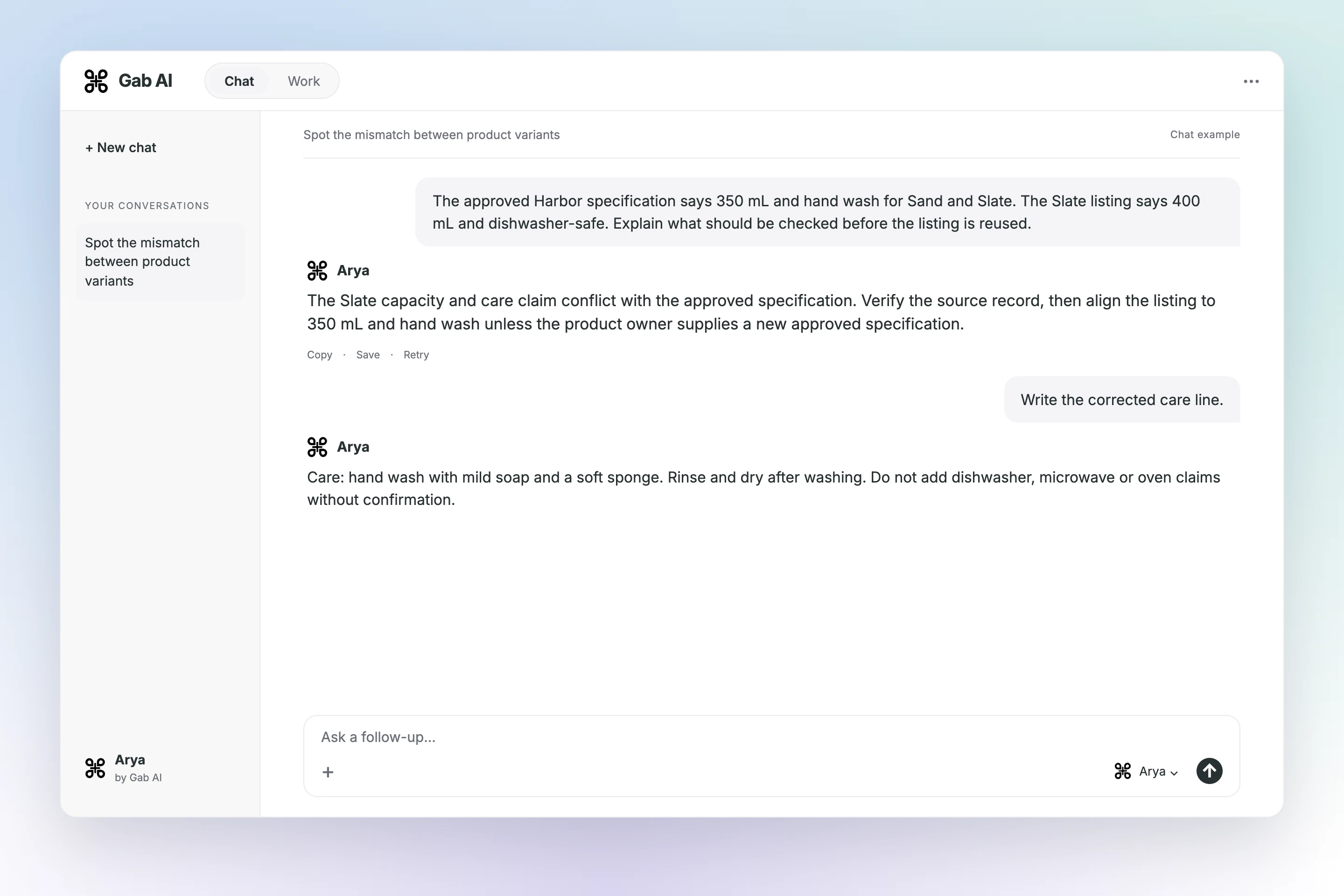
Spot the mismatch between product variants
The Slate capacity and care claim conflict with the approved specification.
The Slate capacity and care claim conflict with the approved specification. Verify the source record, then align the listing to 350 mL and hand wash unless the product owner supplies a new approved specification.
Your follow-up
Write the corrected care line.
Arya
Care: hand wash with mild soap and a soft sponge. Rinse and dry after washing. Do not add dishwasher, microwave or oven claims without confirmation.
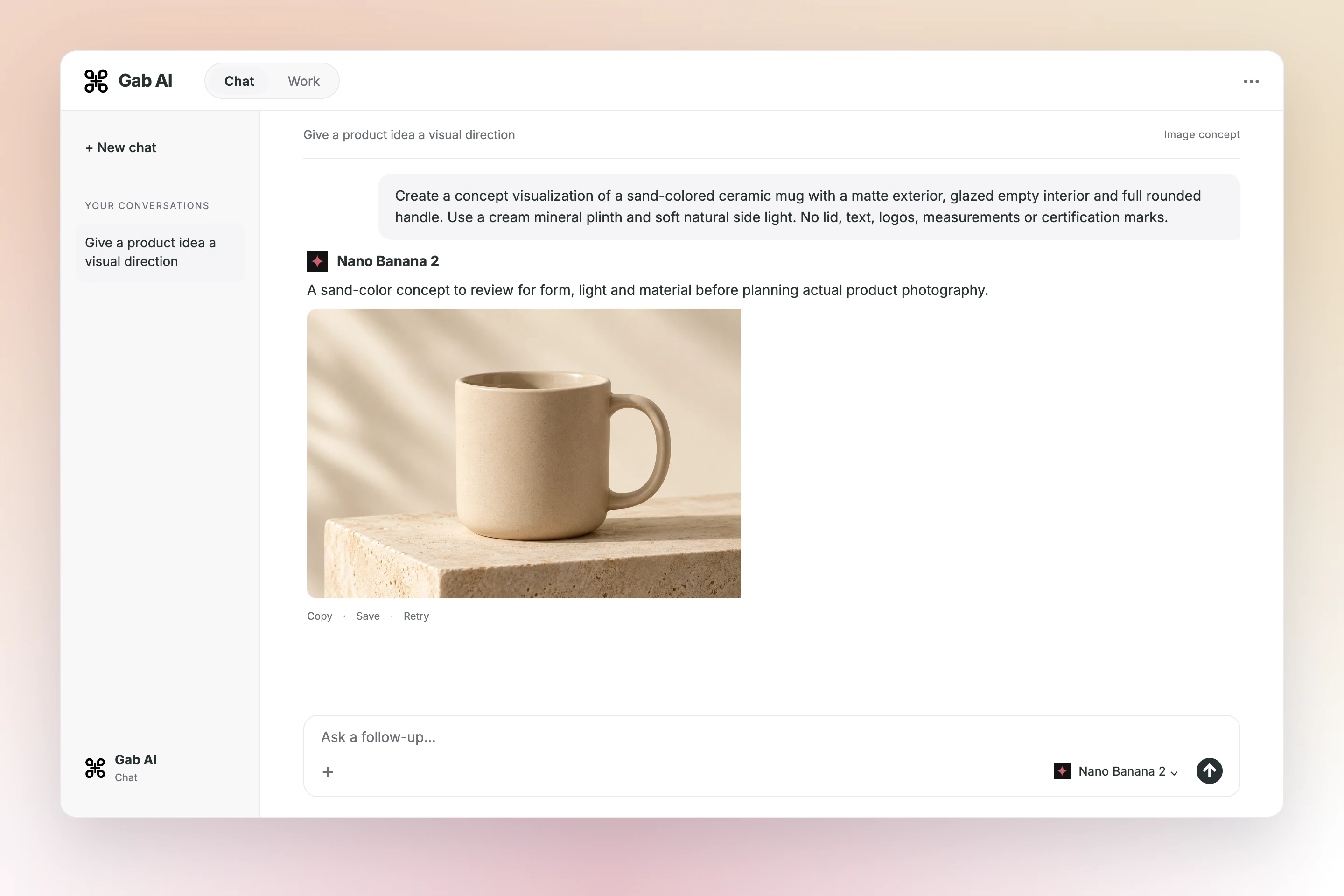
Give a product idea a visual direction
Choose an image model in Chat, describe the result and refine the direction.
A ceramic mug for your everyday table. 350 mL · sand or slate · USD 18 each Sold individually. Lid not included.
Harbor-mug-approved-specifications.txt
The details shoppers need
Matte exterior and glazed interior. Capacity: 350 mL. Country of origin and weight: ask the seller.
Harbor-mug-approved-specifications.txt
Care before checkout
Hand wash with mild soap and a soft sponge. Rinse and dry after washing. Dishwasher, microwave and oven suitability are not confirmed.
Harbor-mug-approved-specifications.txt
Variant controls
Sand selects HM-SAND; slate selects HM-SLATE. Both show the approved 350 mL capacity. The product visualization changes color; it remains a design concept.
Harbor-mug-current-listings.csv
Harbor-mug-approved-specifications.txt
Try an interactive product-page concept with product details and a visual preview.
Read the prompt and inspect the full example
Build a product-page concept with sand and slate variants from these approved specifications.
Harbor mug: ceramic, 350 mL capacity, matte exterior, glazed interior. Colors: sand and slate. Price USD 18 each. Sold individually, without a lid. Country of origin and weight are not supplied.
Approved care wording
Hand wash with mild soap and a soft sponge. Rinse and dry after washing. Dishwasher, microwave and oven suitability have not been confirmed. Do not label this mug dishwasher-safe or microwave-safe.
Claim and image boundaries
No test certificates, food-safety certifications, heat-retention measurements or product photographs are supplied. Use the approved factual wording; do not add certifications or present invented photography as the actual mug.
Harbor-mug-current-listings.csv
Sand listing row
SKU HM-SAND: sand color; listing capacity 350 mL; material ceramic; current claim Hand wash.
Slate listing row
SKU HM-SLATE: slate color; listing capacity 400 mL; material ceramic; current claim Dishwasher-safe.
Review state
Neither catalog correction has been approved or published. Treat the discrepancy list as a review artifact, not an automatic store update.
Check two mug variants against their specification
Flag the slate variant’s capacity and dishwasher claim; leave matching fields alone.
Harbor mug: ceramic, 350 mL capacity, matte exterior, glazed interior. Colors: sand and slate. Price USD 18 each. Sold individually, without a lid. Country of origin and weight are not supplied.
Approved care wording
Hand wash with mild soap and a soft sponge. Rinse and dry after washing. Dishwasher, microwave and oven suitability have not been confirmed. Do not label this mug dishwasher-safe or microwave-safe.
Claim and image boundaries
No test certificates, food-safety certifications, heat-retention measurements or product photographs are supplied. Use the approved factual wording; do not add certifications or present invented photography as the actual mug.
Harbor-mug-current-listings.csv
Sand listing row
SKU HM-SAND: sand color; listing capacity 350 mL; material ceramic; current claim Hand wash.
Slate listing row
SKU HM-SLATE: slate color; listing capacity 400 mL; material ceramic; current claim Dishwasher-safe.
Review state
Neither catalog correction has been approved or published. Treat the discrepancy list as a review artifact, not an automatic store update.
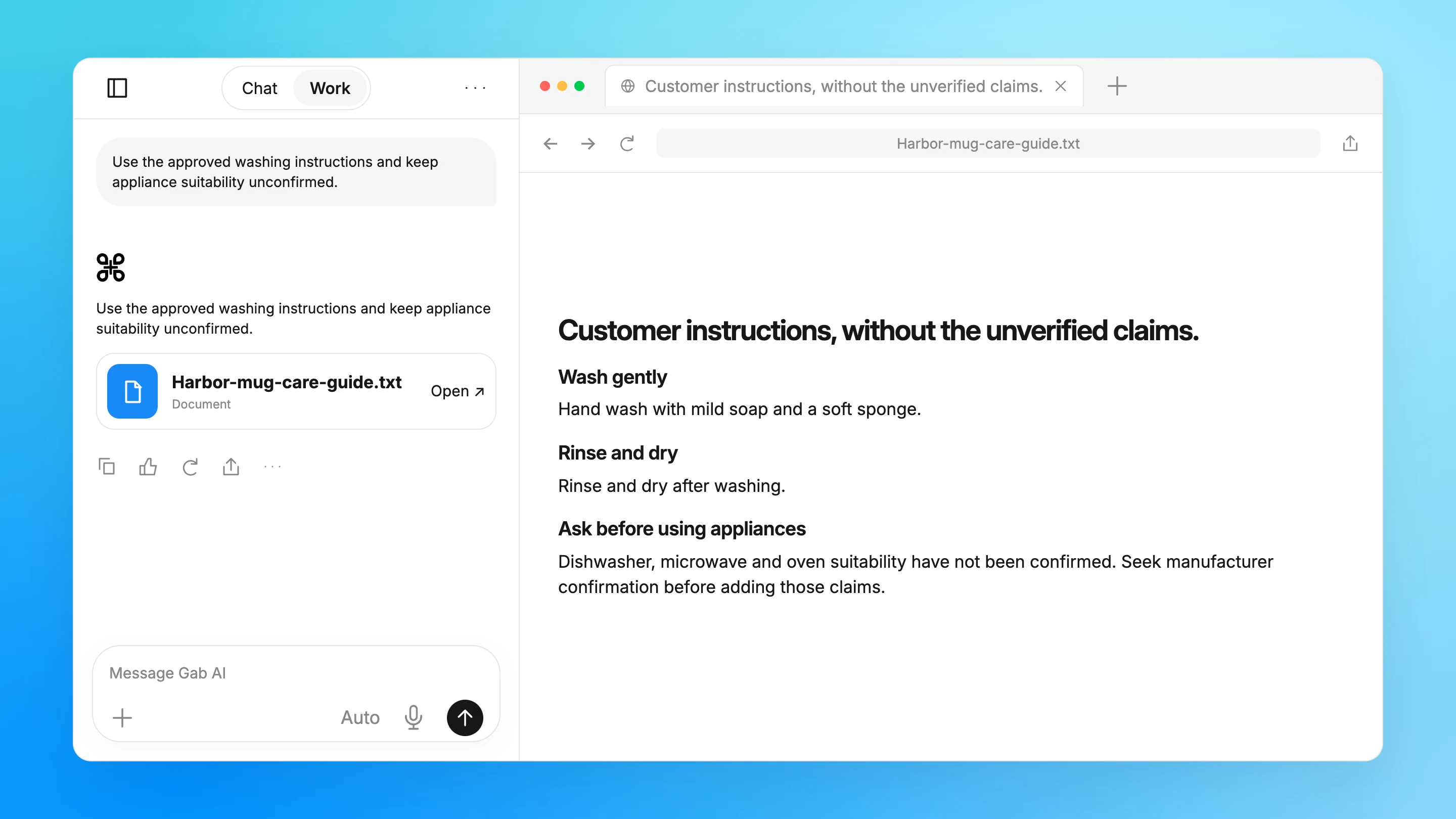
Create a customer care guide with the gaps intact
Use the approved washing instructions and keep appliance suitability unconfirmed.
Harbor mug: ceramic, 350 mL capacity, matte exterior, glazed interior. Colors: sand and slate. Price USD 18 each. Sold individually, without a lid. Country of origin and weight are not supplied.
Approved care wording
Hand wash with mild soap and a soft sponge. Rinse and dry after washing. Dishwasher, microwave and oven suitability have not been confirmed. Do not label this mug dishwasher-safe or microwave-safe.
Claim and image boundaries
No test certificates, food-safety certifications, heat-retention measurements or product photographs are supplied. Use the approved factual wording; do not add certifications or present invented photography as the actual mug.
About these examples
Write product descriptions and organize catalog details
Open an example to inspect the prompt, sample inputs and completed result.
A useful result, with the details behind it
Create product copy from approved specifications
Switch sand and slate variants on a finished product-page concept with approved specifications.
Add the approved product specification, variants and claim boundaries before sending.
Read all source material
Harbor-mug-approved-specifications.txt
Approved product facts
Harbor mug: ceramic, 350 mL capacity, matte exterior, glazed interior. Colors: sand and slate. Price USD 18 each. Sold individually, without a lid. Country of origin and weight are not supplied.
Approved care wording
Hand wash with mild soap and a soft sponge. Rinse and dry after washing. Dishwasher, microwave and oven suitability have not been confirmed. Do not label this mug dishwasher-safe or microwave-safe.
Claim and image boundaries
No test certificates, food-safety certifications, heat-retention measurements or product photographs are supplied. Use the approved factual wording; do not add certifications or present invented photography as the actual mug.
Harbor-mug-current-listings.csv
Sand listing row
SKU HM-SAND: sand color; listing capacity 350 mL; material ceramic; current claim Hand wash.
Slate listing row
SKU HM-SLATE: slate color; listing capacity 400 mL; material ceramic; current claim Dishwasher-safe.
Review state
Neither catalog correction has been approved or published. Treat the discrepancy list as a review artifact, not an automatic store update.
Draft product copy
Build a product-page concept with sand and slate variants from these approved specifications.
Refine product copy against the specifications
Compare the draft with a focused revision, keeping the source facts in view.
Try one focused revision
Suggested follow-up using the same source facts.
Focused follow-up
What change should I ask for?
Write two concise product-copy sentences. Retain capacity, colors, individual price and the missing lid; add no certification or care claim.
Original excerpt
What does the existing example say?
A ceramic mug for your everyday table. 350 mL · sand or slate · USD 18 each Sold individually. Lid not included.
Suggested revision
What could that revision look like?
This 350 mL ceramic mug comes in sand or slate at USD 18 each. Sold individually; lid not included.
Use Chat to discuss the request and refine the result with follow-up questions.
Deliverable: Product listing draft
What to provide
Verified specifications, intended audience and approved claims
Example prompt
Draft a product title, feature bullets and description from the specifications I supply. Explain benefits without adding performance claims, certifications or included accessories. Flag missing dimensions, compatibility details and care instructions.
What to check
Match the real product
Verify claims and usage rights
Approve listing details
Work
Create product copy from approved specifications
Switch sand and slate variants on a finished product-page concept with approved specifications.
Use Work to create the named sample file and review it alongside the conversation.
Deliverable: Harbor-mug-product-copy.html
What to provide
Harbor-mug-approved-specifications.txt
Harbor-mug-current-listings.csv
Example prompt
Create Harbor-mug-product-copy.html from Harbor-mug-approved-specifications.txt and Harbor-mug-current-listings.csv. Build a responsive product-page concept with keyboard-accessible sand/slate variant controls and the supplied SKU identifiers. Use approved 350 mL specifications rather than the erroneous slate listing capacity. Include price, finish, included items and care instructions. Label product imagery as a visualization concept. Do not invent certifications, origin or appliance suitability, and do not connect a store or checkout.
What to check
Inspect the supplied input files
Check the result against the source material
Review and adapt the result before using it
Work
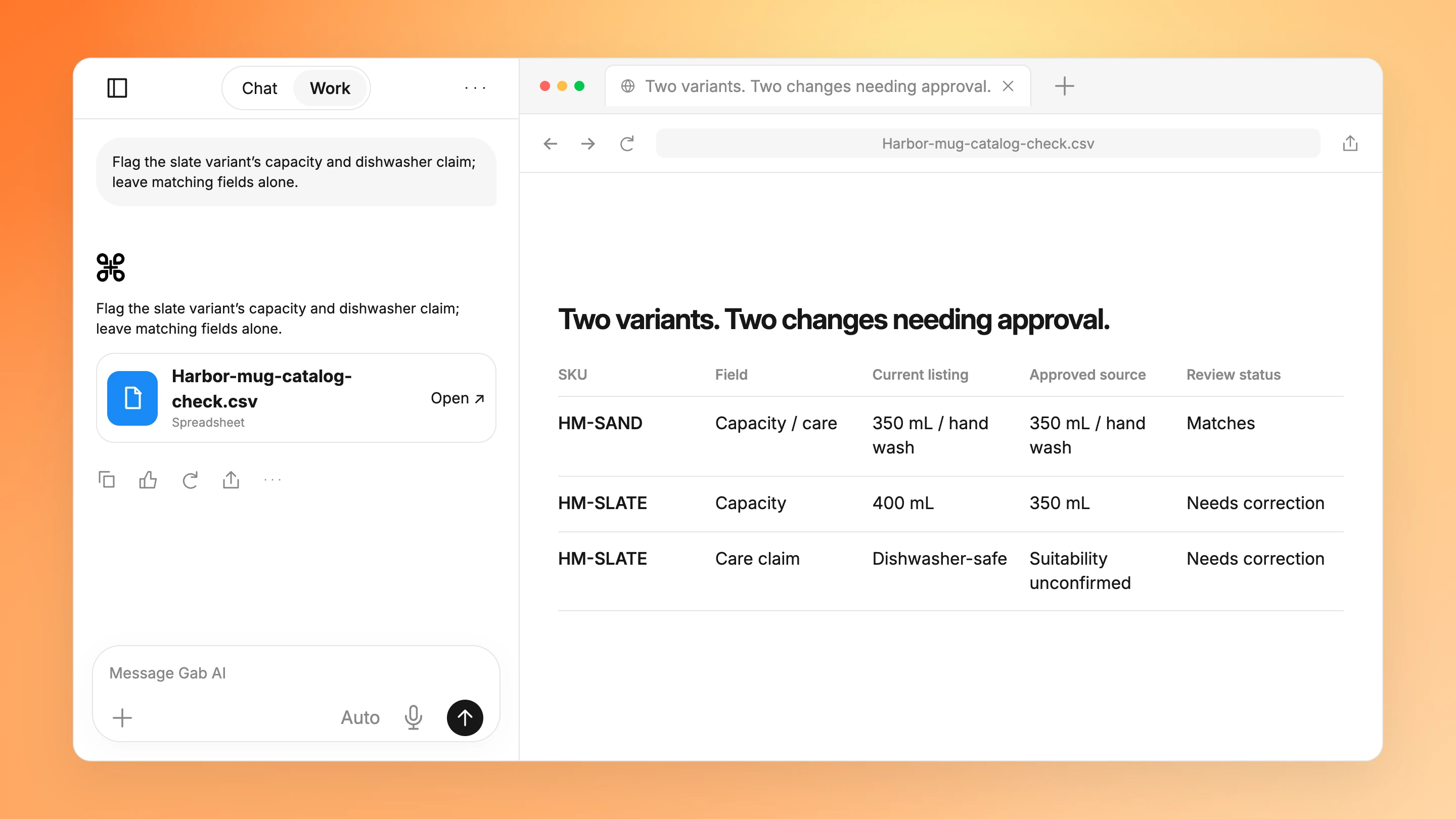
Check two mug variants against their specification
Flag the slate variant’s capacity and dishwasher claim; leave matching fields alone.
Use Work to create the named sample file and review it alongside the conversation.
Deliverable: Harbor-mug-catalog-check.csv
What to provide
Harbor-mug-approved-specifications.txt
Harbor-mug-current-listings.csv
Example prompt
Create Harbor-mug-catalog-check.csv using Harbor-mug-approved-specifications.txt and Harbor-mug-current-listings.csv. Compare each variant’s capacity and care claim with the approved source, show each discrepancy and retain review status. Do not edit or publish a live catalog.
What to check
Inspect the supplied input files
Check the result against the source material
Review and adapt the result before using it
Work
Create a customer care guide with the gaps intact
Use the approved washing instructions and keep appliance suitability unconfirmed.
Use Work to create the named sample file and review it alongside the conversation.
Deliverable: Harbor-mug-care-guide.txt
What to provide
Harbor-mug-approved-specifications.txt
Example prompt
Create Harbor-mug-care-guide.txt from Harbor-mug-approved-specifications.txt. Preserve the hand-washing instructions. Clearly state that dishwasher, microwave and oven suitability are unconfirmed. Do not invent certifications or extend the approved care guidance.
What to check
Inspect the supplied input files
Check the result against the source material
Review and adapt the result before using it
More prompts
Chat
Explore a product image edit
A product background concept to inspect against the original photograph and actual item.
Use Chat to discuss the request and refine the result with follow-up questions.
Deliverable: Product image concept
What to provide
A permissioned product photo and intended background treatment
Example prompt
Edit the background of this product photo to a clean neutral surface. Preserve label wording, color, proportions and included items. Do not add accessories or make the product appear to have a feature it lacks; return a concept for comparison with the original.
What to check
Match the real product
Verify claims and usage rights
Approve listing details
Work
Build a catalog verification workbook
A catalog check workbook linking listing claims to supplied specifications and unresolved discrepancies.
Use Work to build and revise Catalog verification workbook.xlsx from your source material.
Deliverable: Catalog verification workbook.xlsx
What to provide
SKU export, approved specifications and current listing text
Example prompt
Build a workbook comparing each SKU's title, dimensions, compatibility, included items and claims with its approved specification. Preserve SKU identifiers, flag contradictions and list unresolved questions; do not update the storefront. Deliver "Catalog verification workbook.xlsx" as the requested editable artifact. Ask for missing source material rather than inventing facts.
What to check
Match the real product
Verify claims and usage rights
Approve listing details
Work
Create a product care guide
A customer care document preserving approved instructions and identifying wording needing manufacturer confirmation.
Use Work to build and revise Product care guide.docx from your source material.
Deliverable: Product care guide.docx
What to provide
Manufacturer-approved care instructions, photos and safety wording
Example prompt
Create an editable customer care guide using only the supplied manufacturer instructions and permissioned photos. Preserve safety wording, include a version/source footer and flag unclear steps instead of inventing cleaning methods or warranty terms. Deliver "Product care guide.docx" as the requested editable artifact. Ask for missing source material rather than inventing facts.
Start with approved product specifications and your catalog export. Use Chat to draft product descriptions or review wording. Use Work to create a product-page concept, catalog check or customer care file. Inspect the sample inputs and results here, then attach your own material to a draft.
Can Gab AI write product descriptions from my specifications?
Supply the approved specifications, variants and claims. Ask for copy that uses those facts and lists missing information separately. Check capacity, dimensions, included items and care wording before publication.
Can it check a product catalog for inconsistent claims?
Use Work with your catalog export and approved specification files. Ask for a review workbook linking each discrepancy to its source. The sample finds a capacity mismatch and an unverified care claim; it does not change a live store.
Can I use it to edit product images?
Provide an authorized reference image and describe the edit. Inspect the delivered image for changes to product shape, color, labeling and included items before using it commercially. A generated concept is not evidence of the real product’s features.
Can I create an interactive product-page concept?
Use Work to build an HTML concept from approved specifications and variant identifiers. The Harbor mug sample switches sand and slate colors and shows the correct SKU, USD 18 price and 350 mL capacity. Its SVG is explicitly an illustration, not product photography. The example has no store connection or checkout; review the file before using it in your own storefront.
Does opening an example update my store?
No. It opens a draft. Attach your inputs, choose when to send and review the result. Publishing changes to your store remains a separate action.
How should I check product variants and units?
Compare each SKU with the approved specification rather than another listing. Both sample mug variants are 350 mL; the slate listing’s 400 mL and dishwasher-safe claims conflict with the supplied record. Keep USD 18 per individual mug, sand/slate colors and “lid not included” accurate. Review corrections before updating the store.
Can I start in Chat, or do I need Work?
Use Chat for questions and text drafts. Choose Work when you want a project with tools and editable files. Work requires Plus and uses credits; see Pricing for plans and allowances. Opening a draft does not send it or attach the example files.