
A PDF summary you can check against its source
Bring a PDF into Chat to find a detail, extract a table or turn the information into a useful note. Keep the document beside the conversation as you refine the answer.

Enlarge preview
Ask about a PDF
Find the detail you need with the PDF beside your answer.
Enlarge preview
Extract a table
Turn the information in your PDF into a clear table.

Enlarge preview
Create a purchasing note
Refine a PDF summary into a note you can use.
Enlarge preview
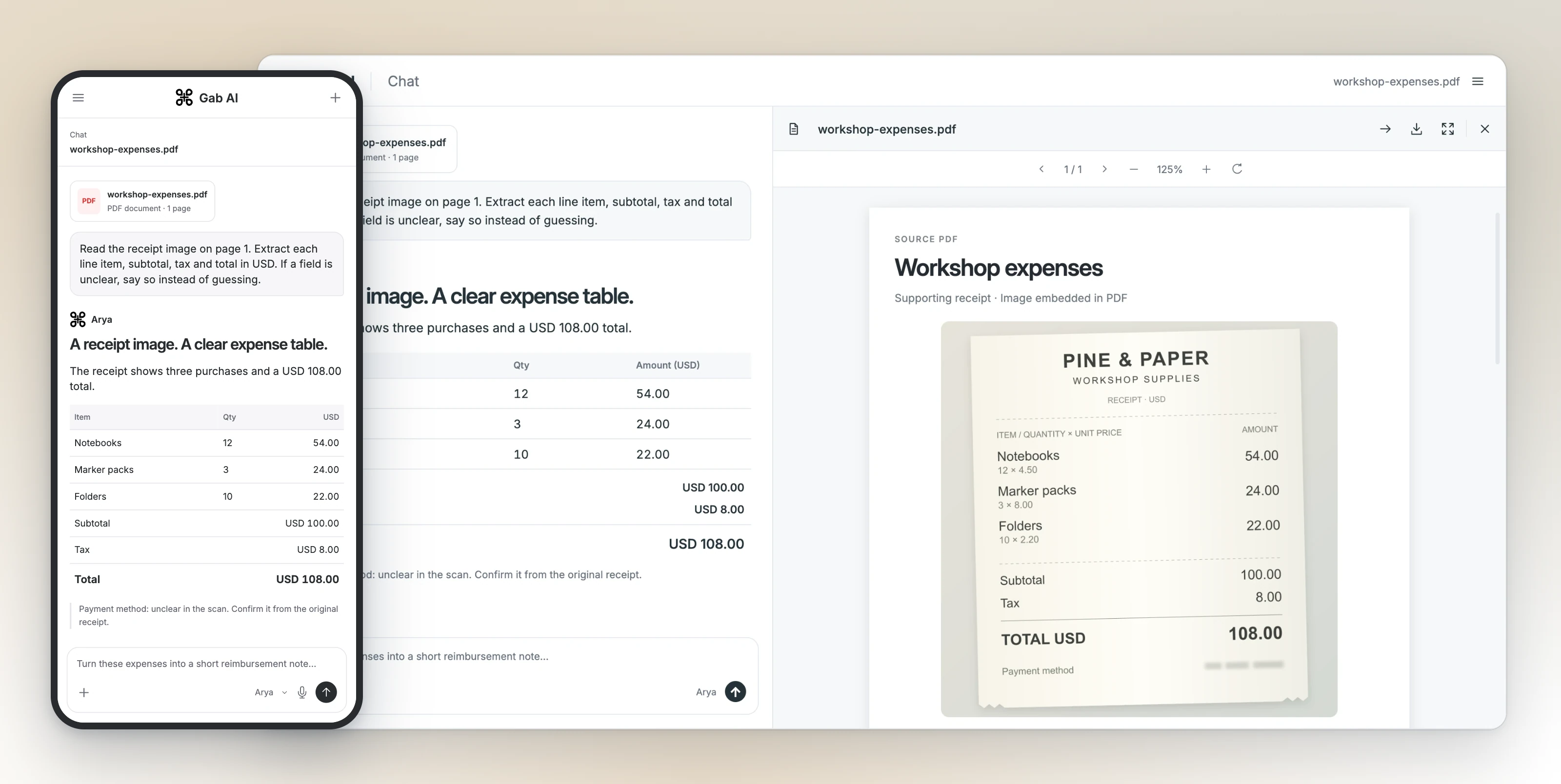
Read a receipt scan
Extract amounts from a receipt image inside your PDF. Choose a model that supports PDF images.
Enlarge preview
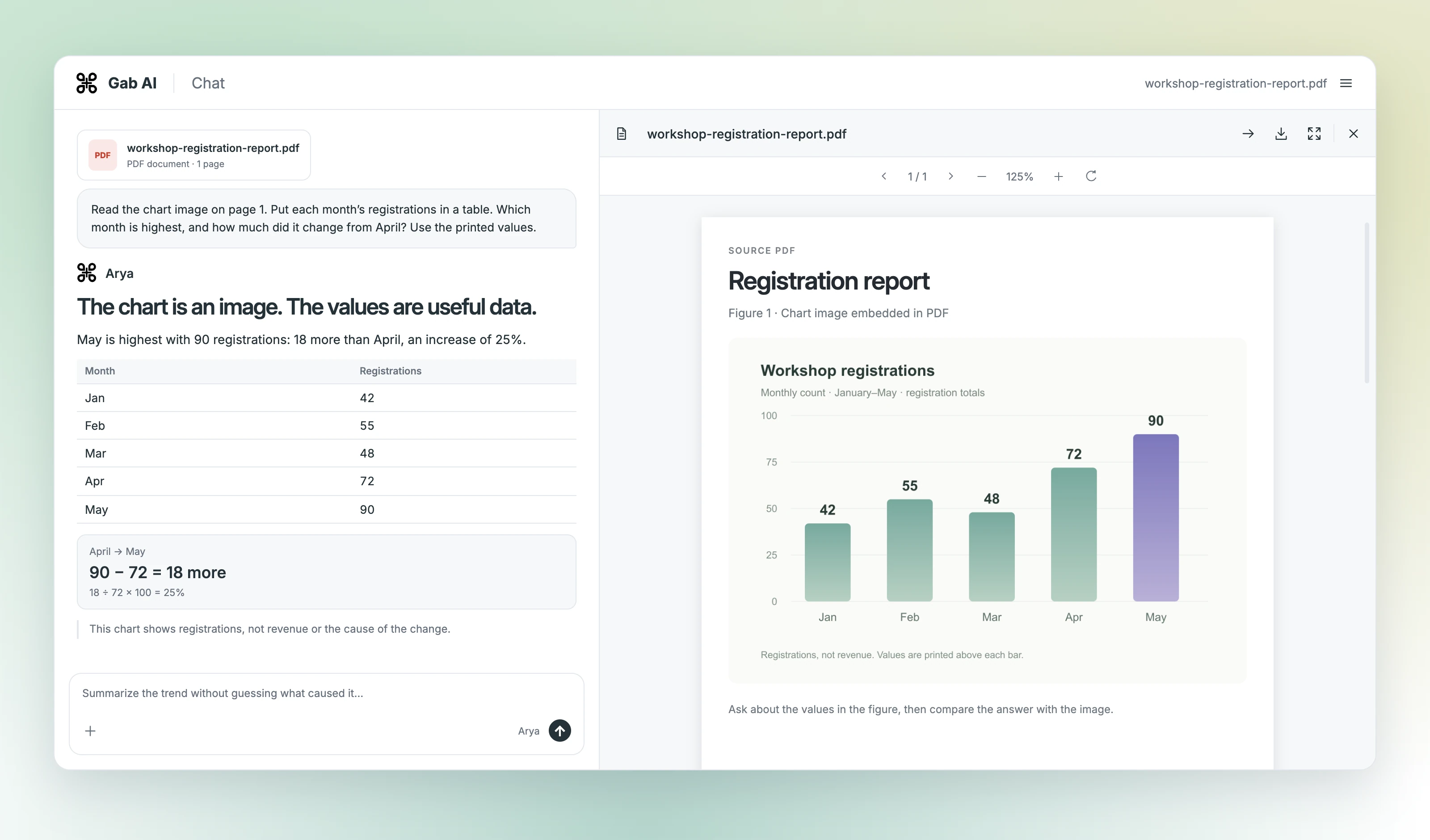
Read a chart image
Read the values in a chart image and compare the change. Choose a model that supports PDF images.
Check the source and response
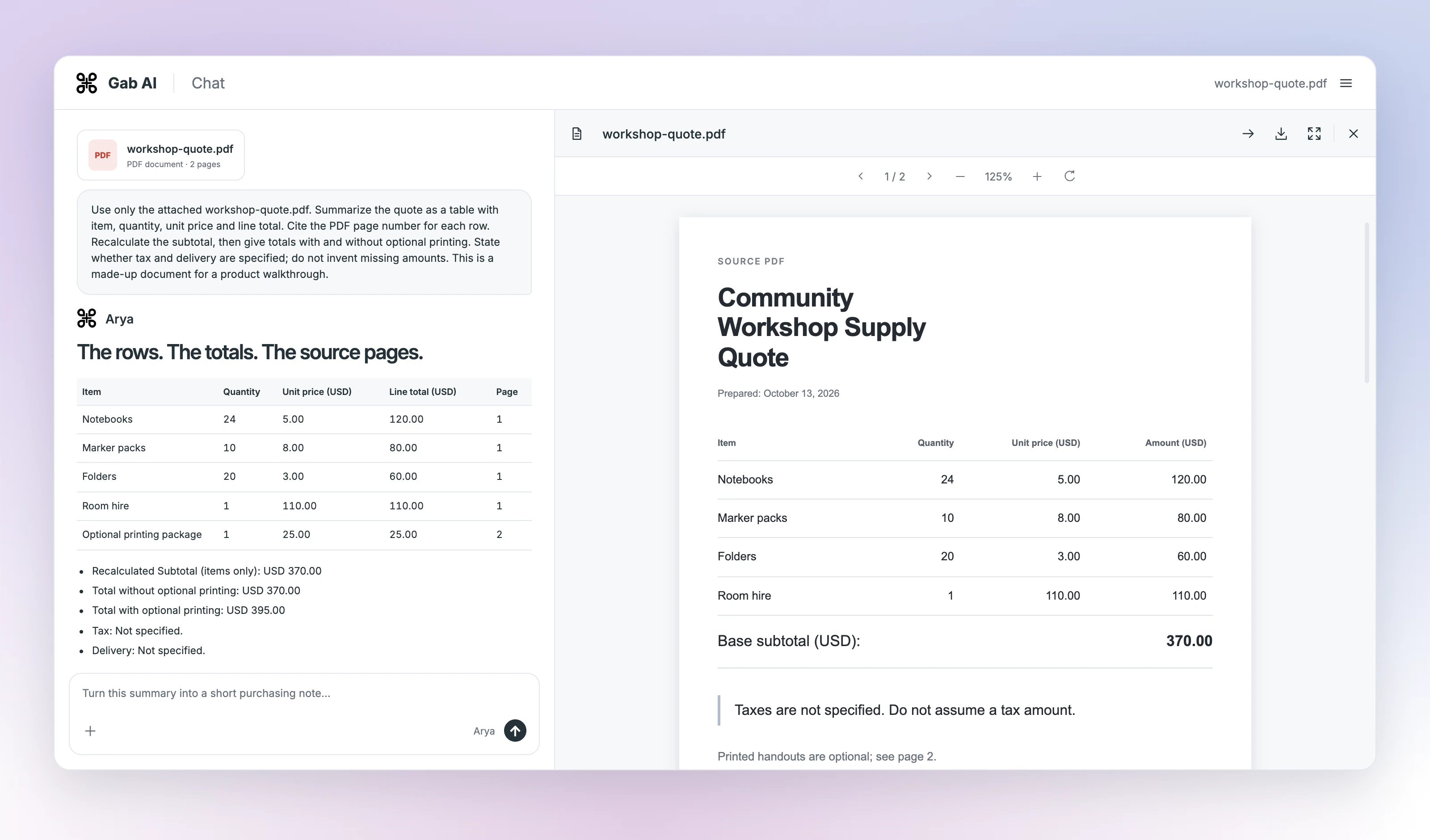
Workshop quote: source figures
| Item | Details |
|---|---|
| Page 1: notebooks | 24 × USD 5 = USD 120 |
| Page 1: marker packs | 10 × USD 8 = USD 80 |
| Page 1: folders | 20 × USD 3 = USD 60 |
| Page 1: room hire | 1 × USD 110 = USD 110 |
| Page 1: base subtotal | USD 370 |
| Page 2: optional printing | USD 25; total with printing USD 395 |
| Missing information | Tax rate and delivery terms are not specified. |
Turn the summary into a purchasing note
The follow-up asks for four bullets without optional printing. The resulting note keeps the USD 370 total and turns the missing tax and delivery details into questions.
- Workshop supplies and room hire subtotal is USD 370.00 for 24 notebooks, 10 marker packs, 20 folders, and 1 room hire (Page 1).
- Optional printed handouts are excluded from this baseline total (Page 2).
- Tax rates are not specified in the document.
- Delivery terms are not specified in the document.
Questions to confirm
- What are the applicable tax rates?
- What are the delivery terms and shipping costs?
Read the exact follow-up and response
Revise this into a concise purchasing note with four bullet points and a short questions-to-confirm list. Exclude optional printing, keep the total USD 370, cite the relevant PDF pages, and explicitly state that tax and delivery remain unspecified. Do not fill in missing terms.- Workshop supplies and room hire subtotal is USD 370.00 for 24 notebooks, 10 marker packs, 20 folders, and 1 room hire (Page 1).
- Optional printed handouts are excluded from this baseline total (Page 2).
- Tax rates are not specified in the document.
- Delivery terms are not specified in the document.
**Questions to confirm:**
- What are the applicable tax rates?
- What are the delivery terms and shipping costs?Ask questions about a PDF
Ask for a short summary, a specific clause, a list of dates or a table. Name the section and the format you need, then compare the important details with your original.
Summarize a document
Name the section and desired length. Compare the summary with the original, especially exclusions and conditions.
Extract a table
Specify headers, currency and units. Check each row and recompute totals from the source.
Find what is missing
Ask which details the file does not specify. Keep missing values explicit rather than accepting a plausible guess.
How to chat with a PDF in Gab AI
Open Chat, attach a readable PDF and wait for processing. Confirm the attachment, choose a model that supports it and ask one focused question. Keep the source open so you can check the answer. You can also use supported Word, spreadsheet and text files; see Docs for their formats and limits.
Use your Gab AI account
Sign in to attach files. Uploads do not require Plus; the model you choose determines answer access and credit use.
Work from a readable source
A scan, password-protected file or complex layout can make extraction difficult. Check processing, ask about a relevant section and compare the answer with the original.
Can AI read PDF files?
Yes. Upload a readable PDF and ask about its contents. Check processing and choose a model that supports the attachment; scans and complex layouts can need extra review.
Is file analysis only for Plus?
No. Attaching a file does not require Plus. The selected model’s access and credit rules apply to its answer; Work is a separate Plus feature.
Can I use this as an AI PDF summarizer?
Yes. Ask for the section and level of detail you need, then compare the summary with the file. Check important numbers, exceptions and source locations.
Does Gab automatically verify PDF citations?
A model can supply a page number or quotation. Open that location in the original and check it yourself; a generated reference is not automatic verification.
