AI for filmmakers: storyboards and production breakdowns.
Turn a screenplay scene into a storyboard, shot list and production breakdown. Compare coverage and directing choices while keeping department needs connected to the script.
Will Eli accept responsibility for the message, or leave Mara carrying that burden? The unopened envelope can hold that tension without revealing its contents or adding another character.
Your follow-up
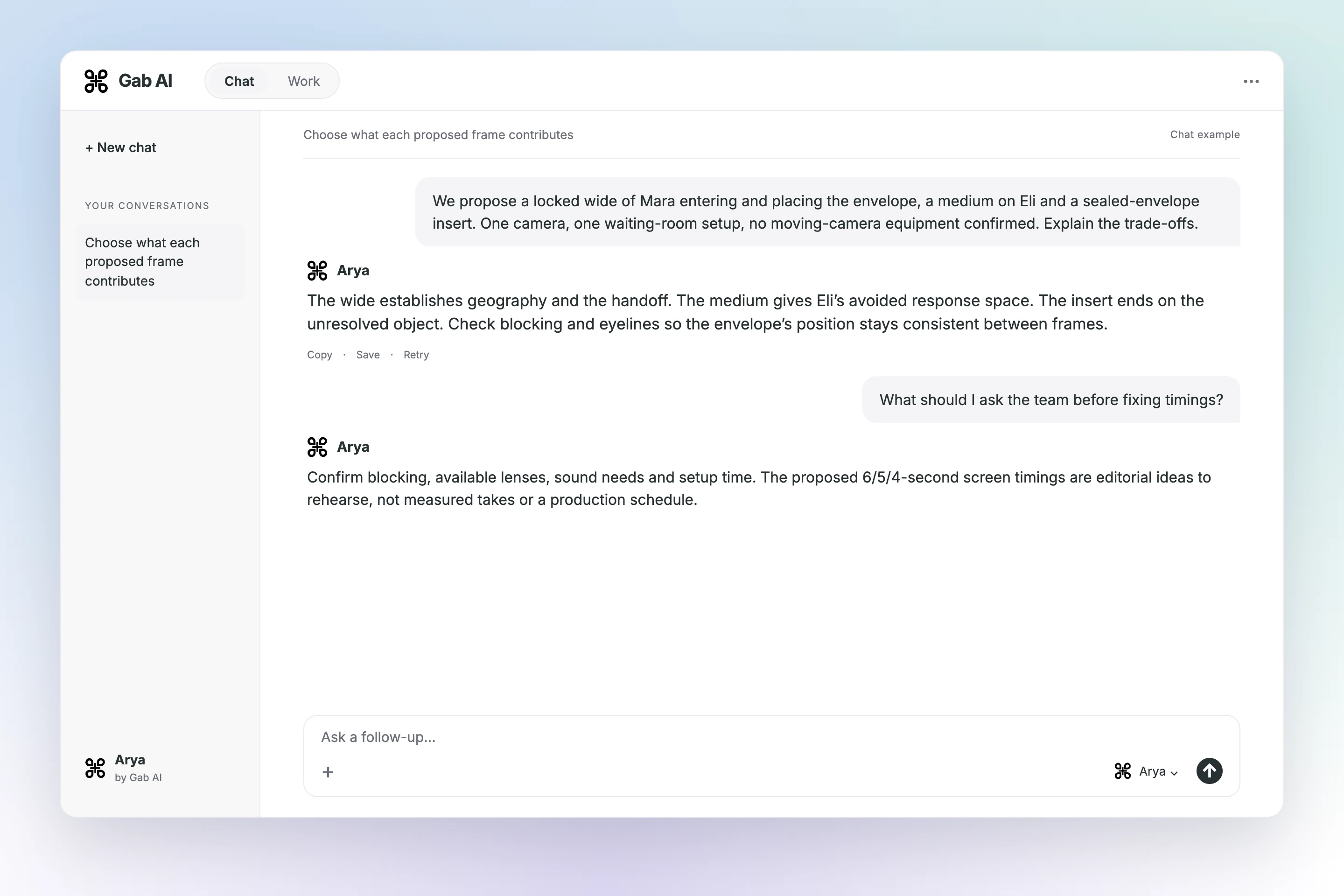
What should the final beat preserve?
Arya
Keep the envelope unopened on the bench. Let the audience register Eli’s avoidance rather than resolving the scene with a contents reveal.
The wide establishes geography and the handoff. The medium gives Eli’s avoided response space. The insert ends on the unresolved object. Check blocking and eyelines so the envelope’s position stays consistent between frames.
Your follow-up
What should I ask the team before fixing timings?
Arya
Confirm blocking, available lenses, sound needs and setup time. The proposed 6/5/4-second screen timings are editorial ideas to rehearse, not measured takes or a production schedule.
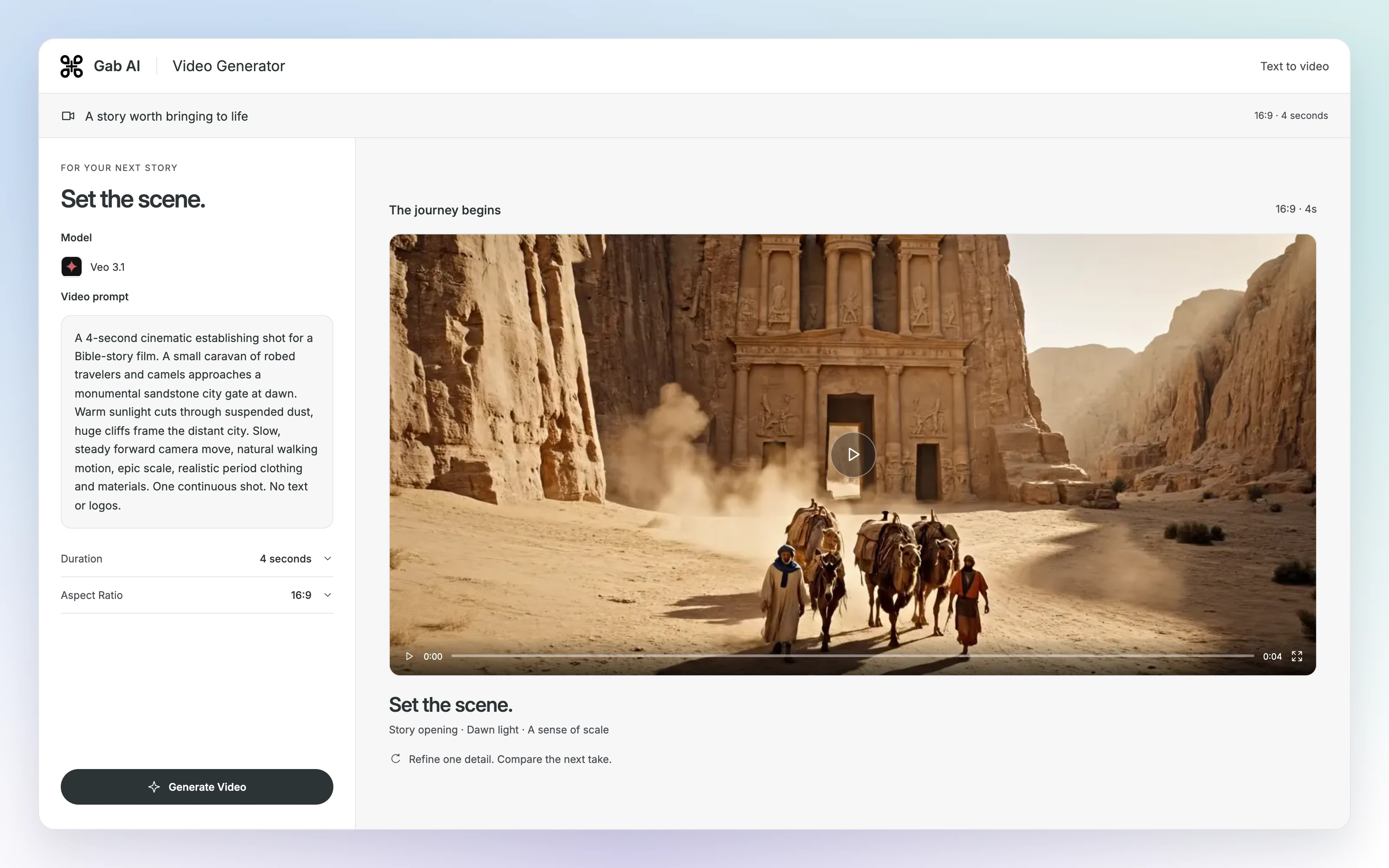
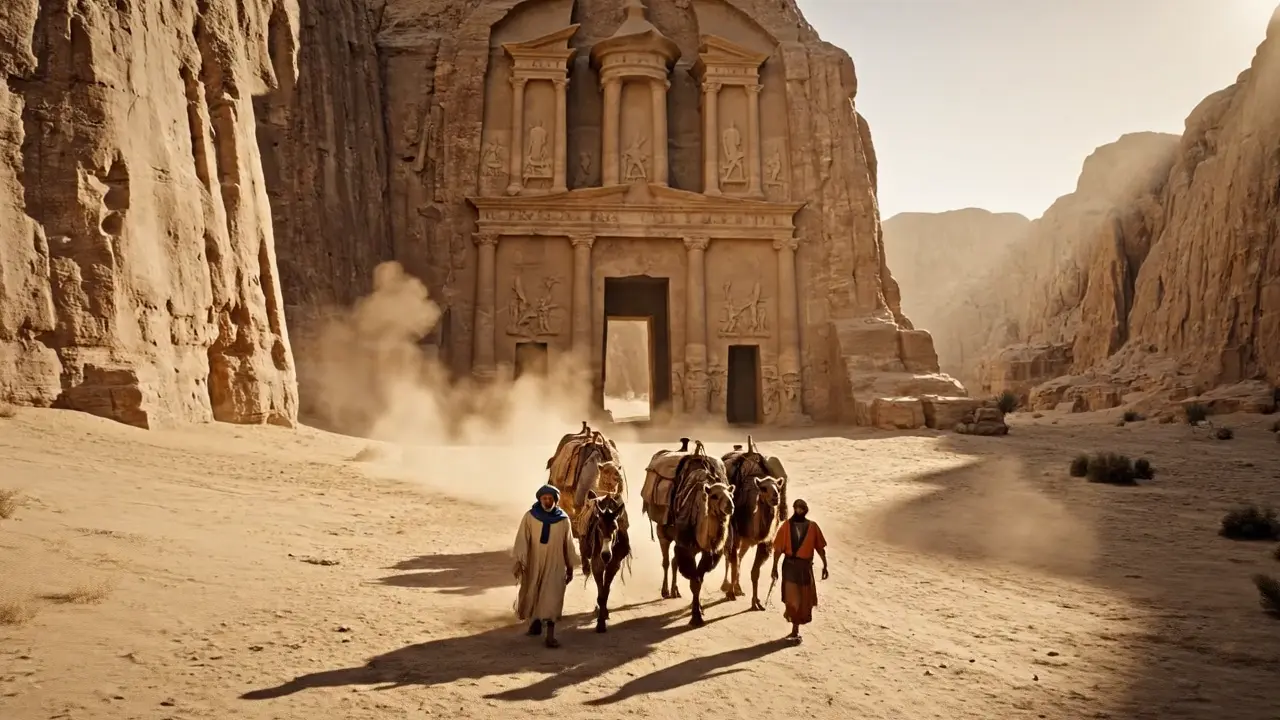
Set the scene with a single cinematic shot
Describe one subject, one action and one camera direction. Watch the returned clip before refining it.
1A 4-second cinematic establishing shot for a Bible-story film. A small caravan of robed travelers and camels approaches a monumental sandstone city gate at dawn. Warm sunlight cuts through suspended dust, huge cliffs frame the distant city. Slow, steady forward camera move, natural walking motion, epic scale, realistic period clothing and materials. One continuous shot. No text or logos.
Choose an available video model and check its duration, frame shape and estimate before generating.
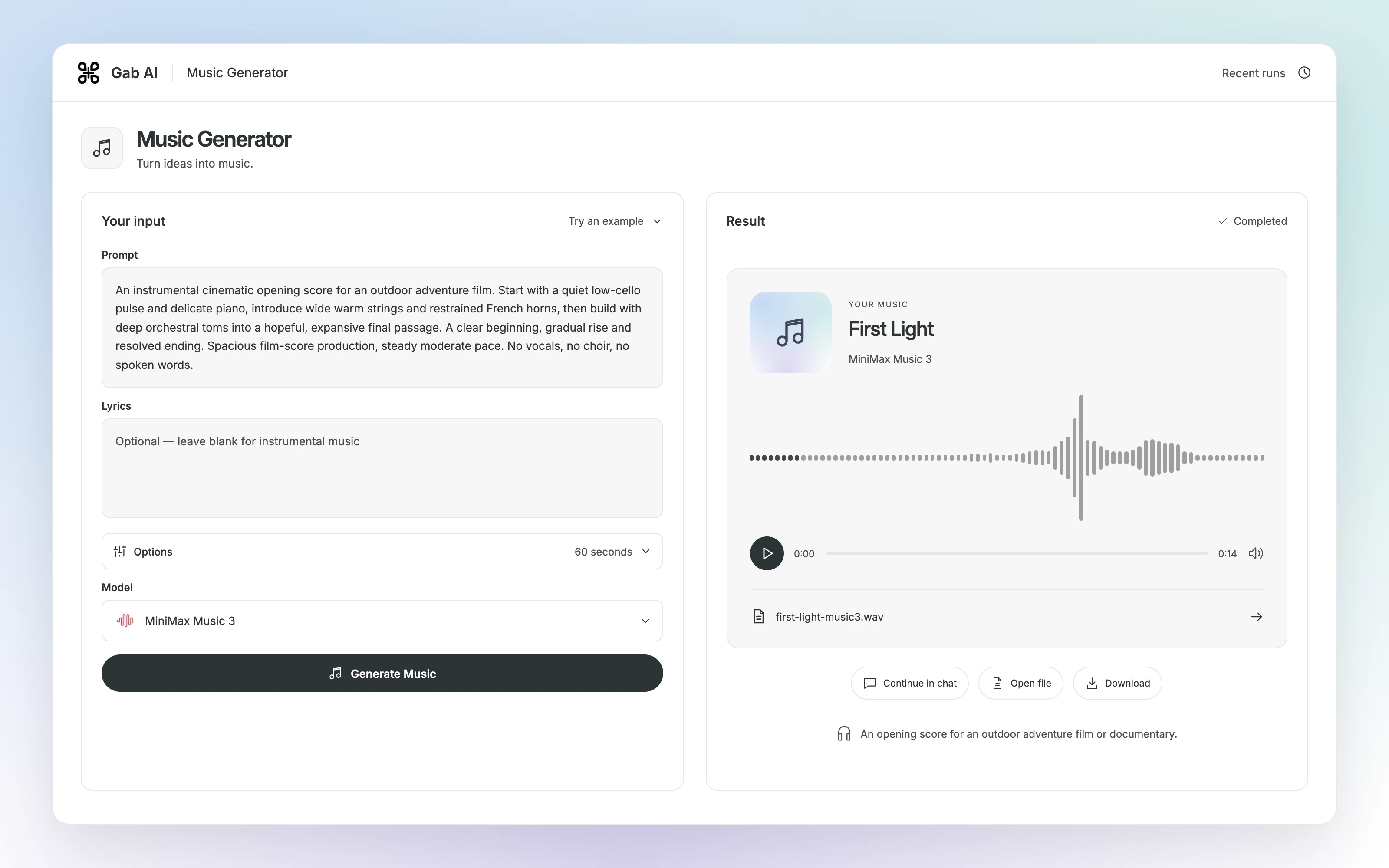
Start a score with a clear emotional direction
Describe the arrangement and review how the finished track fits the project.
An opening score for an outdoor adventure film or documentary.
0:000:14
Ready to play.
This audio could not load.
Read and use the promptPrompt
Text
1An instrumental cinematic opening score for an outdoor adventure film. Start with a quiet low-cello pulse and delicate piano, introduce wide warm strings and restrained French horns, then build with deep orchestral toms into a hopeful, expansive final passage. A clear beginning, gradual rise and resolved ending. Spacious film-score production, steady moderate pace. No vocals, no choir, no spoken words.
Use Prompt for the sound and Lyrics for words you have permission to use. Check the available model and estimate before generating another take.
Build scene coverage and a department breakdown
Explore a visual shot plan, trace production requirements to the script and prepare directing choices for the next production meeting.
Turn a scene into a visual coverage plan
Switch between a wide, medium and insert while checking the envelope’s continuity.
INT. WAITING ROOM — LATE AFTERNOON. Mara enters carrying a sealed envelope in her right hand. Eli is already seated. Mara sets the envelope on the bench between them. Eli looks at it but does not open it. End on the unopened envelope.
Dramatic intent
Mara wants Eli to accept responsibility for the message. Eli avoids answering. Preserve the sealed envelope and the action order; no flashback, reveal of its contents or extra character.
Continuity facts
Mara enters with the envelope in her right hand. After she sets it down, it stays on the bench. Eli never opens it in this scene. The final shot must not reveal its contents.
Station-scene-production-notes-20261022.txt
Available approach
Propose coverage using one camera on a locked tripod, one waiting-room setup and two characters. No dolly, drone or moving-camera setup is in the supplied plan. Camera/lens availability and location booking are not confirmed.
Proposed three-shot coverage
S-01: locked wide, both characters and bench, Mara enters and places the envelope; proposed screen time 6 seconds. S-02: locked medium on Eli, looking without answering; proposed 5 seconds. S-03: locked insert of the sealed envelope on the bench; proposed 4 seconds. Proposed screen times are editorial ideas, not measured takes or setup estimates.
Producer checks
Confirm the waiting-room booking, two cast members, costume continuity, sealed-envelope prop, tripod/camera package and a sound plan. Costs, crew availability, permissions, shoot date and setup durations are not supplied. Do not issue a call sheet as if confirmed.
Storyboard convention
Use original cinematic storyboard concepts, visibly labeled storyboard concepts. Do not portray them as captured footage, generated video, location photographs or final cinematography. Each shot selector shows its proposed framing, dramatic purpose and continuity note.
Give departments a source-linked production breakdown
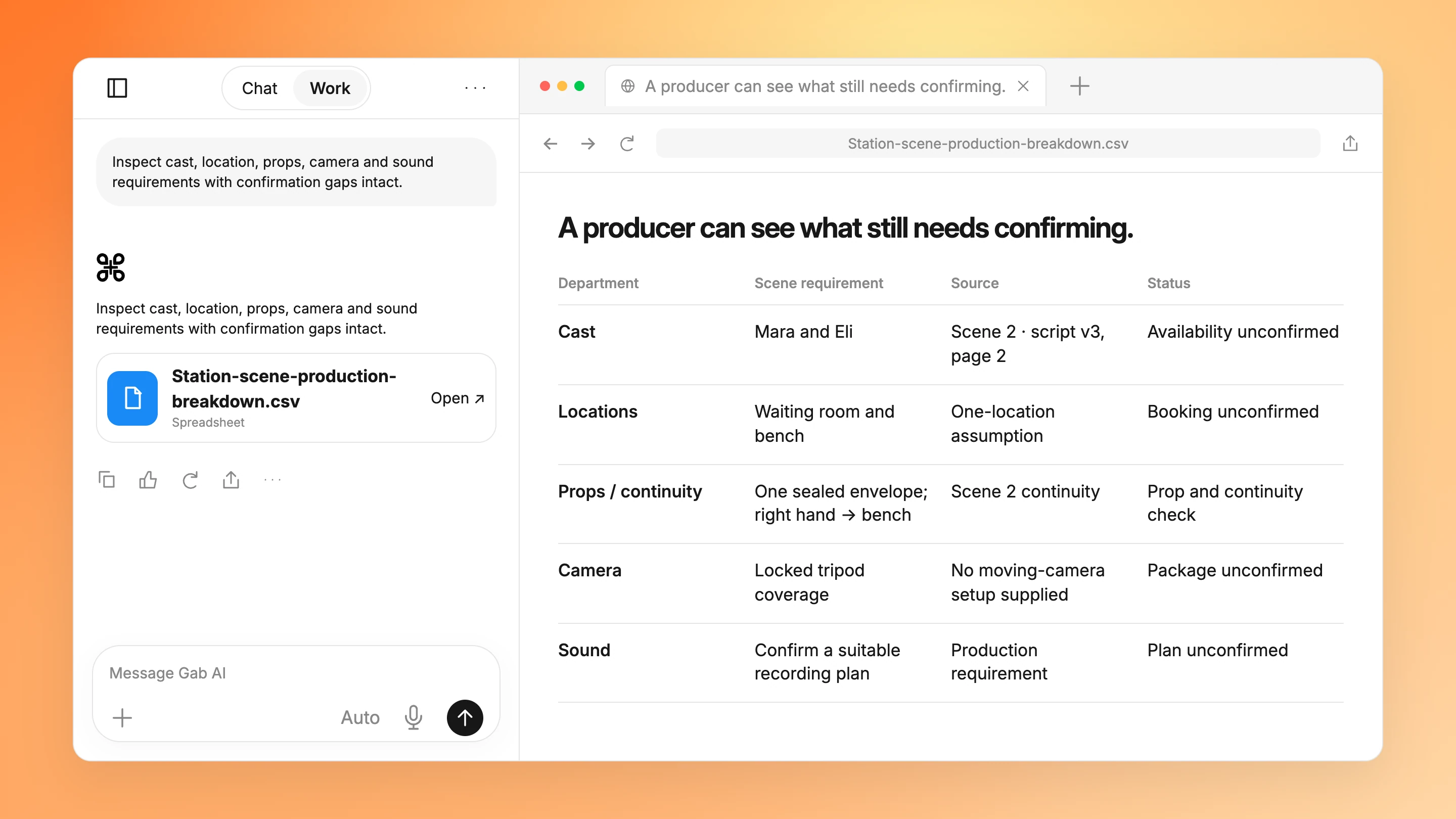
Inspect cast, location, props, camera and sound requirements with confirmation gaps intact.
INT. WAITING ROOM — LATE AFTERNOON. Mara enters carrying a sealed envelope in her right hand. Eli is already seated. Mara sets the envelope on the bench between them. Eli looks at it but does not open it. End on the unopened envelope.
Dramatic intent
Mara wants Eli to accept responsibility for the message. Eli avoids answering. Preserve the sealed envelope and the action order; no flashback, reveal of its contents or extra character.
Continuity facts
Mara enters with the envelope in her right hand. After she sets it down, it stays on the bench. Eli never opens it in this scene. The final shot must not reveal its contents.
Station-scene-production-notes-20261022.txt
Available approach
Propose coverage using one camera on a locked tripod, one waiting-room setup and two characters. No dolly, drone or moving-camera setup is in the supplied plan. Camera/lens availability and location booking are not confirmed.
Proposed three-shot coverage
S-01: locked wide, both characters and bench, Mara enters and places the envelope; proposed screen time 6 seconds. S-02: locked medium on Eli, looking without answering; proposed 5 seconds. S-03: locked insert of the sealed envelope on the bench; proposed 4 seconds. Proposed screen times are editorial ideas, not measured takes or setup estimates.
Producer checks
Confirm the waiting-room booking, two cast members, costume continuity, sealed-envelope prop, tripod/camera package and a sound plan. Costs, crew availability, permissions, shoot date and setup durations are not supplied. Do not issue a call sheet as if confirmed.
Storyboard convention
Use original cinematic storyboard concepts, visibly labeled storyboard concepts. Do not portray them as captured footage, generated video, location photographs or final cinematography. Each shot selector shows its proposed framing, dramatic purpose and continuity note.
Prepare directing choices for the production meeting
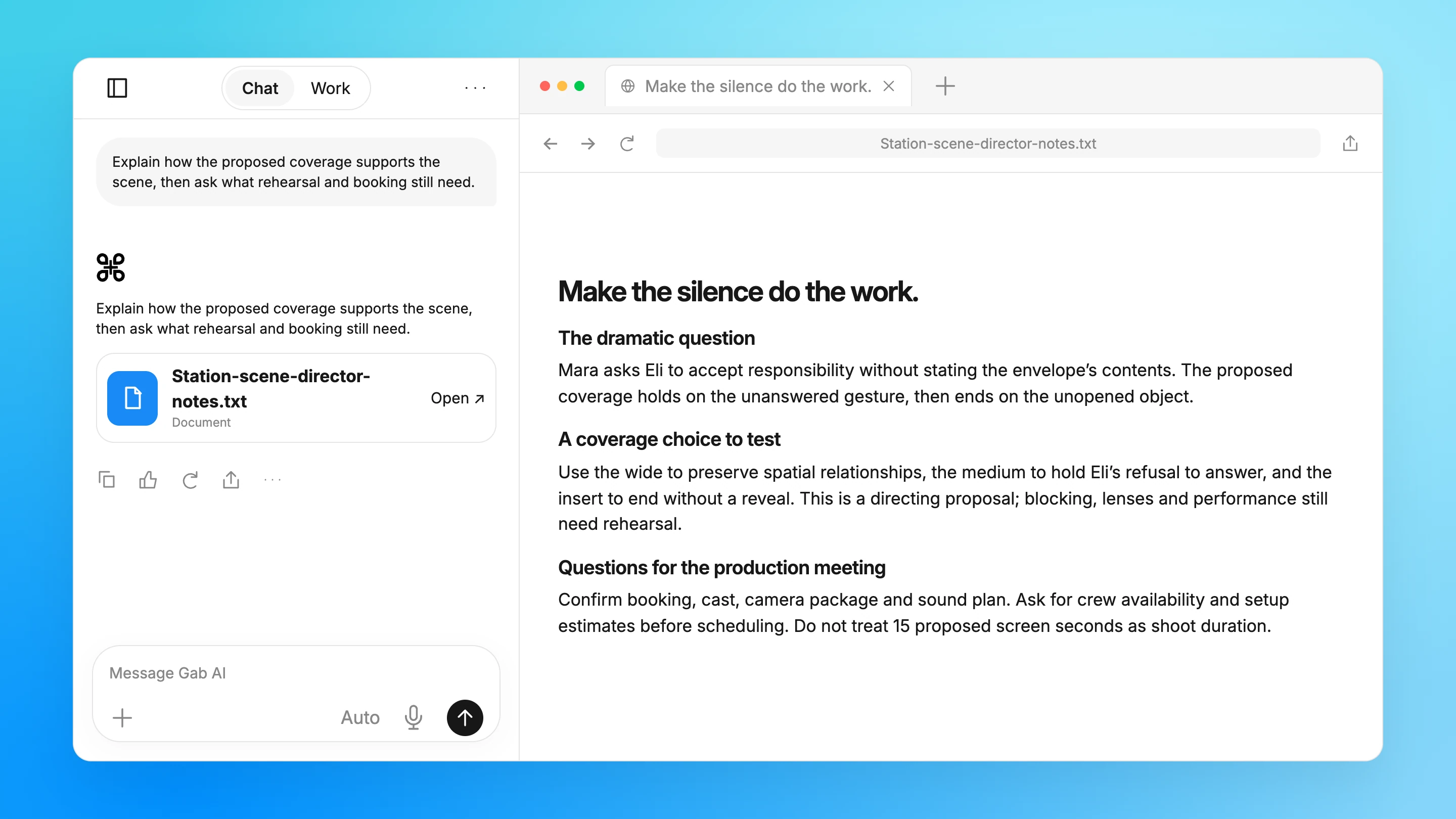
Explain how the proposed coverage supports the scene, then ask what rehearsal and booking still need.
Explain how the proposed coverage supports the scene, then ask what rehearsal and booking still need.
Loading…
This content could not load.
Your source material stays available.
Make the silence do the work.
The dramatic question
Mara asks Eli to accept responsibility without stating the envelope’s contents. The proposed coverage holds on the unanswered gesture, then ends on the unopened object.
Station-scene-script-v3.txt
Station-scene-production-notes-20261022.txt
View full example
A coverage choice to test
Use the wide to preserve spatial relationships, the medium to hold Eli’s refusal to answer, and the insert to end without a reveal. This is a directing proposal; blocking, lenses and performance still need rehearsal.
Station-scene-production-notes-20261022.txt
Station-scene-script-v3.txt
Questions for the production meeting
Confirm booking, cast, camera package and sound plan. Ask for crew availability and setup estimates before scheduling. Do not treat 15 proposed screen seconds as shoot duration.
Station-scene-production-notes-20261022.txt
A source-bound directing note with creative proposals kept separate from script facts.
INT. WAITING ROOM — LATE AFTERNOON. Mara enters carrying a sealed envelope in her right hand. Eli is already seated. Mara sets the envelope on the bench between them. Eli looks at it but does not open it. End on the unopened envelope.
Dramatic intent
Mara wants Eli to accept responsibility for the message. Eli avoids answering. Preserve the sealed envelope and the action order; no flashback, reveal of its contents or extra character.
Continuity facts
Mara enters with the envelope in her right hand. After she sets it down, it stays on the bench. Eli never opens it in this scene. The final shot must not reveal its contents.
Station-scene-production-notes-20261022.txt
Available approach
Propose coverage using one camera on a locked tripod, one waiting-room setup and two characters. No dolly, drone or moving-camera setup is in the supplied plan. Camera/lens availability and location booking are not confirmed.
Proposed three-shot coverage
S-01: locked wide, both characters and bench, Mara enters and places the envelope; proposed screen time 6 seconds. S-02: locked medium on Eli, looking without answering; proposed 5 seconds. S-03: locked insert of the sealed envelope on the bench; proposed 4 seconds. Proposed screen times are editorial ideas, not measured takes or setup estimates.
Producer checks
Confirm the waiting-room booking, two cast members, costume continuity, sealed-envelope prop, tripod/camera package and a sound plan. Costs, crew availability, permissions, shoot date and setup durations are not supplied. Do not issue a call sheet as if confirmed.
Storyboard convention
Use original cinematic storyboard concepts, visibly labeled storyboard concepts. Do not portray them as captured footage, generated video, location photographs or final cinematography. Each shot selector shows its proposed framing, dramatic purpose and continuity note.
About these examples
Plan storyboards, shot lists and production breakdowns
Open an example to inspect the prompt, sample inputs and completed result.
A useful result, with the details behind it
Turn a scene into a visual coverage plan
Switch between a wide, medium and insert while checking the envelope’s continuity.
Add the scene, intention and production constraints before sending. These storyboards are planning drawings.
Read all source material
Station-scene-script-v3.txt
Scene 2 · page 2
INT. WAITING ROOM — LATE AFTERNOON. Mara enters carrying a sealed envelope in her right hand. Eli is already seated. Mara sets the envelope on the bench between them. Eli looks at it but does not open it. End on the unopened envelope.
Dramatic intent
Mara wants Eli to accept responsibility for the message. Eli avoids answering. Preserve the sealed envelope and the action order; no flashback, reveal of its contents or extra character.
Continuity facts
Mara enters with the envelope in her right hand. After she sets it down, it stays on the bench. Eli never opens it in this scene. The final shot must not reveal its contents.
Station-scene-production-notes-20261022.txt
Available approach
Propose coverage using one camera on a locked tripod, one waiting-room setup and two characters. No dolly, drone or moving-camera setup is in the supplied plan. Camera/lens availability and location booking are not confirmed.
Proposed three-shot coverage
S-01: locked wide, both characters and bench, Mara enters and places the envelope; proposed screen time 6 seconds. S-02: locked medium on Eli, looking without answering; proposed 5 seconds. S-03: locked insert of the sealed envelope on the bench; proposed 4 seconds. Proposed screen times are editorial ideas, not measured takes or setup estimates.
Producer checks
Confirm the waiting-room booking, two cast members, costume continuity, sealed-envelope prop, tripod/camera package and a sound plan. Costs, crew availability, permissions, shoot date and setup durations are not supplied. Do not issue a call sheet as if confirmed.
Storyboard convention
Use original cinematic storyboard concepts, visibly labeled storyboard concepts. Do not portray them as captured footage, generated video, location photographs or final cinematography. Each shot selector shows its proposed framing, dramatic purpose and continuity note.
Plan a scene’s coverage
Switch between a wide, medium and insert while checking the envelope’s continuity.
Refine scene continuity and production assumptions
Compare the draft with a focused revision, keeping the source facts in view.
Try one focused revision
Suggested follow-up using the same source facts.
Focused follow-up
What change should I ask for?
Summarize the proposed coverage and total screen time. Preserve locked framing and continuity review; do not estimate shoot duration or cost.
Original excerpt
What does the existing example say?
Wide 6 seconds; medium 5; insert 4. Use locked framing and inspect the continuity note for each proposal.
Suggested revision
What could that revision look like?
Proposed coverage: a 6-second wide, 5-second medium and 4-second insert, totaling 15 seconds on screen. Use locked framing and check each continuity note; these timings do not establish shoot duration or cost.
Use Chat to discuss the request and refine the result with follow-up questions.
Deliverable: Scene treatment
What to provide
Original story brief, characters and production constraints
Example prompt
Develop a short scene treatment from my original story brief. State the dramatic objective, turning point and visual action, then flag practical production questions. Do not imitate a copyrighted scene or invent that locations or cast are available.
What to check
Review story and continuity
Clear references and contributor rights
Inspect every generated shot
Work
Turn a scene into a visual coverage plan
Switch between a wide, medium and insert while checking the envelope’s continuity.
Use Work to create and revise the named file from the supplied sources.
Deliverable: Station-scene-shot-board.html
What to provide
Station-scene-script-v3.txt
Station-scene-production-notes-20261022.txt
Example prompt
Create Station-scene-shot-board.html from Station-scene-script-v3.txt and Station-scene-production-notes-20261022.txt. Build three selectable cinematic storyboard concepts for the supplied locked wide, medium and insert. Preserve the sealed envelope, right-hand entry and final bench position. Display the proposed 6/5/4-second screen times, dramatic purpose and continuity notes. Label the images as storyboard concepts. Do not invent lenses, availability, setup times or bookings.
What to check
Inspect the supplied sample files
Check the result against your own sources
Review before sharing or acting
Work
Give departments a source-linked production breakdown
Inspect cast, location, props, camera and sound requirements with confirmation gaps intact.
Create Station-scene-production-breakdown.csv from Station-scene-script-v3.txt and Station-scene-production-notes-20261022.txt. Map scene 2, script v3 page 2 to cast, location, prop continuity, camera and sound requirements. Link source parts and distinguish requirements from confirmed resources. Keep costs, shoot date, availability, permissions and setup duration unknown. Do not issue a booked call sheet.
What to check
Inspect the supplied sample files
Check the result against your own sources
Review before sharing or acting
Chat
Prepare directing choices for the production meeting
Explain how the proposed coverage supports the scene, then ask what rehearsal and booking still need.
Use Chat to question the supplied process and refine the response.
Deliverable: Station-scene-director-notes.txt
What to provide
Station-scene-script-v3.txt
Station-scene-production-notes-20261022.txt
Example prompt
Using Station-scene-script-v3.txt and Station-scene-production-notes-20261022.txt, explain the dramatic question and trade-offs of the three proposed shots. Keep script facts distinct from directing choices. Preserve action order and unopened-envelope continuity. Ask about blocking, lenses, cast, booking, sound and setup time rather than inventing them.
What to check
Inspect the supplied sample files
Check the result against your own sources
Review before sharing or acting
More prompts
Chat
Compare shot approaches
A shot comparison grounded in storytelling aims and actual production constraints.
Use Chat to discuss the request and refine the result with follow-up questions.
Deliverable: Shot approach comparison
What to provide
Approved scene, location constraints and permissioned references
Example prompt
Compare three ways to cover this scene within the supplied location and equipment constraints. Explain storytelling trade-offs, continuity needs and setup implications; do not promise achievable camera moves without confirming resources.
What to check
Review story and continuity
Clear references and contributor rights
Inspect every generated shot
Work
Build a production breakdown
A source-linked production workbook with resource dependencies and unanswered clearance questions.
Use Work to build and revise Production breakdown.xlsx from your source material.
Deliverable: Production breakdown.xlsx
What to provide
Approved script version, cast, props and location facts
Example prompt
Create a scene breakdown workbook with cast, props, locations, continuity references, effects and unresolved requirements. Link rows to script pages and distinguish tentative resources from confirmed bookings or clearances. Deliver "Production breakdown.xlsx" as the requested editable artifact. Ask for missing source material rather than inventing facts.
What to check
Review story and continuity
Clear references and contributor rights
Inspect every generated shot
Work
Create a generated scene concept
A storyboard and labeled generated scene concept with preview and revision points for the filmmaker.
Use Work to build and revise Scene concept video project from your source material.
Deliverable: Scene concept video project
What to provide
Approved scene brief, storyboard direction and permissioned assets
Example prompt
Prepare a storyboard for review, then create a short generated concept using only approved references. Identify generated footage, preserve a preview for review and avoid presenting it as documentation of a real event. Ask before generating additional paid takes. Deliver "Scene concept video project" as the requested editable artifact. Ask for missing source material rather than inventing facts.
What to check
Review story and continuity
Clear references and contributor rights
Inspect every generated shot
Work
Build a production breakdown workbook
A workbook mapping scenes to cast, locations, props, effects, continuity notes and unresolved production needs.
Use Work to create and revise Production breakdown workbook.xlsx alongside the conversation.
Deliverable: Production breakdown workbook.xlsx
What to provide
Approved script, scene intent and creative constraints
Script version, locations, cast, props and production assumptions
Example prompt
Create a workbook mapping scenes to cast, locations, props, effects, continuity notes and unresolved production needs. Include script/page references and distinguish tentative resources from booked ones; do not invent clearances, budgets or availability. Deliver an editable artifact named "Production breakdown workbook.xlsx". If source material is missing, ask for it instead of filling factual gaps.
What to check
Trace scene references to the approved script version
Verify cast, location, prop and continuity requirements
Review unresolved production needs with department heads
Supply your script, scene intention and practical constraints. Work can create a visual planning resource with shot notes. This example uses original schematic drawings and selectable frames; it is not filmed or generated footage.
How can producers and directors use the breakdown?
Use it to connect script pages with cast, locations, props, continuity and department questions. The sample preserves unconfirmed bookings, equipment, permissions and shoot dates so a proposal is not mistaken for a call sheet.
Can proposed screen time tell me how long the shoot will take?
No. The 6-, 5- and 4-second proposed shots total 15 screen seconds. Setup, takes, crew, location access and approvals need a separate production estimate; the storyboard does not confirm shoot duration or cost.
Can I also create generated video concepts in Gab AI?
Gab AI has a video-project workflow for generated concepts and review of takes. Use permitted references, inspect the actual output and choose paid generation steps yourself. The examples on this page demonstrate preproduction rather than claiming a video was generated.
Can I start in Chat, or do I need Work?
Use Chat for questions and text drafts. Choose Work when you want a project with tools and editable files. Work requires Plus and uses credits; see Pricing for plans and allowances. Opening a draft does not send it or attach the example files.