AI for real estate agents, grounded in property facts.
Write real estate listing descriptions, create a property brochure and compare the records behind each listing. Prepare buyer and seller follow-ups using the facts and next steps you can confirm.
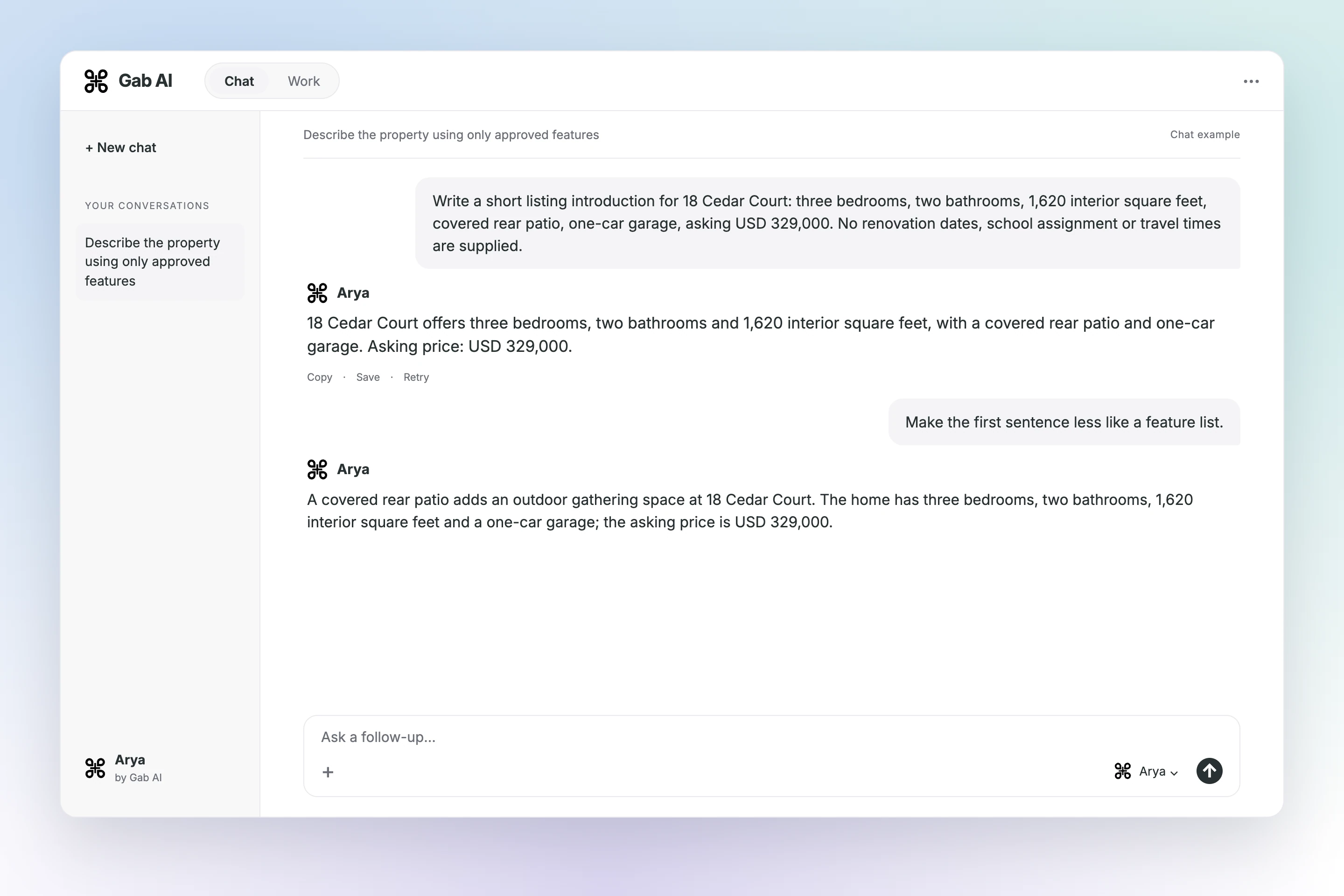
18 Cedar Court offers three bedrooms, two bathrooms and 1,620 interior square feet, with a covered rear patio and one-car garage. Asking price: USD 329,000.
Your follow-up
Make the first sentence less like a feature list.
Arya
A covered rear patio adds an outdoor gathering space at 18 Cedar Court. The home has three bedrooms, two bathrooms, 1,620 interior square feet and a one-car garage; the asking price is USD 329,000.
Turn missing listing details into a useful follow-up
Ask for the roof’s documented age and condition, official school-assignment information, and permitted current property photos.
Ask for the roof’s documented age and condition, official school-assignment information, and permitted current property photos. Check travel times for the buyer’s actual destination and time of day.
Your follow-up
Turn that into a short message.
Arya
Could you share the roof records, current school-assignment source and approved property photos? The buyer would also like to check travel times against their own route before arranging next steps.
Build a property brochure and prepare a showing follow-up
Turn approved property facts into a brochure, compare buyer options and prepare viewing follow-ups. Open the sources behind each example.
Build a brochure from approved property facts
Create a clean brochure without invented photos, renovations or neighborhood claims.
18 Cedar Court is a listing. Approved features: three bedrooms, two bathrooms, 1,620 interior square feet, a covered rear patio and a one-car garage. Asking price: USD 329,000. The packet does not identify the roof age, school assignment or travel times.
Publication instructions
Use the approved features only. Do not add renovation dates, neighborhood characterizations, school claims, accessibility claims or financing estimates. No property photographs are supplied. The sample brochure must use a typography-led layout rather than simulated property photography.
Contact and event information
Contact block: Listing team — contact details to be confirmed. A viewing is proposed for Saturday, October 10, 2026, 10:00–11:00 local time; seller confirmation and visitor details are still pending.
Compare three properties without filling the gaps
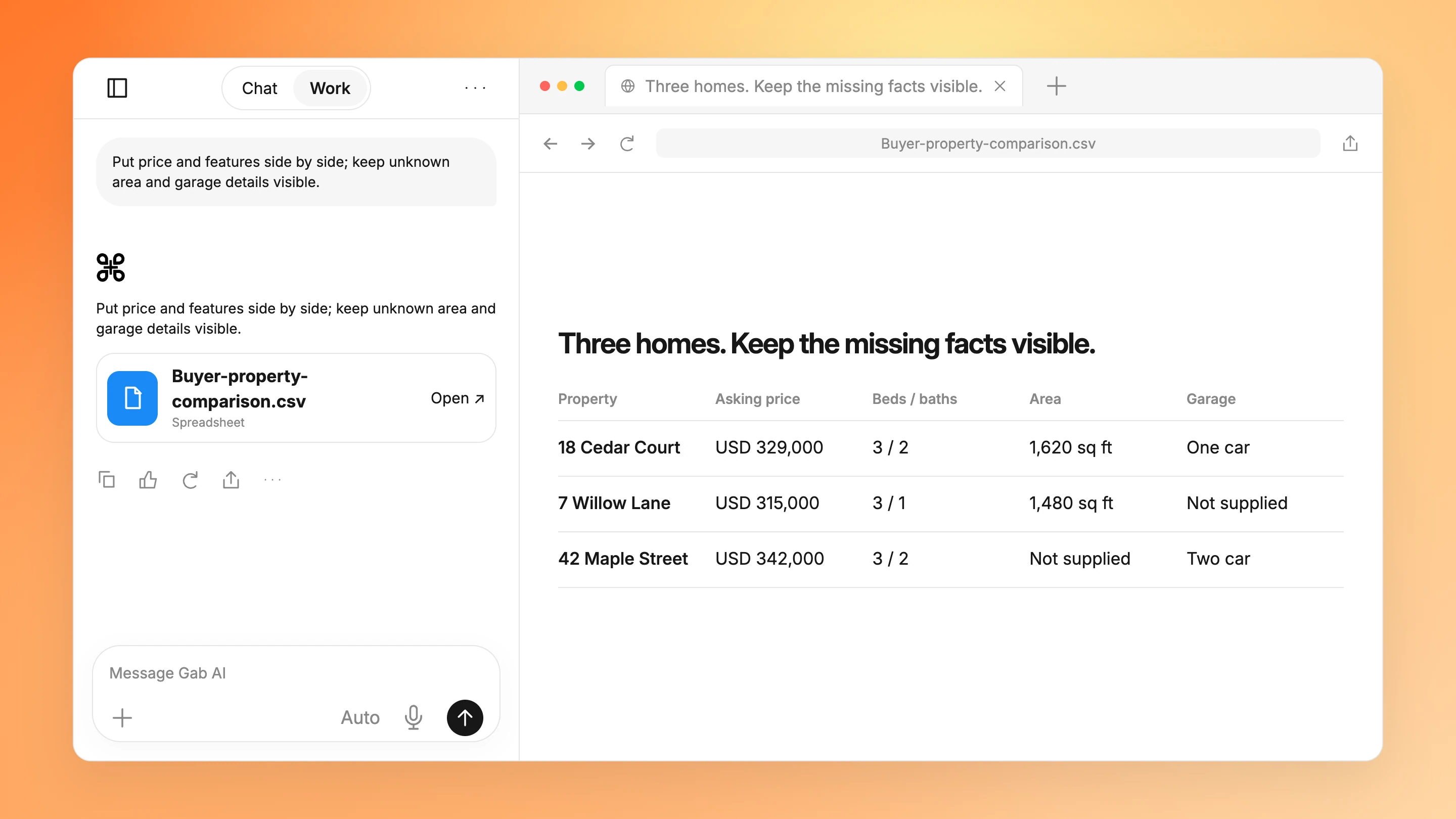
Put price and features side by side; keep unknown area and garage details visible.
42 Maple Street: asking price USD 342,000; 3 bedrooms; 2 bathrooms; interior area not supplied; two-car garage.
Comparison scope
The buyer asked to compare asking price, bedrooms, bathrooms, area and garage. Do not rank the homes, infer sale value or estimate monthly payments. Missing information must remain missing.
Prepare the proposed viewing and follow-up
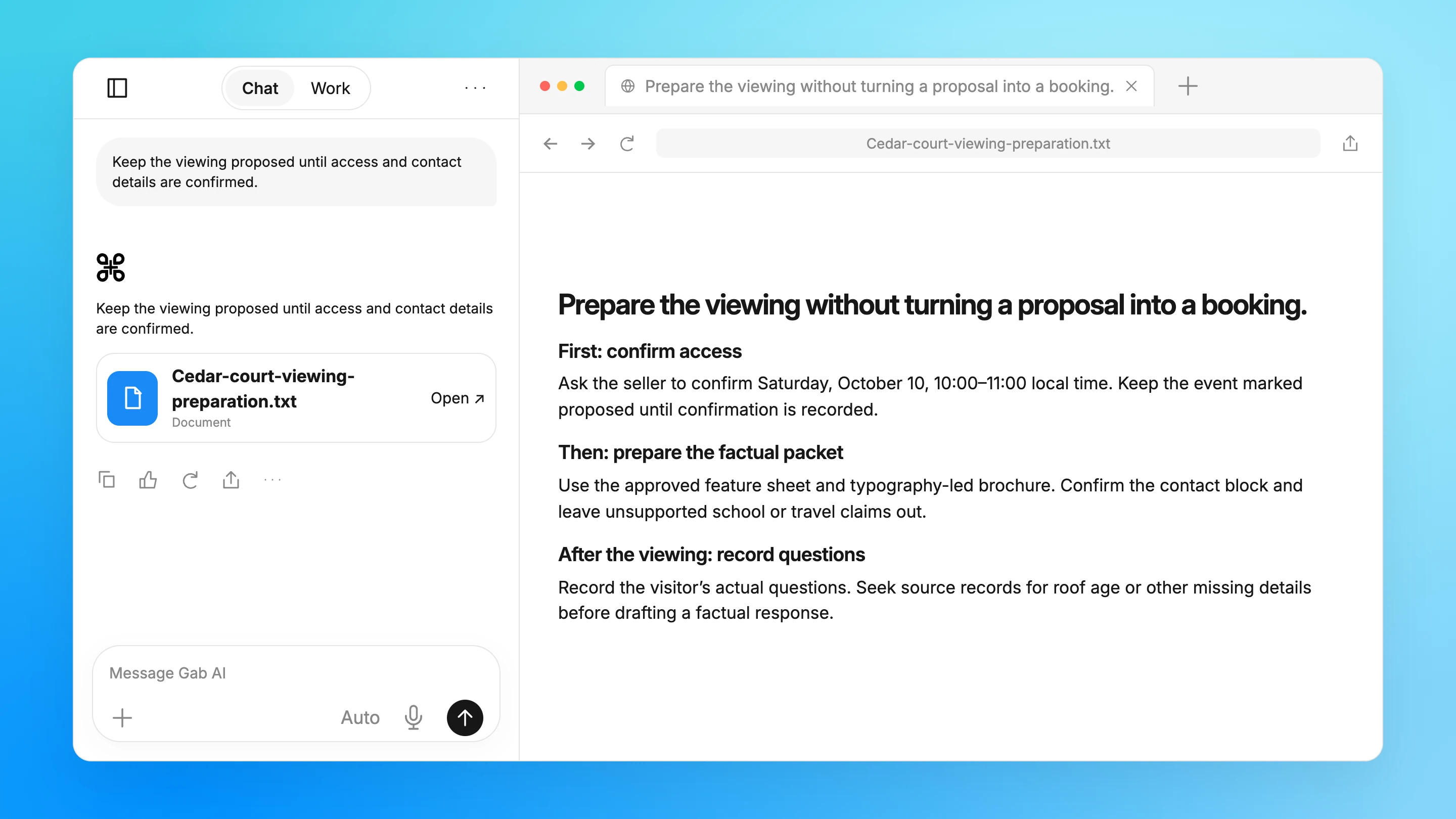
Keep the viewing proposed until access and contact details are confirmed.
18 Cedar Court is a listing. Approved features: three bedrooms, two bathrooms, 1,620 interior square feet, a covered rear patio and a one-car garage. Asking price: USD 329,000. The packet does not identify the roof age, school assignment or travel times.
Publication instructions
Use the approved features only. Do not add renovation dates, neighborhood characterizations, school claims, accessibility claims or financing estimates. No property photographs are supplied. The sample brochure must use a typography-led layout rather than simulated property photography.
Contact and event information
Contact block: Listing team — contact details to be confirmed. A viewing is proposed for Saturday, October 10, 2026, 10:00–11:00 local time; seller confirmation and visitor details are still pending.
About these examples
Write property descriptions, brochures and buyer replies
Open an example to inspect the prompt, sample inputs and completed result.
A useful result, with the details behind it
Build a brochure from approved property facts
Create a clean brochure without invented photos, renovations or neighborhood claims.
Add approved property facts, permitted photos and contact details before sending.
Read all source material
Cedar-court-property-facts.txt
Approved property features
18 Cedar Court is a listing. Approved features: three bedrooms, two bathrooms, 1,620 interior square feet, a covered rear patio and a one-car garage. Asking price: USD 329,000. The packet does not identify the roof age, school assignment or travel times.
Publication instructions
Use the approved features only. Do not add renovation dates, neighborhood characterizations, school claims, accessibility claims or financing estimates. No property photographs are supplied. The sample brochure must use a typography-led layout rather than simulated property photography.
Contact and event information
Contact block: Listing team — contact details to be confirmed. A viewing is proposed for Saturday, October 10, 2026, 10:00–11:00 local time; seller confirmation and visitor details are still pending.
42 Maple Street: asking price USD 342,000; 3 bedrooms; 2 bathrooms; interior area not supplied; two-car garage.
Comparison scope
The buyer asked to compare asking price, bedrooms, bathrooms, area and garage. Do not rank the homes, infer sale value or estimate monthly payments. Missing information must remain missing.
Draft a property brochure
Create a clean brochure without invented photos, renovations or neighborhood claims.
Refine listing claims and unconfirmed details
Compare the draft with a focused revision, keeping the source facts in view.
Try one focused revision
Suggested follow-up using the same source facts.
Focused follow-up
What change should I ask for?
Turn this into a short message asking the seller for confirmation. Preserve the proposed date and local time; do not announce a confirmed event.
Original excerpt
What does the existing example say?
Ask the seller to confirm Saturday, October 10, 10:00–11:00 local time. Keep the event marked proposed until confirmation is recorded.
Suggested revision
What could that revision look like?
Could you confirm whether Saturday, October 10, 10:00–11:00 local time works for the viewing? I’ll keep it marked proposed until you confirm.
Use Chat to question the source material and revise the response before preparing a file.
Deliverable: Response in Chat
What to provide
Verified property facts, seller approvals and photo rights
Example prompt
Draft a listing description using only these verified property facts. Emphasize layout and features, include the supplied limitations, and avoid demographic targeting or unsupported neighborhood claims. Mark missing details rather than inventing amenities.
What to check
Verify property facts
Check approved terms
Agent review
Work
Build a brochure from approved property facts
Create a clean brochure without invented photos, renovations or neighborhood claims.
Use Work to create the named sample file and review it alongside the conversation.
Deliverable: Cedar-court-property-brochure.html
What to provide
Cedar-court-property-facts.txt
Example prompt
Create Cedar-court-property-brochure.html from Cedar-court-property-facts.txt. Use a typography-led three-section brochure with the approved features and asking price. No photographs are supplied: do not invent property imagery. Keep contact details unconfirmed and the viewing time proposed. List missing facts for agent review.
What to check
Inspect the supplied input files
Check the result against the source material
Review and adapt the result before using it
Work
Compare three properties without filling the gaps
Put price and features side by side; keep unknown area and garage details visible.
Use Work to create the named sample file and review it alongside the conversation.
Deliverable: Buyer-property-comparison.csv
What to provide
Buyer-property-options.csv
Example prompt
Create Buyer-property-comparison.csv from Buyer-property-options.csv. Compare the supplied asking prices, bedrooms, bathrooms, interior area and garage. Preserve missing fields as Not supplied. Do not rank properties, infer sale values or estimate financing.
What to check
Inspect the supplied input files
Check the result against the source material
Review and adapt the result before using it
Chat
Prepare the proposed viewing and follow-up
Keep the viewing proposed until access and contact details are confirmed.
Use Chat to discuss the supplied material and inspect each reasoning step.
Deliverable: Cedar-court-viewing-preparation.txt
What to provide
Cedar-court-property-facts.txt
Example prompt
Using Cedar-court-property-facts.txt, draft a viewing preparation sequence and a factual follow-up checklist. Keep October 10, 2026, 10:00–11:00 local time proposed until seller confirmation. Do not book, send messages, invent visitor details or treat missing property facts as verified.
What to check
Inspect the supplied input files
Check the result against the source material
Review and adapt the result before using it
More prompts
Work
Create a verified property brochure
An editable brochure from the verified facts and approved photos, with a concise description, feature table and contact block.
Use Work to create and revise Property brochure.docx alongside the conversation.
Deliverable: Property brochure.docx
What to provide
Verified property facts, seller approvals and photo rights
Example prompt
Create an editable brochure from the verified facts and approved photos, with a concise description, feature table and contact block. Preserve the home's actual condition, flag unverified details and avoid demographic targeting, invented neighborhood claims or automatic MLS publication. Deliver an editable artifact named "Property brochure.docx". If source material is missing, ask for it instead of filling factual gaps.
What to check
Compare every feature and figure with verified property facts
Check photo permissions and required brokerage disclosures
Have the listing agent approve the brochure before marketing it
Chat
Prepare a client property comparison
A property comparison preserving documented features, supplied costs and the buyer's stated criteria.
Use Chat to question the source material and revise the response before preparing a file.
Deliverable: Response in Chat
What to provide
Confirmed buyer criteria and documented property comparisons
Example prompt
Compare these property information sheets against the buyer’s stated criteria. Build a table of documented features, supplied costs and unanswered questions. Do not infer neighborhood demographics, predict appreciation or recommend financing terms.
What to check
Verify property facts
Check approved terms
Agent review
Chat
Write a transaction follow-up checklist
A transaction checklist using approved dates, responsible parties and requested documents, with professional questions identified.
Use Chat to question the source material and revise the response before preparing a file.
Deliverable: Response in Chat
What to provide
Transaction milestones and approved follow-up wording
Example prompt
Create a client transaction checklist from these approved notes. Include supplied deadlines, responsible parties, documents requested and questions for the appropriate professionals. Do not invent contractual obligations or provide legal advice.
What to check
Verify property facts
Check approved terms
Agent review
Chat
Check listing copy against property facts
A listing-to-facts review identifying invented features, changed dimensions, unsupported distances and wording requiring agent correction.
Use Chat to question the source material and revise the response before preparing a file.
Deliverable: Response in Chat
What to provide
The draft Verified property facts and listing draft.pdf and the source it should match
Example prompt
Compare this listing draft with the verified property facts and approved disclosures. Flag invented amenities, changed dimensions, unsupported distance claims and wording that targets a demographic group. Quote the relevant fact or missing source, then suggest factual revisions for the agent. Do not estimate value, infer neighborhood demographics or add legal assurances.
What to check
Verify property facts
Check approved terms
Agent review
Chat
Write a listing description
A factual listing draft using only the example features, with claims the agent must verify before use.
Use Chat to question the source material and revise the response before preparing a file.
Deliverable: Response in Chat
What to provide
The four explicitly property facts supplied in the prompt
Example prompt
Draft a listing description for this property using only these example facts: three bedrooms, two bathrooms, a renovated kitchen and a fenced backyard. Keep the copy focused on the property. Do not add measurements, school claims, distances or neighborhood characteristics, and list facts the agent should confirm before use.
What to check
Verify property facts
Check approved terms
Agent review
Chat
Generate listing variations
Three property descriptions preserving the verified features and disclosures, with unsupported claims flagged.
Use Chat to question the source material and revise the response before preparing a file.
Deliverable: Response in Chat
What to provide
Verified property features, disclosures and approved marketing formats
Example prompt
Write three descriptions from the verified property details supplied: a full listing draft, a concise factual version and a short social caption. Preserve features and disclosures, avoid demographic targeting, and mark any claim needing source confirmation. Do not invent amenities or neighborhood details.
What to check
Verify property facts
Check approved terms
Agent review
Chat
Virtually stage a room
A furnished-room concept with permanent-feature checks and virtual-staging labeling questions.
Use Chat to question the source material and revise the response before preparing a file.
Deliverable: Image concept in Chat
What to provide
Authorized empty-room photo and required virtual-staging disclosure
Example prompt
Create a furnished concept from this empty-room photo using a sofa, rug, coffee table and plants. Preserve doors, windows, walls and permanent fixtures. Treat the furniture as virtual staging, identify any structural details that changed unintentionally, and prepare a note for agent review about labeling the image as virtually staged.
What to check
Verify property facts
Check approved terms
Agent review
Chat
Enhance a property photo
A proposed exposure and white-balance correction that requires comparison with the original property condition.
Use Chat to question the source material and revise the response before preparing a file.
Deliverable: Image concept in Chat
What to provide
Original property photo and permitted exposure/white-balance corrections
Example prompt
Adjust exposure and white balance in this property photo while preserving actual finishes, views and condition. Do not remove defects, add landscaping, change fixtures or turn a window view into a different scene. Describe the requested corrections and flag details the agent must compare with the original image.
What to check
Verify property facts
Check approved terms
Agent review
Chat
Create a just-listed graphic
A listing graphic concept with space for the verified address, confirmed price and approved brokerage details.
Use Chat to question the source material and revise the response before preparing a file.
Deliverable: Image concept in Chat
What to provide
Approved photo, verified address, price, contact and brokerage text
Example prompt
Develop a just-listed social graphic concept using the approved condo photo, verified address, confirmed asking price and agent contact details I provide. Leave clear space for those details and any required brokerage text. Preserve the supplied figures and identify text that needs checking in the final design.
What to check
Verify property facts
Check approved terms
Agent review
Chat
Make a property tour video
A photo-based property storyboard separating verified features from proposed transitions and unrecorded footage.
Use Chat to question the source material and revise the response before preparing a file.
Deliverable: Storyboard draft in Chat
What to provide
Authorized property photos and verified features for each proposed shot
Example prompt
Draft a 30-second property-highlight storyboard from these authorized photos and verified features. For each shot, specify the source photo, factual on-screen text and transition idea. Do not invent rooms, views or amenities, and separate the proposed storyboard from footage actually recorded at the property.
What to check
Verify property facts
Check approved terms
Agent review
Chat
Write a neighborhood guide
A sourced area-guide draft covering public resources and amenities without demographic or subjective school claims.
Use Chat to question the source material and revise the response before preparing a file.
Deliverable: Response in Chat
What to provide
Verified municipal/public-resource links and source dates
Example prompt
Using the verified municipal and public-resource sources I provide, draft a factual area guide covering parks, transport routes, public services and named amenities. Cite each source and its date, flag information requiring current confirmation, and avoid demographic descriptions, subjective school ratings or claims about who should live there.
What to check
Verify property facts
Check approved terms
Agent review
Chat
Plan an open house campaign
An open-house communication plan with social, email and follow-up drafts based on confirmed event details.
Use Chat to question the source material and revise the response before preparing a file.
Deliverable: Response in Chat
What to provide
Approved property facts, confirmed event time, photos and contact details
Example prompt
Draft a one-week open-house communication plan using the approved property facts, confirmed event date and time, authorized photos and contact details. Include social copy, an email and a follow-up draft. Mark required information not supplied and do not invent attendance, buyer interest or urgency.
What to check
Verify property facts
Check approved terms
Agent review
Chat
Follow up with a lead
Tour follow-up text and email grounded in the actual conversation and confirmed next-step options.
Use Chat to question the source material and revise the response before preparing a file.
Deliverable: Response in Chat
What to provide
Approved buyer-tour notes and confirmed follow-up options
Example prompt
Draft a follow-up text and email using my approved notes from a buyer tour. Refer only to the questions actually discussed, include the confirmed next-step options and invite a reply. Do not infer buyer intent, invent competing offers, promise financing or add pressure based on unsupported urgency.
What to check
Verify property facts
Check approved terms
Agent review
Chat
Explain the process to a first-time buyer
A buyer process overview based on approved guidance, with local and financing questions for the appropriate professional.
Use Chat to question the source material and revise the response before preparing a file.
Deliverable: Response in Chat
What to provide
Approved brokerage guidance, transaction steps and supplied deadlines
Example prompt
Draft a buyer process overview using my approved brokerage guidance and the transaction steps I provide. Explain each step, the responsible professional and questions to ask. Include only supplied deadlines and terms, flag local or financing questions for the appropriate professional, and do not promise approval or closing.
What to check
Verify property facts
Check approved terms
Agent review
Chat
Draft an offer summary
An offer-summary email preserving supplied terms and omitting personal buyer details and contract interpretation.
Use Chat to question the source material and revise the response before preparing a file.
Deliverable: Response in Chat
What to provide
Agent-approved offer terms, proposed dates and document list
Example prompt
Draft a factual offer-summary email from these agent-approved terms. List the offered price, proposed dates, included documents and questions still awaiting confirmation, exactly as supplied. Omit buyers' personal characteristics and family circumstances. Do not interpret the contract or suggest that the offer has been accepted.
What to check
Verify property facts
Check approved terms
Agent review
Chat
Prep for a listing presentation
A listing-appointment Q&A grounded in the agent's actual service plan, with unanswered questions identified.
Use Chat to question the source material and revise the response before preparing a file.
Deliverable: Response in Chat
What to provide
Verified service plan, approved marketing examples and current property facts
Example prompt
Prepare a listing-appointment Q&A using my verified service plan, approved marketing examples and current property information. Include questions about pricing method, fees, communication and marketing scope. Answer only from the supplied materials, flag missing evidence, and avoid promises about sale price, timing or buyer interest.
How can real estate agents use Gab AI in their work?
Start with approved property facts, source records, photo permissions and your brokerage instructions. Use Chat to draft listing copy and client responses, or Work to create a brochure or comparison file. Check the result against the supplied records before sharing it.
Can Gab AI check listing copy against property facts?
Compare listing claims with verified property records and flag added features, unsupported distances or missing disclosure language for agent review.
What needs my professional review?
Verify property facts, disclosures, fair-housing rules and local requirements with qualified sources. AI does not value a property, establish legal rights, promise financing or guarantee a transaction outcome.
Can I compare properties for a buyer?
Supply property sheets and the buyer’s criteria. Ask for documented features, supplied costs and unanswered questions. The Maple record lacks floor area; the comparison keeps this and other missing fields visible. It does not estimate value, fill missing measurements or establish financing.
Can Gab AI draft listing descriptions?
Yes. Provide verified property facts, approved disclosures and the listing service's constraints. Ask for factual copy and review every feature, dimension and claim before publication. A generated description still needs the agent's and listing service's checks.
How should I use a virtual staging concept?
Start from an authorized property photo and specify furnishings to explore while preserving doors, windows, dimensions and permanent features. Inspect changes and follow the applicable rules for labeling altered imagery. A concept must not imply that improvements or furnishings are included in the property.
Can Gab AI help prepare open-house materials?
Use approved photos, verified features, the confirmed event date and time, and contact details. It can help draft flyer copy, social concepts and a video storyboard. Review all text and imagery and prepare the final materials through your usual publication process.
Can Gab AI draft buyer and seller follow-ups?
Yes. Supply the approved conversation notes and confirmed next step. Ask for a message that preserves the stated terms and avoids assumptions about financing, contract rights or transaction outcomes. Review the draft and send it through your own authorized communication tools.
Can I build an editable property brochure?
Ask Work for an editable document using your approved facts and photos, or inspect the three-section HTML brochure sample on this page. Opening a draft does not start it. Review property claims, permissions and contact details before sharing the file.
Can I start in Chat, or do I need Work?
Use Chat for questions and text drafts. Choose Work when you want a project with tools and editable files. Work requires Plus and uses credits; see Pricing for plans and allowances. Opening a draft does not send it or attach the example files.