AI for designers: explore concepts and explain your direction.
Explore graphic design concepts, build a visual direction presentation and turn a brief into a website prototype. Compare the alternatives and explain why a direction fits before developing it further.
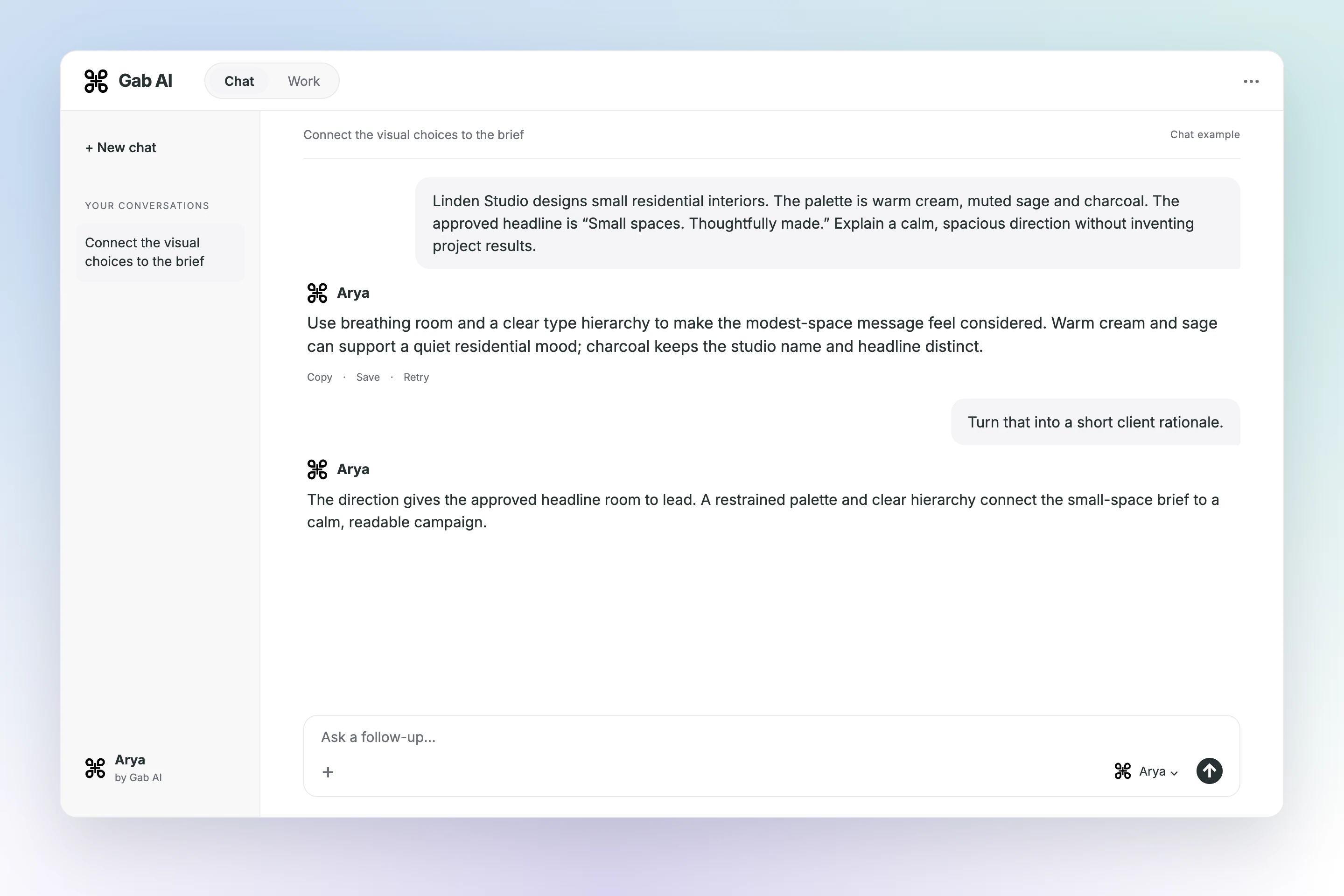
Use breathing room and a clear type hierarchy to make the modest-space message feel considered. Warm cream and sage can support a quiet residential mood; charcoal keeps the studio name and headline distinct.
Your follow-up
Turn that into a short client rationale.
Arya
The direction gives the approved headline room to lead. A restrained palette and clear hierarchy connect the small-space brief to a calm, readable campaign.
Ask for the revision that matters
Increase the studio-name hierarchy, then reduce competing elements near the headline.
Increase the studio-name hierarchy, then reduce competing elements near the headline. Keep the headline and palette unchanged so the review focuses on prominence and spacing.
Your follow-up
Give me a concise revision request.
Arya
Make Linden Studio easier to find at a glance. Add space around “Small spaces. Thoughtfully made.” and keep the existing headline, palette and overall direction.
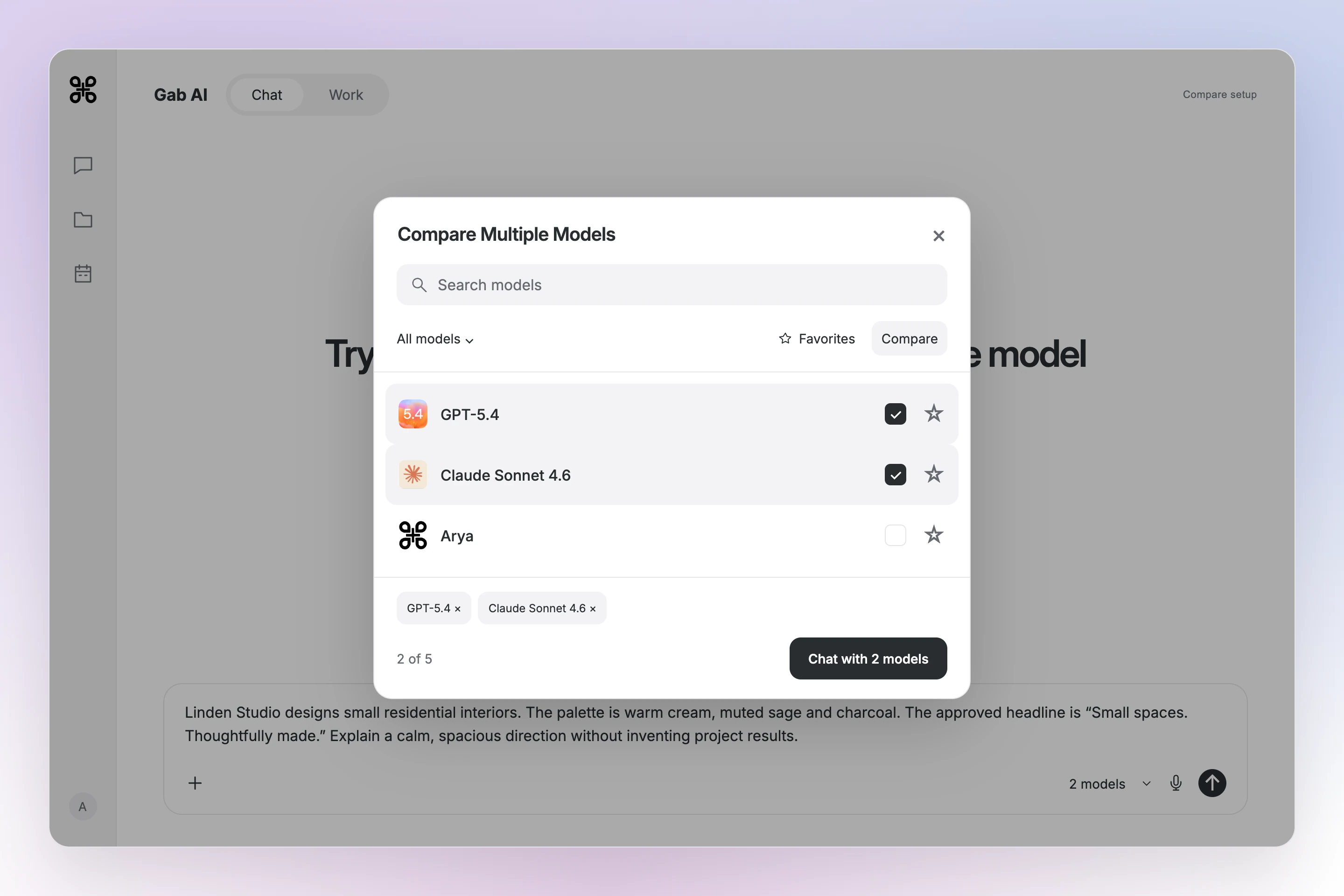
Try the same question with more than one model
Choose compatible models, compare their reasoning and decide which answer helps with your task.
In the model picker, turn on Compare and choose compatible models before sending the same prompt. Compare requires Plus; model access and credit use depend on the selection. Check facts and omissions rather than assuming a winner.
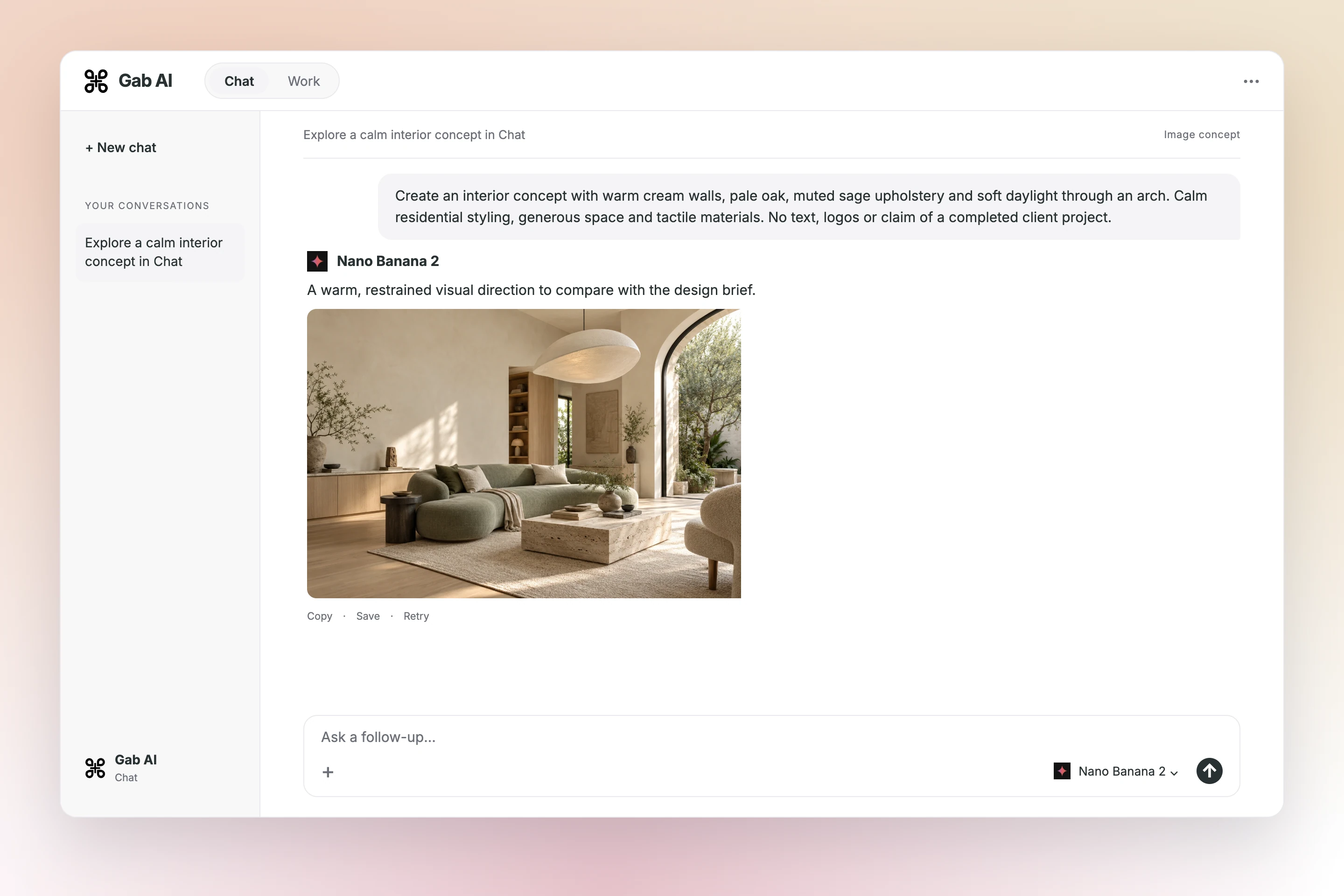
Explore a calm interior concept in Chat
Choose an image model in Chat, describe the result and refine the direction.
Linden Studio designs small residential interiors. Audience: homeowners planning a modest-space renovation. Explore a campaign poster and a short client-facing direction deck. Do not add prices, testimonials, project photographs, or performance claims.
Visual constraints
Use warm cream, muted sage and dark charcoal. Favor calm spacing, strong type hierarchy and architectural geometric shapes. A serif headline is welcome. Concepts are exploratory, not a final logo or cleared identity.
Approved concept copy
Studio name: Linden Studio. Concept 01 headline: Small spaces. Thoughtfully made. Concept 02 headline: Room for better living. Supporting line: Residential interiors. Keep the studio name visible and separate from the headline.
Build a visual direction presentation
Give a client or teammate a designed deck with the concept, visual reasoning, and decision to make.
Linden Studio designs small residential interiors. Audience: homeowners planning a modest-space renovation. Explore a campaign poster and a short client-facing direction deck. Do not add prices, testimonials, project photographs, or performance claims.
Visual constraints
Use warm cream, muted sage and dark charcoal. Favor calm spacing, strong type hierarchy and architectural geometric shapes. A serif headline is welcome. Concepts are exploratory, not a final logo or cleared identity.
Approved concept copy
Studio name: Linden Studio. Concept 01 headline: Small spaces. Thoughtfully made. Concept 02 headline: Room for better living. Supporting line: Residential interiors. Keep the studio name visible and separate from the headline.
Build a responsive design-review prototype
Turn the visual direction into a working page you can inspect on a phone, tablet or desktop.
Editorial calm uses the supplied Small spaces. Thoughtfully made. headline and arch forms. Architectural rhythm uses Room for better living. and angled planes. Both are exploratory design directions.
Linden-interface-requirements-20261022.txt
Linden-brand-brief-20261022.txt
A flow you can exercise
Switch direction with tabs or Arrow/Home/End keys. Follow actual page-section links. On a narrow screen, open the menu and close it with Escape to return focus. Selecting a direction records a review state, not approval.
Linden-interface-requirements-20261022.txt
Prototype, then review
The inline HTML preview includes its CSS, embedded interior concept imagery, controls and source excerpts. It makes no external requests and collects no visitor information. Publication and any booking/contact integrations are outside this brief.
Linden-interface-requirements-20261022.txt
A responsive page with two visual directions and source notes.
Read the prompt and inspect the full example
Turn this brief into a responsive page with working direction tabs and a mobile menu.
Linden Studio designs small residential interiors. Audience: homeowners planning a modest-space renovation. Explore a campaign poster and a short client-facing direction deck. Do not add prices, testimonials, project photographs, or performance claims.
Visual constraints
Use warm cream, muted sage and dark charcoal. Favor calm spacing, strong type hierarchy and architectural geometric shapes. A serif headline is welcome. Concepts are exploratory, not a final logo or cleared identity.
Approved concept copy
Studio name: Linden Studio. Concept 01 headline: Small spaces. Thoughtfully made. Concept 02 headline: Room for better living. Supporting line: Residential interiors. Keep the studio name visible and separate from the headline.
Linden-interface-requirements-20261022.txt
Visitor task
Create a responsive Linden Studio concept page for homeowners planning a modest-space renovation. Let a reviewer compare two approved visual directions and inspect the design brief. This is a design-review prototype, not a booking or lead-collection page.
Direction states
Default to Editorial calm: Concept 01, headline Small spaces. Thoughtfully made., with a serif heading and soft arch geometry. The second state is Architectural rhythm: Concept 02, headline Room for better living., with angled geometric planes. Both retain Linden Studio, Residential interiors and the supplied cream/sage/charcoal palette. Selection means a direction is being inspected, not client approval.
Interaction requirements
Provide two direction tabs with Arrow Left/Right and Home/End navigation, a visible selected state and a matching panel. Directions and Design brief links must navigate to actual sections. On narrow screens, a Menu button opens these links; Escape closes it and returns focus to the button. Keep controls at least 44 pixels high with visible keyboard focus.
Prototype color values
For this interface prototype, use warm cream #F4F0E8, muted sage #8CA28D and dark charcoal #27352E. These exact values are additional prototype requirements; the original campaign brief supplies color names only. Keep important text charcoal on cream; use sage for geometric artwork and decoration.
Delivery and review
Deliver Linden-interface-prototype.html as one self-contained file with inline CSS, embedded interior concept imagery and working JavaScript controls. Do not load external resources, submit forms, store visitor information, connect accounts, invent project photography, add prices/testimonials/performance claims, or publish the page. Before publication, the designer must check content and rights, keyboard and screen-reader behavior, contrast, responsive layouts and any additional integrations.
About these examples
Explore graphic design, presentations and interface ideas
Carry the same brief through visual concepts, a direction deck and a working interface.
Give the idea a visible form
Compare two visual directions
Actual compositions with a different rhythm and the same constraints.
Add the brief, approved copy and permitted visual references before sending.
Read all source material
Linden-brand-brief-20261022.txt
Audience and use
Linden Studio designs small residential interiors. Audience: homeowners planning a modest-space renovation. Explore a campaign poster and a short client-facing direction deck. Do not add prices, testimonials, project photographs, or performance claims.
Visual constraints
Use warm cream, muted sage and dark charcoal. Favor calm spacing, strong type hierarchy and architectural geometric shapes. A serif headline is welcome. Concepts are exploratory, not a final logo or cleared identity.
Approved concept copy
Studio name: Linden Studio. Concept 01 headline: Small spaces. Thoughtfully made. Concept 02 headline: Room for better living. Supporting line: Residential interiors. Keep the studio name visible and separate from the headline.
Linden-revision-note.txt
Revision scope
Refine Concept 01 by increasing the studio-name prominence and leaving more breathing room around the headline. Keep the warm cream, muted sage and dark charcoal palette. Preserve the headline exactly: Small spaces. Thoughtfully made. Do not introduce a new slogan or imagery.
Linden-interface-requirements-20261022.txt
Visitor task
Create a responsive Linden Studio concept page for homeowners planning a modest-space renovation. Let a reviewer compare two approved visual directions and inspect the design brief. This is a design-review prototype, not a booking or lead-collection page.
Direction states
Default to Editorial calm: Concept 01, headline Small spaces. Thoughtfully made., with a serif heading and soft arch geometry. The second state is Architectural rhythm: Concept 02, headline Room for better living., with angled geometric planes. Both retain Linden Studio, Residential interiors and the supplied cream/sage/charcoal palette. Selection means a direction is being inspected, not client approval.
Interaction requirements
Provide two direction tabs with Arrow Left/Right and Home/End navigation, a visible selected state and a matching panel. Directions and Design brief links must navigate to actual sections. On narrow screens, a Menu button opens these links; Escape closes it and returns focus to the button. Keep controls at least 44 pixels high with visible keyboard focus.
Prototype color values
For this interface prototype, use warm cream #F4F0E8, muted sage #8CA28D and dark charcoal #27352E. These exact values are additional prototype requirements; the original campaign brief supplies color names only. Keep important text charcoal on cream; use sage for geometric artwork and decoration.
Delivery and review
Deliver Linden-interface-prototype.html as one self-contained file with inline CSS, embedded interior concept imagery and working JavaScript controls. Do not load external resources, submit forms, store visitor information, connect accounts, invent project photography, add prices/testimonials/performance claims, or publish the page. Before publication, the designer must check content and rights, keyboard and screen-reader behavior, contrast, responsive layouts and any additional integrations.
Explore design directions
Show two campaign directions for Linden Studio. Preserve the brief’s palette and approved copy.
Refine design decisions against the brief
Compare the draft with a focused revision, keeping the source facts in view.
Try one focused revision
Suggested follow-up using the same source facts.
Focused follow-up
What change should I ask for?
Write a two-sentence reviewer summary. Preserve each direction name and its exact headline, and make their exploratory status clear.
Original excerpt
What does the existing example say?
Editorial calm uses the supplied Small spaces. Thoughtfully made. headline and arch forms. Architectural rhythm uses Room for better living. and angled planes. Both are exploratory design directions.
Suggested revision
What could that revision look like?
Editorial calm pairs arch forms with “Small spaces. Thoughtfully made.” Architectural rhythm pairs angled planes with “Room for better living.” Both are exploratory directions for review.
Trace the controls and delivery limits to the supplied interaction brief.
What can I actually try in this page?
Working controls Compare the two directions with tabs or Arrow/Home/End keys, follow the section links and open the menu on a narrow screen. Escape closes that menu and returns focus. These are supplied interaction requirements.
Does switching the tab approve the design?
Selection or approval? No. It changes which direction you are inspecting. The source explicitly separates a selected review state from client approval.
Is the prototype already a published business site?
Before publishing No. This is an offline HTML design-review prototype with no forms, booking or account connections. Publication and additional integrations require separate work and review.
Use Chat to question the source material and revise the response before preparing a file.
Deliverable: Response in Chat
What to provide
Creative brief, audience, brand assets and usage rights
Example prompt
Propose two visual directions for the supplied Linden Studio residential-interiors campaign brief. For each, describe composition, typography, color and imagery, explain its link to the audience, and identify production constraints. Preserve the supplied studio name, approved headlines and palette; do not add testimonials or copy a named artist’s work.
What to check
Check the brief
Verify production details
Designer review
Work
Create two visual directions from a brief
Explore two visible campaign compositions that retain the audience, palette, and approved copy.
Use Work to create the named artifact, inspect its sources, and request a focused revision.
Deliverable: Linden visual directions.html
What to provide
Linden-brand-brief-20261022.txt: A interior-design studio’s audience, visual direction, and approved concept copy.
Example prompt
Using Linden-brand-brief-20261022.txt, create Linden visual directions.html with two distinct campaign compositions. Keep the supplied studio name and approved headlines, cream/sage/charcoal palette, and architectural shapes. Show both directions with a short rationale. Do not invent testimonials, prices, client imagery or performance claims. Deliver a self-contained HTML artifact and identify typography, contrast and production checks for designer review.
What to check
Inspect hierarchy and contrast
Verify copy and rights
Check production requirements
Work
Build a visual direction presentation
Give a client or teammate a designed deck with the concept, visual reasoning, and decision to make.
Use Work to create the named artifact, inspect its sources, and request a focused revision.
Deliverable: Linden direction deck.pptx
What to provide
Linden-brand-brief-20261022.txt: A interior-design studio’s audience, visual direction, and approved concept copy.
Example prompt
Using Linden-brand-brief-20261022.txt, create Linden direction deck.pptx as an editable three-slide presentation: visual concept cover; palette and hierarchy rationale; comparison and next decision. Use the supplied copy and palette with real visual compositions, not text-only placeholders. Add short speaker notes and identify the review checks before production. Do not imply client approval. Deliver the editable presentation.
What to check
Inspect hierarchy and contrast
Verify copy and rights
Check production requirements
Work
Build a responsive design-review prototype
Turn the visual direction into a working page you can inspect on a phone, tablet or desktop.
Use Work to create and revise the self-contained HTML artifact before considering publication.
Deliverable: Linden-interface-prototype.html
What to provide
Linden-brand-brief-20261022.txt: approved audience, palette and concept copy
Linden-interface-requirements-20261022.txt: responsive controls and delivery boundaries
Example prompt
Using Linden-brand-brief-20261022.txt and Linden-interface-requirements-20261022.txt, create Linden-interface-prototype.html as a self-contained responsive landing-page prototype. Implement both approved direction states, keyboard-operable tabs, working section links and a narrow-screen menu with Escape and focus return. Preserve the studio name, exact headlines and palette. Use embedded interior concept imagery, clearly presented as design concepts rather than completed client projects. Include the brief and review boundaries. Do not add forms, external requests, storage, booking, pricing, testimonials or deployment. Deliver the HTML file and record the checks performed and any untested behavior.
What to check
Exercise both direction states and section links
Check keyboard controls, focus and responsive layouts
Review content, accessibility and rights before publication
More prompts
Work
Create a brand presentation deck
An editable presentation comparing three concept directions from the supplied brief and assets.
Use Work to create and revise Brand concept presentation.pptx alongside the conversation.
Deliverable: Brand concept presentation.pptx
What to provide
Creative brief, audience, brand assets and usage rights
Supplied layout, hierarchy requirements and delivery sizes
Example prompt
Create an editable presentation comparing three concept directions from the supplied brief and assets. Include rationale, typography hierarchy, asset references and production constraints. Label generated concepts, preserve client marks, and avoid inventing licensed assets or guaranteed print readiness. Deliver an editable artifact named "Brand concept presentation.pptx". If source material is missing, ask for it instead of filling factual gaps.
What to check
Check each concept against the approved creative brief
Verify asset rights, readability and brand consistency
Approve the direction before producing final design assets
Chat
Critique a layout against the brief
A layout critique prioritizing hierarchy, spacing, legibility and required-copy issues, with production checks still needed.
Use Chat to question the source material and revise the response before preparing a file.
Deliverable: Response in Chat
What to provide
Supplied layout, hierarchy requirements and delivery sizes
Example prompt
Critique the layout image I provide against this design brief. Discuss hierarchy, spacing, legibility and required information, then suggest prioritized revisions. Flag accessibility or print details needing verification and do not claim the image is production-ready.
What to check
Check the brief
Verify production details
Designer review
Chat
Write a design presentation rationale
A client rationale connecting type, color and composition to approved goals without inventing audience-response claims.
Use Chat to question the source material and revise the response before preparing a file.
Deliverable: Response in Chat
What to provide
Approved concept rationale and client decision questions
Example prompt
Write a client presentation rationale from these design notes. Explain composition, type, color and imagery in relation to the approved brief. Distinguish intentional choices from options under review and avoid unsupported claims about conversion or audience response.
What to check
Check the brief
Verify production details
Designer review
Chat
Check a design brief's deliverables
A design-brief comparison listing conflicting required copy, dimensions, brand rules and delivery formats for client clarification.
Use Chat to question the source material and revise the response before preparing a file.
Deliverable: Response in Chat
What to provide
The draft Graphic design brief and delivery list.pdf and the source it should match
Example prompt
Compare this event-poster brief with the supplied delivery list and brand guidance. Check required text, dimensions, color specifications, logo rules and file formats. Flag conflicting requirements and missing production details, then draft client clarification questions. Do not invent audience research, approve image rights or describe a concept as press-ready without production checks.
What to check
Check the brief
Verify production details
Designer review
Chat
Generate a logo concept
Four exploratory logo directions for a coffee brief, with small-size and one-color refinement questions.
Use Chat to question the source material and revise the response before preparing a file.
Deliverable: Image concepts in Chat
What to provide
Ember & Oak logo brief and one-color label requirements
Example prompt
Explore four logo directions for a specialty coffee roaster called Ember & Oak. The brief calls for a simple mark usable on a one-color bag label, readable at small sizes, with separate wordmark and symbol options. Show the directions on a plain background and explain what needs refinement before final artwork.
What to check
Check the brief
Verify production details
Designer review
Chat
Create a hero illustration
A landing-page illustration concept with the specified team scene, palette and space for approved headline copy.
Use Chat to question the source material and revise the response before preparing a file.
Deliverable: Image concepts in Chat
What to provide
Collaboration illustration brief, page composition and palette
Example prompt
Create a concept illustration for a team-collaboration software landing page. Show three colleagues reviewing a shared project board, use purple and teal accents, and leave the left third open for headline text. Keep interface details abstract and avoid logos or text that could be mistaken for a finished product screen.
What to check
Check the brief
Verify production details
Designer review
Chat
Design social media graphics
Three social-graphic concepts using approved campaign copy, supplied product images and required disclaimer space.
Use Chat to question the source material and revise the response before preparing a file.
Deliverable: Image concepts in Chat
What to provide
Approved campaign brief, product images, palette and exact offer text
Example prompt
Develop three matching social graphic concepts from the approved skincare campaign brief I provide. Use the supplied palette, product images and confirmed offer text, with room for required disclaimers. Keep dates and price claims exactly as supplied and identify text that must be checked in the final layout.
What to check
Check the brief
Verify production details
Designer review
Chat
Explore event poster layouts
Three book-festival poster directions with required copy, date hierarchy and sponsor-space decisions.
Use Chat to question the source material and revise the response before preparing a file.
Deliverable: Image concepts in Chat
What to provide
book festival copy, two-color palette and poster dimensions
Example prompt
Develop three event-poster layout directions for a local book festival. Required copy: Book Weekend, October 17-18, Community Library, and Free entry. Use a limited two-color palette, make the date readable at a distance, and leave space for a sponsor strip. Explain type hierarchy and production questions.
What to check
Check the brief
Verify production details
Designer review
Chat
Edit an existing image
An image revision concept with the specified background and compositions, plus product and text details to inspect.
Use Chat to question the source material and revise the response before preparing a file.
Deliverable: Image concepts in Chat
What to provide
Authorized graphic, approved copy and required social formats
Example prompt
Revise this supplied graphic with a deep navy background and clearer separation between the product and background. Preserve the product shape, logo and approved copy. Propose square-post and vertical-story compositions, flag text that needs resetting in design software, and describe any elements that changed unintentionally.
What to check
Check the brief
Verify production details
Designer review
Chat
Remove and replace a background
A studio-background concept retaining the product details, with edge and packaging-text checks for the designer.
Use Chat to question the source material and revise the response before preparing a file.
Deliverable: Image concepts in Chat
What to provide
Authorized product photo and background editing directions
Example prompt
Create a studio-background concept from this authorized product photo with a soft gradient and subtle reflection. Preserve the product shape, packaging text, logo and visible finish. Flag edge or detail changes for designer review and avoid adding features or claims to the product image.
What to check
Check the brief
Verify production details
Designer review
Chat
Build a color palette
A six-color palette proposal with color roles and text-background pairs whose contrast needs verification.
Use Chat to question the source material and revise the response before preparing a file.
Deliverable: Response in Chat
What to provide
wellness brand direction and intended text/background roles
Example prompt
Propose a six-color palette for a wellness brand with neutral backgrounds, one primary accent and one secondary accent. Give hex values and roles, then suggest text-background pairs and state which contrast checks I should run. Avoid claiming accessibility based only on how the palette looks.
What to check
Check the brief
Verify production details
Designer review
Chat
Generate variations of a concept
Four poster variations preserving required copy and logo placement, with hierarchy differences to compare.
Use Chat to question the source material and revise the response before preparing a file.
Deliverable: Image concepts in Chat
What to provide
Poster concept, required copy, logo placement and brand rules
Example prompt
Develop four variations of this poster concept while preserving required copy and logo placement. Vary the color treatment and typography direction within the supplied brand rules. Explain which hierarchy decisions change and identify any copy, accessibility or print details requiring designer review.
What to check
Check the brief
Verify production details
Designer review
Chat
Create a brand style guide
A style-guide draft based on supplied assets, with logo, color, type and production questions made explicit.
Use Chat to question the source material and revise the response before preparing a file.
Deliverable: Response in Chat
What to provide
Provided logo, palette, font choices and asset licensing details
Example prompt
Draft a one-page style-guide structure for a boutique bakery from the logo, palette and font choices I provide. Cover logo spacing, color roles, type hierarchy, image direction and tone examples. Mark missing assets and licensing or production questions rather than treating suggestions as approved brand rules.
What to check
Check the brief
Verify production details
Designer review
Chat
Design a pitch deck look
A presentation visual-system proposal with layout, type and chart conventions that preserve the supplied data.
Use Chat to question the source material and revise the response before preparing a file.
Deliverable: Response in Chat
What to provide
Brand rules, real chart samples and investor deck content
Example prompt
Propose a visual system for a ten-slide investor presentation using the brand rules and real chart samples I provide. Define a layout grid, type hierarchy, color roles and chart-label conventions. Show how to keep figures readable and consistent without changing data, exaggerating trends or adding unsupported claims.
What to check
Check the brief
Verify production details
Designer review
Chat
Mock up packaging
Three-flavor packaging concepts with a shared label grid, copy placeholders and print-production checks.
Use Chat to question the source material and revise the response before preparing a file.
Deliverable: Image concepts in Chat
What to provide
tea range brief, approved label copy and packaging constraints
Example prompt
Explore packaging concepts for a herbal-tea range with three flavors. Use a shared label grid and a distinct accent color per flavor on a kraft-paper concept. Leave placeholders for approved ingredient and regulatory copy, and identify dieline, print and legibility checks needed before producing final artwork.
What to check
Check the brief
Verify production details
Designer review
Chat
Write a creative brief
A creative brief separating confirmed client requirements from preferences and outstanding clarification questions.
Use Chat to question the source material and revise the response before preparing a file.
Deliverable: Response in Chat
What to provide
Client notes, deliverables, dimensions and approval requirements
Example prompt
Turn these client notes into a creative brief with objective, audience, required message, deliverables, dimensions, brand constraints and approval steps. Separate confirmed requirements from exploratory preferences and list clarification questions. Do not invent audience research, production specifications or agreed success measures.
What to check
Check the brief
Verify production details
Designer review
Work
Turn feedback into a precise revision brief
Keep the requested hierarchy changes separate from changes the client did not ask for.
Use Work to create the named artifact, inspect its sources, and request a focused revision.
Deliverable: Linden revision brief.docx
What to provide
Linden-brand-brief-20261022.txt: A interior-design studio’s audience, visual direction, and approved concept copy.
Linden-revision-note.txt: One deliberate change, with the original palette and copy preserved.
Example prompt
Using Linden-brand-brief-20261022.txt and Linden-revision-note.txt, create Linden revision brief.docx. Specify the two requested hierarchy changes to Concept 01, list the copy and palette to preserve, and provide acceptance checks at the intended poster size. Do not invent a new slogan, change the audience or add imagery. Deliver an editable document suitable for the designer’s next revision.
What to check
Inspect hierarchy and contrast
Verify copy and rights
Check production requirements
Work
Build a testable interface prototype
A standalone HTML prototype of the supplied flow with working state transitions, labeled controls, keyboard navigation and sample data.
Use Work to create and revise Interface prototype.html alongside the conversation.
Deliverable: Interface prototype.html
What to provide
User task, flow, states and accessibility requirements
Supplied screens, layout constraints and review criteria
Example prompt
Create a standalone HTML prototype of the supplied flow with working state transitions, labeled controls, keyboard navigation and sample data. Test the stated interactions where supported and record untested behavior; do not connect production accounts or claim production readiness. Deliver an editable artifact named "Interface prototype.html". If source material is missing, ask for it instead of filling factual gaps.
What to check
Exercise every documented state and transition
Check labels, keyboard navigation and focus behavior
Explore concepts from a creative brief, explain the visual choices in a presentation and build an HTML prototype to test interface states. Include audience, approved copy, brand constraints and the interactions you need to inspect.
Can Gab AI check a design brief's deliverables?
Check that required copy, sizes, brand rules and delivery formats agree across the brief and production list before developing concepts.
Can I try a responsive page before publishing it?
Yes. The interface example is a self-contained HTML prototype with working direction tabs, section links and a narrow-screen menu. It demonstrates design-review behavior; it has no booking, forms or live business integrations.
Can I publish a website through Gab AI?
Gab AI supports creating and publishing Sites. Preview the result, review content, rights, accessibility and integrations, then choose Publish yourself. A published site is public. This remains a local HTML prototype.
What needs my professional review?
Check brand accuracy, accessibility, production specifications and rights to images, fonts and references. AI concepts and feedback need designer judgment and do not establish copyright clearance.
What is a practical first prompt?
Try the layout-critique example with a design image and approved brief; review hierarchy, legibility and print requirements before accepting revisions.
How can I explore several visual directions for a brief?
Use the same audience, required copy, dimensions and brand rules for each direction. Ask for different composition, typography or imagery choices and compare their rationale. Select and refine the direction using your own design judgment.
Can Gab AI help explore logo concepts?
Yes. Specify the business, audience, intended uses and visual constraints. Use generated directions for discussion and refinement, then prepare final artwork in your design tools and check distinctiveness, licensing, small-size legibility and production requirements.
Can I request changes to a supplied graphic?
Describe the element to change and the elements to preserve, such as required copy, logo placement and product shape. Review the result for unintended changes. Recheck text, brand colors and production details before including it in a deliverable.
Are generated concepts ready to send to a printer?
Treat them as concept material until you have checked dimensions, bleed, resolution, color requirements, typography and asset rights. Prepare and inspect the final production files using your normal design workflow and the printer's specifications.
Can I build an editable brand concept presentation?
Use the "Create a brand presentation deck" Work example with the listed source material. Inspect the delivered file and its source references before using it. Opening the draft does not start the task.
How can I adapt these design examples to my own brief?
Bring the audience, approved copy, visual references and constraints. Compare the concept directions, inspect the presentation and try the interface prototype. Use your own materials to develop a new draft, then review the visuals and interactions before client or production use.
Which parts of the page prototype need real integration?
Use the preview to review layout, content hierarchy and controls. A concept does not establish a working booking system, contact delivery, analytics or a published site. Specify and verify those integrations separately before launch; generated artwork and interface ideas also need design and rights review.
Can I start in Chat, or do I need Work?
Use Chat for questions and text drafts. Choose Work when you want a project with tools and editable files. Work requires Plus and uses credits; see Pricing for plans and allowances. Opening a draft does not send it or attach the example files.