
10 min reading · Practice at your pace
How to make a presentation with AI and revise it
Turn a source brief into four slides, check the figures and notes, then revise two slides while keeping the rest.
Enlarge preview
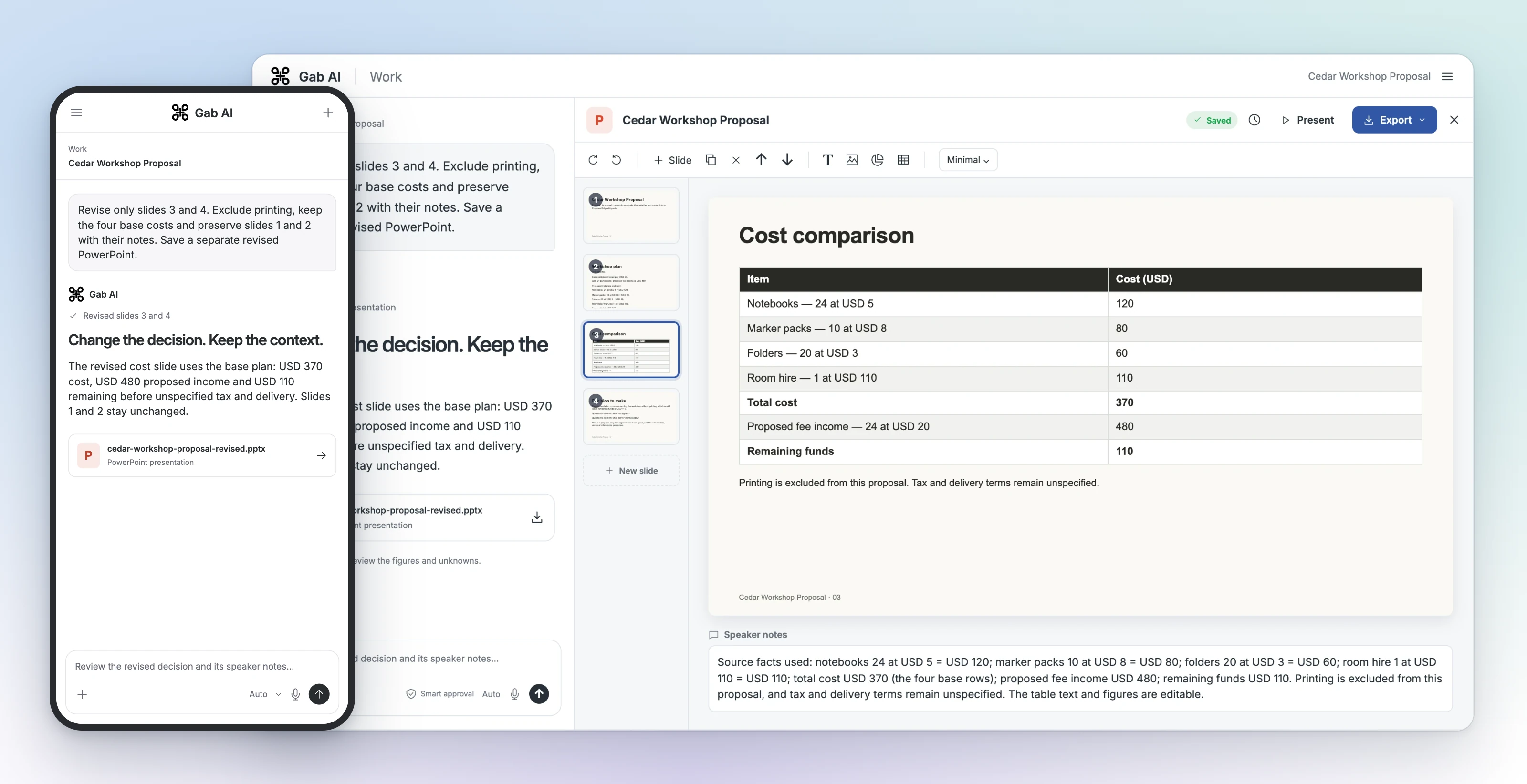
The revised cost slide
Give the deck a clear audience and decision
This community workshop proposal asks whether to run the event and include printing. Follow its source, slides and revision, then use the complete practice brief below or replace the facts with your own.
Start with facts you can check
The brief separates base costs, optional printing and proposed income. Tax, delivery, date and venue remain unspecified. Keep those unknowns visible when comparing the slides with the source.
Source facts
| Item | Details |
|---|---|
| Audience | A small community group deciding whether to run a workshop. |
| Participants and fee | 24 proposed participants × USD 20 = USD 480 proposed income. |
| Notebooks | 24 × USD 5 = USD 120. |
| Marker packs | 10 × USD 8 = USD 80. |
| Folders | 20 × USD 3 = USD 60. |
| Room hire | 1 × USD 110 = USD 110. |
| Base and optional costs | USD 370 base; optional printing USD 25; USD 395 with printing. |
| Remaining funds | USD 110 without printing; USD 85 with printing, before unspecified tax and delivery. |
| Unknowns | Tax, delivery, date, venue and attendance guarantee remain unspecified. The proposal is not approved. |
Turn notes into presentation slides
Specify the audience, decision, slide count and facts to preserve. Ask Work for an editable presentation with speaker notes. The workshop brief below shows the source facts and slide instructions.
Create a real editable four-slide presentation in Gab Work from ONLY the source below. Do not use personal memories, outside research, invented facts, photos or decorative images. The workshop is a proposal awaiting approval. Title: Cedar Workshop Proposal. Audience: a small community group deciding whether to run a workshop. Use a plain readable presentation. Make the text and cost table editable. Include short speaker notes identifying which source facts each slide uses. Return the finished presentation artifact, not just a written outline.
SOURCE
The proposed workshop has 24 participants. Each participant would pay USD 20, so proposed fee income is USD 480. Costs: notebooks, 24 at USD 5 = USD 120; marker packs, 10 at USD 8 = USD 80; folders, 20 at USD 3 = USD 60; room hire, 1 at USD 110 = USD 110. Base subtotal is USD 370. An optional printing package costs USD 25. Total with printing is USD 395. Remaining funds are USD 110 without printing or USD 85 with printing. Tax and delivery terms are unspecified. No date, venue, attendance guarantee or approved budget exists.
SLIDE OUTLINE
1. Cedar Workshop Proposal: audience, proposed 24 participants, and clear proposal status.
2. Workshop plan: explain the fee and materials using only the source.
3. Cost comparison: editable table with the four base rows, subtotal USD 370, optional printing USD 25, totals USD 370 / USD 395, fee income USD 480, remaining funds USD 110 / USD 85. State that tax and delivery remain unspecified.
4. Decision to make: whether to run the workshop and whether to include optional printing. Explicitly call the plan a proposal. Do not claim approval.
Keep exactly four slides including the title slide. Preserve USD units and all source numbers. Do not imply tax or delivery is zero. Do not add a public download link or share the deck publicly.Read the four original slides
The actual PowerPoint contains native text, a cost table and speaker notes. Read each slide below and open its notes to see how it uses the supplied source.
Slide 1: Cedar Workshop Proposal
Cedar Workshop Proposal
Prepared for a small community group deciding whether to run a workshop. Proposed 24 participants.
Speaker notes — original slide 1
Source facts used: the proposed workshop has 24 participants; the audience is a small community group deciding whether to run a workshop; the workshop is a proposal awaiting approval. No date, venue, attendance guarantee or approved budget exists.
Slide 2: Workshop plan
Workshop plan
Cedar Workshop Proposal · example · 02
Proposed fee
Each participant would pay USD 20.
With 24 participants, proposed fee income is USD 480.
Proposed materials and room
Notebooks: 24 at USD 5 = USD 120.
Marker packs: 10 at USD 8 = USD 80.
Folders: 20 at USD 3 = USD 60.
Room hire: 1 at USD 110 = USD 110.
Base subtotal: USD 370.
Speaker notes — original slide 2
Source facts used: 24 participants at USD 20 each, so proposed fee income is USD 480; notebooks 24 at USD 5 = USD 120; marker packs 10 at USD 8 = USD 80; folders 20 at USD 3 = USD 60; room hire 1 at USD 110 = USD 110; base subtotal USD 370.
Slide 3: Cost comparison
Cost comparison
Cedar Workshop Proposal · example · 03
Tax and delivery terms remain unspecified.
Actual original slide 3 table
| Item | Details |
|---|---|
| Notebooks — 24 at USD 5 | Without printing (USD): 120; With printing (USD): 120 |
| Marker packs — 10 at USD 8 | Without printing (USD): 80; With printing (USD): 80 |
| Folders — 20 at USD 3 | Without printing (USD): 60; With printing (USD): 60 |
| Room hire — 1 at USD 110 | Without printing (USD): 110; With printing (USD): 110 |
| Base subtotal | Without printing (USD): 370; With printing (USD): 370 |
| Optional printing package | Without printing (USD): Not included; With printing (USD): 25 |
| Total cost | Without printing (USD): 370; With printing (USD): 395 |
| Proposed fee income — 24 at USD 20 | Without printing (USD): 480; With printing (USD): 480 |
| Remaining funds | Without printing (USD): 110; With printing (USD): 85 |
Speaker notes — original slide 3
Source facts used: notebooks 24 at USD 5 = USD 120; marker packs 10 at USD 8 = USD 80; folders 20 at USD 3 = USD 60; room hire 1 at USD 110 = USD 110; base subtotal USD 370; optional printing package USD 25; total with printing USD 395; proposed fee income USD 480; remaining funds USD 110 without printing or USD 85 with printing; tax and delivery terms are unspecified. The table text and figures are editable.
Slide 4: Decision to make
Decision to make
Cedar Workshop Proposal · example · 04
This plan is a proposal, not an approved plan.
Whether to run the workshop.
Whether to include the optional printing package at USD 25.
Remaining funds would be USD 110 without printing or USD 85 with printing.
No approval has been given, and no date, venue or attendance guarantee exists.
Speaker notes — original slide 4
Source facts used: the two decisions are whether to run the workshop and whether to include the optional printing package at USD 25; remaining funds are USD 110 without printing or USD 85 with printing. The plan is described only as a proposal; no approval has been given, and no date, venue, attendance guarantee or approved budget exists.
Check the costs, income and unknowns
Base costs are USD 120 + 80 + 60 + 110 = USD 370. Printing adds USD 25, making USD 395. Proposed fee income is 24 × USD 20 = USD 480, leaving USD 110 without printing or USD 85 with printing, before unspecified tax and delivery. Check labels and notes as well as the arithmetic.
Change two slides and preserve the rest
The actual follow-up removes printing from slide 3 and makes slide 4 a proposal without printing, with tax and delivery questions. It asks for a separate revised file and preservation of slides 1 and 2 and their notes.
Revise the existing Cedar Workshop Proposal deck, changing only slides 3 and 4. Save a separate finished editable file named cedar-workshop-proposal-revised.pptx so the original remains available. On slide 3 remove the with-printing scenario and optional-printing row. Keep the four base cost rows, total cost USD 370, proposed fee income USD 480 and remaining funds USD 110. Label printing as excluded from this proposal in a short note. Keep tax and delivery unspecified. On slide 4 give a concise recommendation to consider the workshop without printing, followed by two questions to confirm: what tax applies, and what delivery terms apply? Keep it explicitly a proposal with no approval, date, venue or attendance guarantee. Preserve slides 1 and 2 exactly, retain four slides total, and update source-based speaker notes only on the changed slides. Do not introduce new facts, decorative images, personal memories or outside research. Return the real revised editable presentation artifact. Do not share it publicly or add public sample download links.Compare the revised slides
The revised file keeps four slides. Slides 1 and 2 and their notes are unchanged; slides 3 and 4 use the base plan and retain the unknown tax and delivery terms. Read the complete changed slides below.
Enlarge image
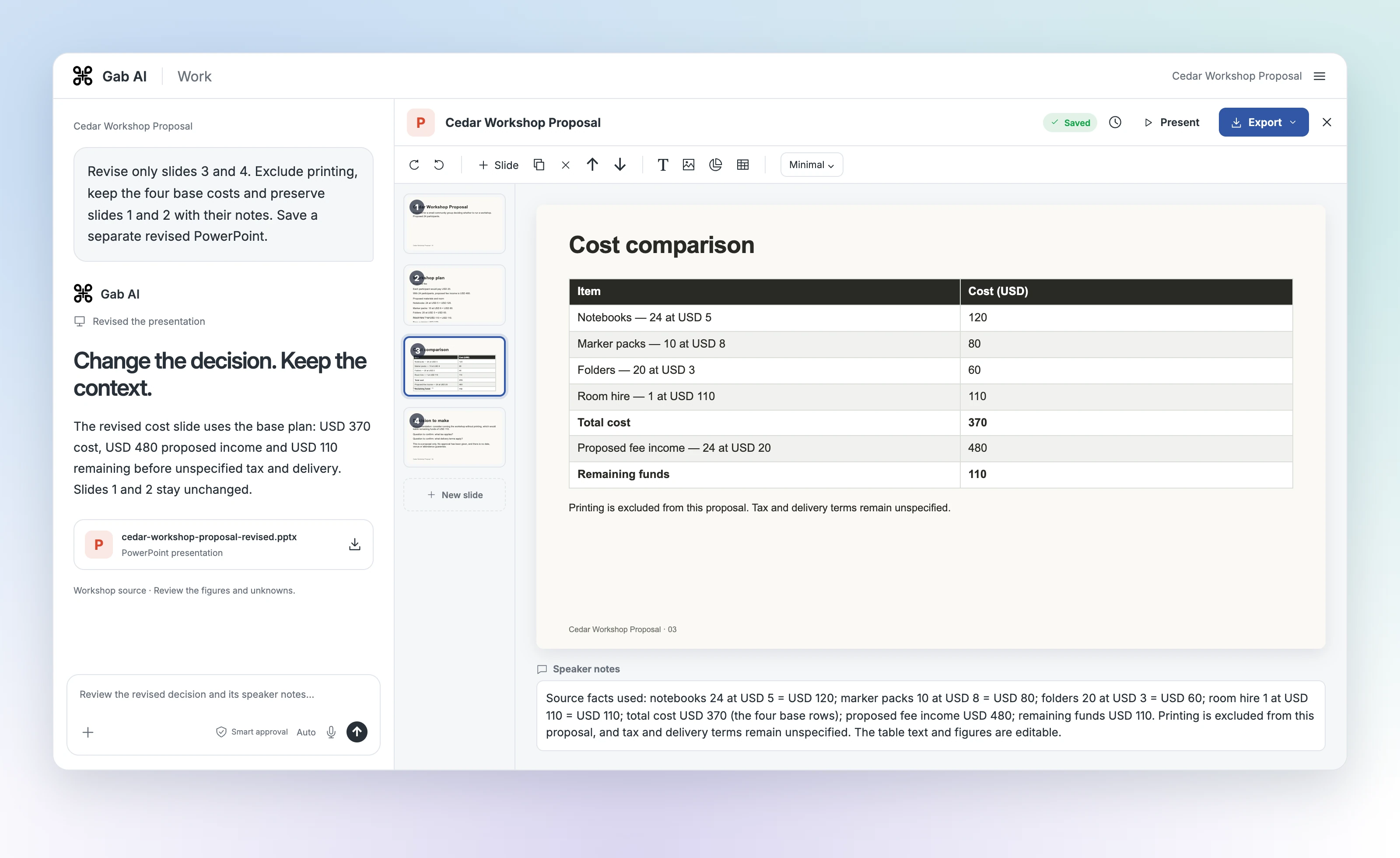
The revised base plan
The actual revised cost slide: printing excluded, USD 370 base cost and USD 110 remaining before unspecified tax and delivery.
Slide 3: Cost comparison
Cost comparison
Cedar Workshop Proposal · example · 03
Printing is excluded from this proposal. Tax and delivery terms remain unspecified.
Actual revised slide 3 table
| Item | Details |
|---|---|
| Notebooks — 24 at USD 5 | Cost (USD): 120 |
| Marker packs — 10 at USD 8 | Cost (USD): 80 |
| Folders — 20 at USD 3 | Cost (USD): 60 |
| Room hire — 1 at USD 110 | Cost (USD): 110 |
| Total cost | Cost (USD): 370 |
| Proposed fee income — 24 at USD 20 | Cost (USD): 480 |
| Remaining funds | Cost (USD): 110 |
Speaker notes — revised slide 3
Source facts used: notebooks 24 at USD 5 = USD 120; marker packs 10 at USD 8 = USD 80; folders 20 at USD 3 = USD 60; room hire 1 at USD 110 = USD 110; total cost USD 370 (the four base rows); proposed fee income USD 480; remaining funds USD 110. Printing is excluded from this proposal, and tax and delivery terms remain unspecified. The table text and figures are editable.
Slide 4: Decision to make
Decision to make
Cedar Workshop Proposal · example · 04
Recommendation: consider running the workshop without printing, which would leave remaining funds of USD 110.
Question to confirm: what tax applies?
Question to confirm: what delivery terms apply?
This is a proposal only. No approval has been given, and there is no date, venue or attendance guarantee.
Speaker notes — revised slide 4
Source facts used: remaining funds would be USD 110 without printing, which supports the recommendation to consider the workshop without printing; tax and delivery terms are unspecified, so the two questions to confirm are what tax applies and what delivery terms apply. The plan is described only as a proposal; no approval has been given, and no date, venue, attendance guarantee or approved budget exists.
Continue with an editable copy
Open the PPTX and choose Edit a copy of this presentation when offered. Review the imported slides, edit the text or table cells and use Speaker notes for presenter guidance. Keep the original file and check the copy after saving and reopening it.
Review the version you will present
Walk through every slide and its notes. When you need an editable file, use Export → PowerPoint .pptx, confirm it arrives and open the exported file to check it before sharing. See Docs for available formats, saving and recovery.
Your turn
Make a workshop proposal your group can review.
Use the complete source below or replace it with your own checked notes. Create four slides with a cost table and speaker notes. Check the deck, then use the full follow-up below to remove printing from two slides while preserving the others.
Write a draft and review the checklist.
Your draft saves in this browser. You can leave and come back.
Take your brief into Work
Copy your brief, open Gab AI and choose Work before pasting and sending it. Opening Gab AI does not carry over or submit the draft. Work requires Plus and uses applicable credits; see the presentation guide for details.
Open Gab AI for WorkPresentation controls and accessRemove printing while preserving the rest
After checking the finished deck, send this follow-up in the same Work task. Keep the original and compare the separate revised presentation, including the unchanged slides and notes.
Revise only slides 3 and 4. Remove optional printing and the with-printing scenario. Keep the four base cost rows, total cost USD 370, proposed income USD 480 and remaining funds USD 110. State that printing is excluded and tax and delivery remain unspecified. On slide 4, recommend considering the workshop without printing and ask what tax and delivery terms apply. Keep it a proposal with no approval, date, venue or attendance guarantee. Preserve slides 1 and 2 and their speaker notes, keep four slides total, and update notes only on the changed slides. Deliver a separate revised presentation so I can compare both versions.If you replaced the workshop source, update the slide numbers, figures and change request to match your own deck before sending.