AI for agencies: pitches, approvals and client handoffs.
Build a client creative pitch deck, organize a production handoff and prepare a clear approval workflow. Compare directions and explain scope changes before promising the next deliverable.
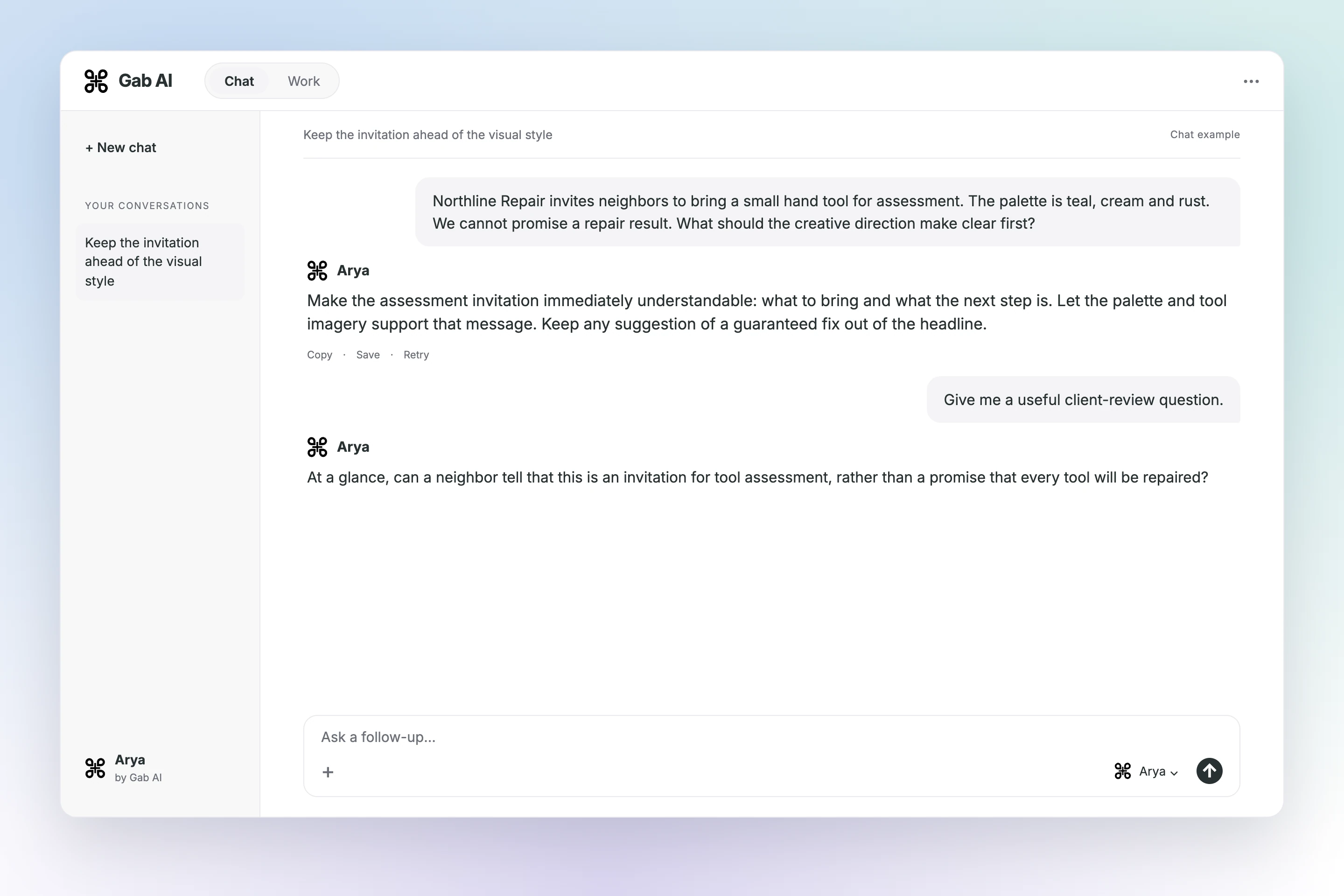
Make the assessment invitation immediately understandable: what to bring and what the next step is. Let the palette and tool imagery support that message. Keep any suggestion of a guaranteed fix out of the headline.
Your follow-up
Give me a useful client-review question.
Arya
At a glance, can a neighbor tell that this is an invitation for tool assessment, rather than a promise that every tool will be repaired?
Clarify a 15-second video request before estimating
We can review the social video as additional scope.
We can review the social video as additional scope. Could you confirm the platform and format, available footage, music permissions and caption needs? We will use those inputs to prepare an estimate and timing for approval.
Your follow-up
Keep the reply shorter.
Arya
Happy to scope the video separately. Please confirm format, footage, music rights and captions so we can estimate the work before adding it to the agreed deliverables.
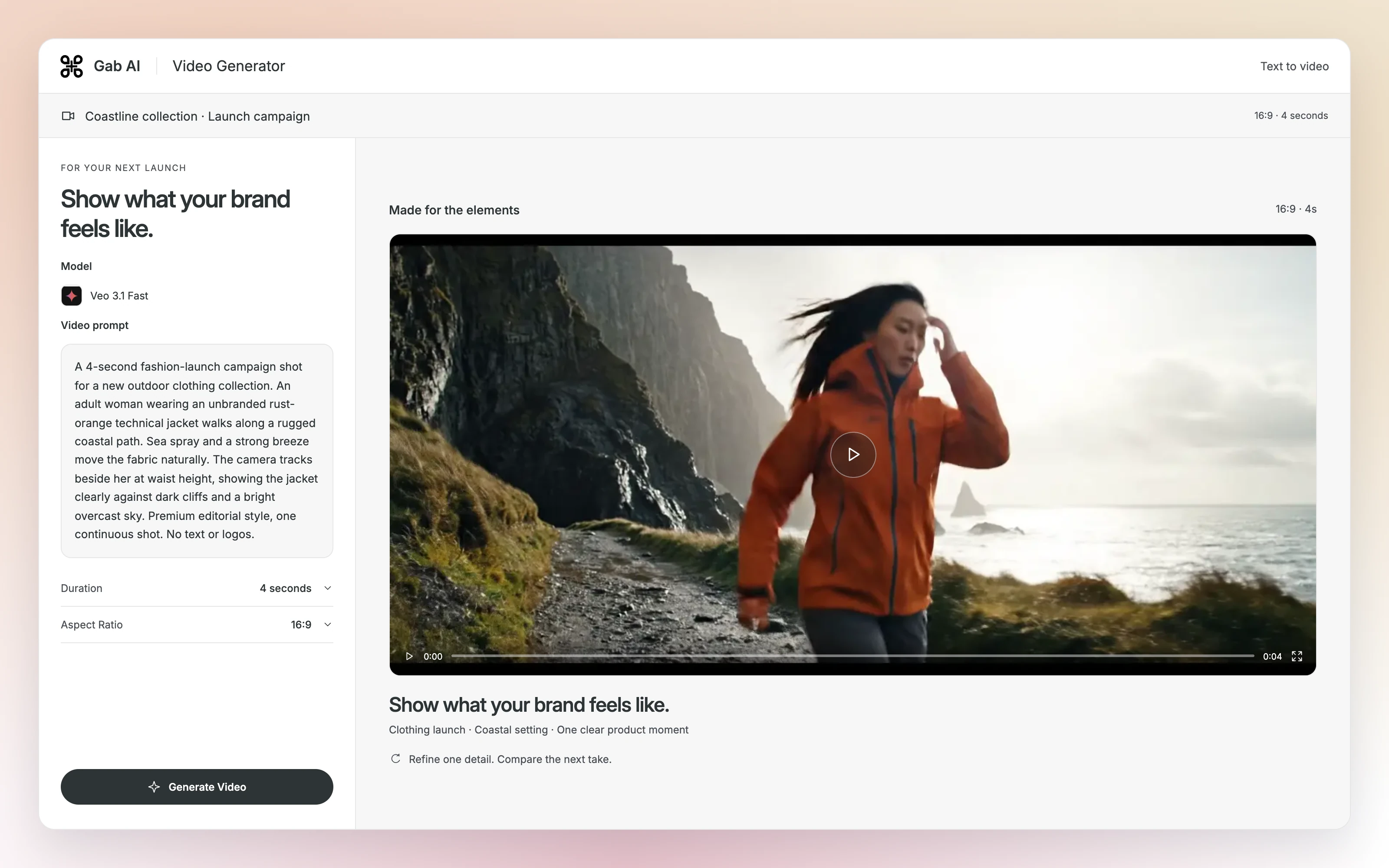
Bring another campaign direction into motion
Describe one subject, one action and one camera direction. Watch the returned clip before refining it.
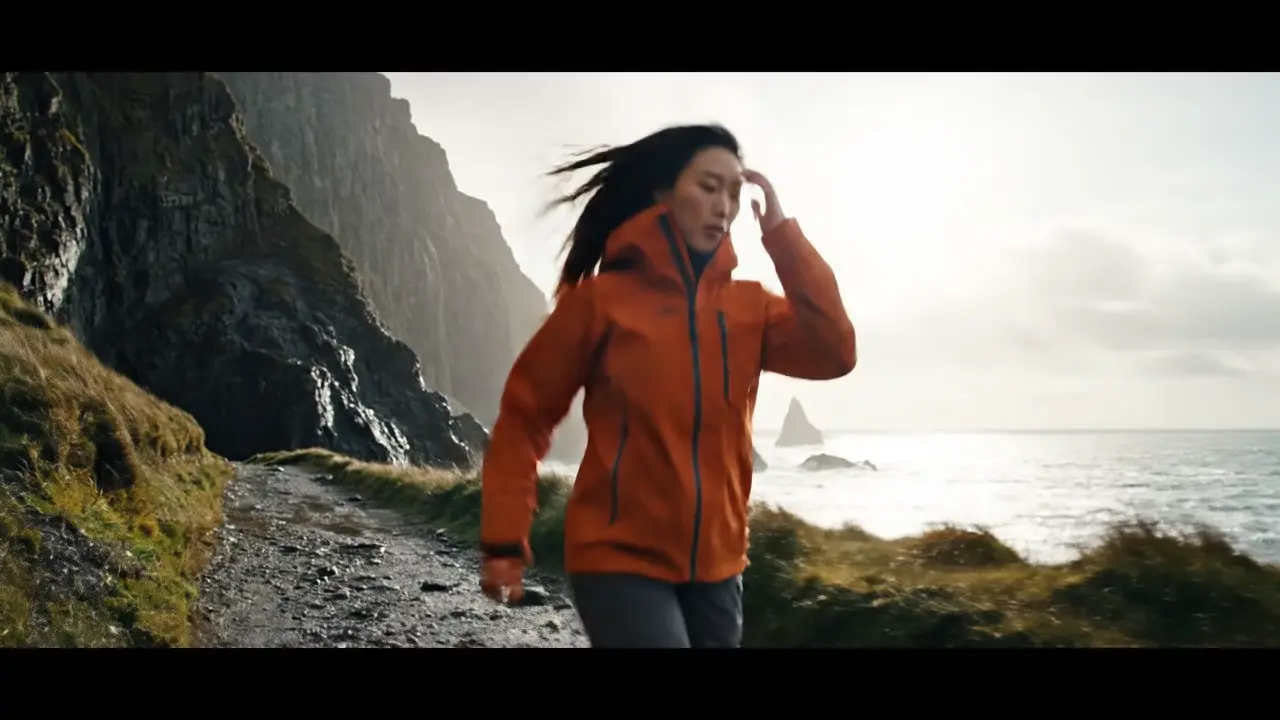
Coastline collection · Launch campaignReady to play.
Ready to try it yourself?
Read and use the promptPrompt
Text
1A 4-second fashion-launch campaign shot for a new outdoor clothing collection. An adult woman wearing an unbranded rust-orange technical jacket walks along a rugged coastal path. Sea spray and a strong breeze move the fabric naturally. The camera tracks beside her at waist height, showing the jacket clearly against dark cliffs and a bright overcast sky. Premium editorial style, one continuous shot. No text or logos.
Choose an available video model and check its duration, frame shape and estimate before generating.
Build visual directions and a client delivery plan
Create a visual pitch, connect deliverables to their production requirements and keep client changes tied to explicit approvals.
Turn the client brief into visual directions
Compare two original concepts in a finished pitch, then inspect the decisions still needed.
Invite local residents to bring a small hand tool for assessment. Keep the date, venue and registration link unresolved. No attendance target, testimonial or repair guarantee is supported.
Northline-repair-client-brief-20261022.txt
02 · Direction A: Tool notes
Proposed tool-concept imagery, deep teal field and warm cream type. The repair-assessment invitation leads; supporting notes make the practical process visible.
Northline-repair-client-brief-20261022.txt
03 · Direction B: Make room for repair
Proposed warm editorial layout with three steps: bring a tool, discuss its condition, decide the next step. A restrained rust accent marks the invitation. This is a creative proposal, not proof of repair outcomes.
Northline-repair-client-brief-20261022.txt
04 · Before production
Ask the client to select A or B and confirm date, venue, registration link and copy. Plan the poster, website hero and email header from their specifications. Rights review, cost, schedule and release approval remain open.
Northline-repair-client-brief-20261022.txt
Northline-repair-deliverable-specs.csv
Compare two creative directions, then review the client decisions before production.
Read the prompt and inspect the full example
Compare two original concepts in a finished pitch, then inspect the decisions still needed.
Northline Repair is a neighborhood tool-repair program. The client wants a clear invitation for local residents to bring a small hand tool for assessment. The program name is supplied; attendance, customer testimonials, guaranteed repair outcomes and campaign performance are not supplied.
Approved visual constraints
Use deep teal, warm cream and a restrained rust accent. Keep the invitation clear and practical. Use original tool-concept imagery or typography. No client logo, location photographs, licensed reference assets or rights approvals are supplied.
Requested deliverables
Propose two creative directions for client review, then plan an A3 poster, a 1600-by-900 website hero and a 600-pixel-wide email header. The client has not selected a direction. Date, venue, registration link, production budget and release approval are unknown. Video is outside this base scope.
New client request
The client asks to add a 15-second social video to the base deliverables. The creative lead has not estimated it. Footage, music permissions, format, caption requirements, cost and delivery date are not supplied. No change approval is recorded.
Northline-repair-deliverable-specs.csv
Supplied formats
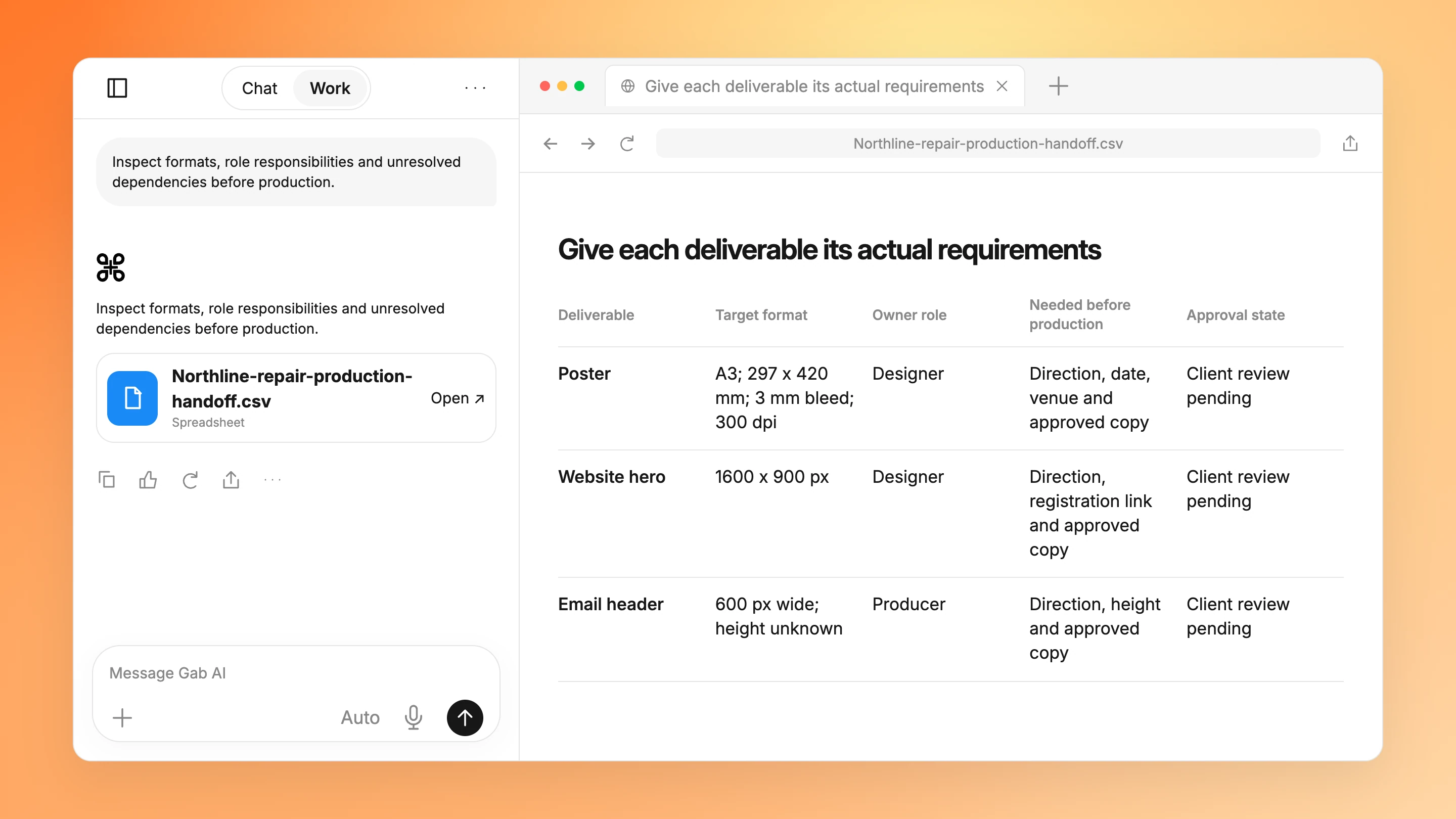
Poster: A3, 297 by 420 mm, with 3 mm bleed and 300 dpi production requirement. Website hero: 1600 by 900 pixels. Email header: 600 pixels wide; height is not supplied. These are target specifications, not files already delivered.
Supplied responsibility roles
Designer prepares the poster and website hero. Producer prepares the email-header handoff. Account lead coordinates consolidated client feedback and obtains the selected direction, final copy and release decision. These are role assignments, not named people or confirmed availability.
Dependencies before production
All three deliverables depend on a client-selected direction, confirmed date and venue, final registration link and approved copy. Rights review and release approval remain pending. No production or publication date is confirmed.
Connect the chosen assets to owners and approvals
Inspect formats, role responsibilities and unresolved dependencies before production.
Northline Repair is a neighborhood tool-repair program. The client wants a clear invitation for local residents to bring a small hand tool for assessment. The program name is supplied; attendance, customer testimonials, guaranteed repair outcomes and campaign performance are not supplied.
Approved visual constraints
Use deep teal, warm cream and a restrained rust accent. Keep the invitation clear and practical. Use original tool-concept imagery or typography. No client logo, location photographs, licensed reference assets or rights approvals are supplied.
Requested deliverables
Propose two creative directions for client review, then plan an A3 poster, a 1600-by-900 website hero and a 600-pixel-wide email header. The client has not selected a direction. Date, venue, registration link, production budget and release approval are unknown. Video is outside this base scope.
New client request
The client asks to add a 15-second social video to the base deliverables. The creative lead has not estimated it. Footage, music permissions, format, caption requirements, cost and delivery date are not supplied. No change approval is recorded.
Northline-repair-deliverable-specs.csv
Supplied formats
Poster: A3, 297 by 420 mm, with 3 mm bleed and 300 dpi production requirement. Website hero: 1600 by 900 pixels. Email header: 600 pixels wide; height is not supplied. These are target specifications, not files already delivered.
Supplied responsibility roles
Designer prepares the poster and website hero. Producer prepares the email-header handoff. Account lead coordinates consolidated client feedback and obtains the selected direction, final copy and release decision. These are role assignments, not named people or confirmed availability.
Dependencies before production
All three deliverables depend on a client-selected direction, confirmed date and venue, final registration link and approved copy. Rights review and release approval remain pending. No production or publication date is confirmed.
Clarify a client video request before accepting it
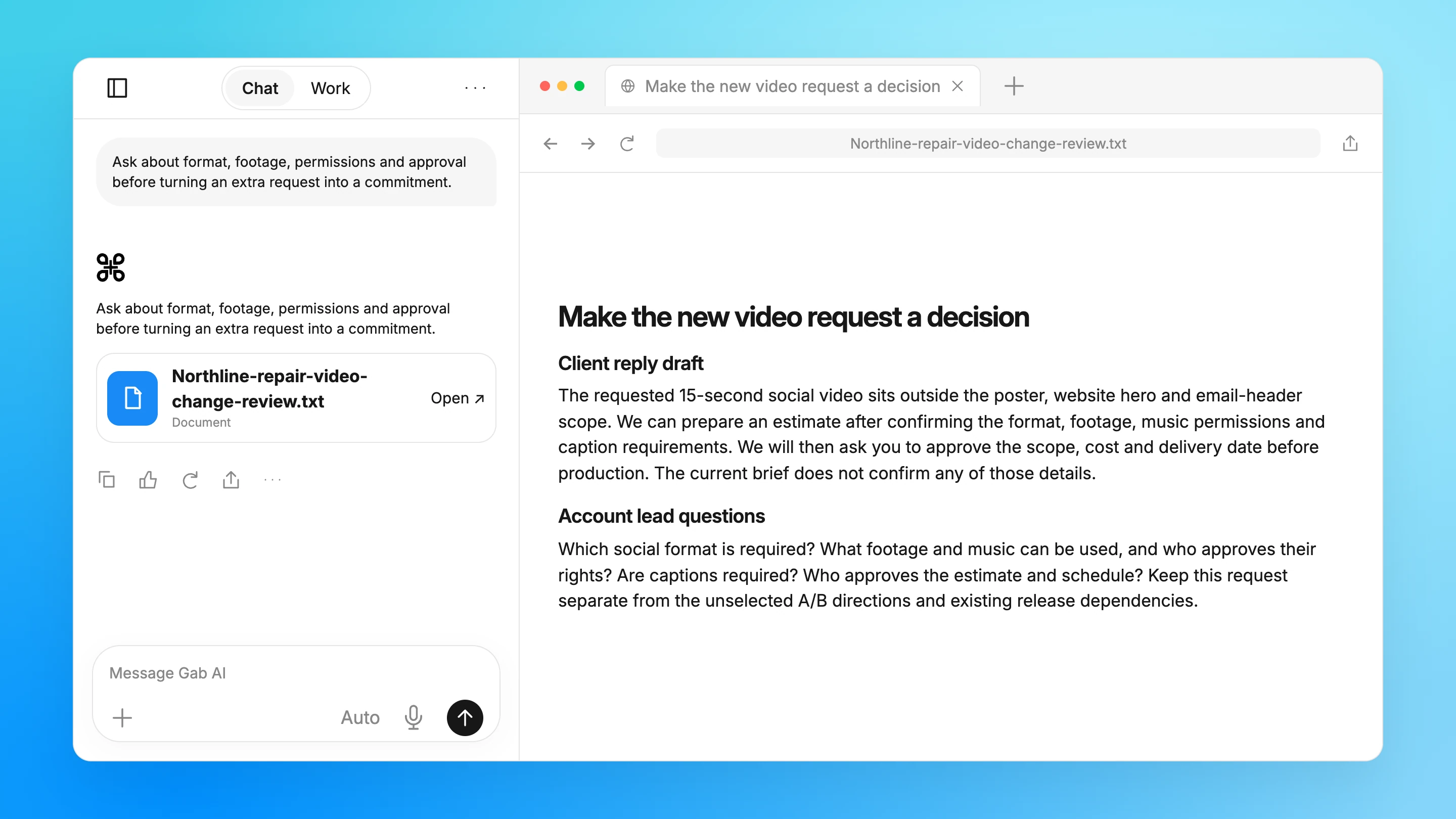
Ask about format, footage, permissions and approval before turning an extra request into a commitment.
Ask about format, footage, permissions and approval before turning an extra request into a commitment.
Loading…
This content could not load.
Your source material stays available.
Make the new video request a decision
Client reply draft
The requested 15-second social video sits outside the poster, website hero and email-header scope. We can prepare an estimate after confirming the format, footage, music permissions and caption requirements. We will then ask you to approve the scope, cost and delivery date before production. The current brief does not confirm any of those details.
Northline-repair-client-brief-20261022.txt
Account lead questions
Which social format is required? What footage and music can be used, and who approves their rights? Are captions required? Who approves the estimate and schedule? Keep this request separate from the unselected A/B directions and existing release dependencies.
Northline-repair-client-brief-20261022.txt
Northline-repair-deliverable-specs.csv
An account-team draft, not an accepted change, production estimate or client message.
Northline Repair is a neighborhood tool-repair program. The client wants a clear invitation for local residents to bring a small hand tool for assessment. The program name is supplied; attendance, customer testimonials, guaranteed repair outcomes and campaign performance are not supplied.
Approved visual constraints
Use deep teal, warm cream and a restrained rust accent. Keep the invitation clear and practical. Use original tool-concept imagery or typography. No client logo, location photographs, licensed reference assets or rights approvals are supplied.
Requested deliverables
Propose two creative directions for client review, then plan an A3 poster, a 1600-by-900 website hero and a 600-pixel-wide email header. The client has not selected a direction. Date, venue, registration link, production budget and release approval are unknown. Video is outside this base scope.
New client request
The client asks to add a 15-second social video to the base deliverables. The creative lead has not estimated it. Footage, music permissions, format, caption requirements, cost and delivery date are not supplied. No change approval is recorded.
Northline-repair-deliverable-specs.csv
Supplied formats
Poster: A3, 297 by 420 mm, with 3 mm bleed and 300 dpi production requirement. Website hero: 1600 by 900 pixels. Email header: 600 pixels wide; height is not supplied. These are target specifications, not files already delivered.
Supplied responsibility roles
Designer prepares the poster and website hero. Producer prepares the email-header handoff. Account lead coordinates consolidated client feedback and obtains the selected direction, final copy and release decision. These are role assignments, not named people or confirmed availability.
Dependencies before production
All three deliverables depend on a client-selected direction, confirmed date and venue, final registration link and approved copy. Rights review and release approval remain pending. No production or publication date is confirmed.
About these examples
Develop client pitches and plan production handoffs
Open an example to inspect the prompt, sample inputs and completed result.
A useful result, with the details behind it
Turn the client brief into visual directions
Compare two original concepts in a finished pitch, then inspect the decisions still needed.
Add the client brief, approved copy and permitted assets before sending.
Read all source material
Northline-repair-client-brief-20261022.txt
Client objective and audience
Northline Repair is a neighborhood tool-repair program. The client wants a clear invitation for local residents to bring a small hand tool for assessment. The program name is supplied; attendance, customer testimonials, guaranteed repair outcomes and campaign performance are not supplied.
Approved visual constraints
Use deep teal, warm cream and a restrained rust accent. Keep the invitation clear and practical. Use original tool-concept imagery or typography. No client logo, location photographs, licensed reference assets or rights approvals are supplied.
Requested deliverables
Propose two creative directions for client review, then plan an A3 poster, a 1600-by-900 website hero and a 600-pixel-wide email header. The client has not selected a direction. Date, venue, registration link, production budget and release approval are unknown. Video is outside this base scope.
New client request
The client asks to add a 15-second social video to the base deliverables. The creative lead has not estimated it. Footage, music permissions, format, caption requirements, cost and delivery date are not supplied. No change approval is recorded.
Northline-repair-deliverable-specs.csv
Supplied formats
Poster: A3, 297 by 420 mm, with 3 mm bleed and 300 dpi production requirement. Website hero: 1600 by 900 pixels. Email header: 600 pixels wide; height is not supplied. These are target specifications, not files already delivered.
Supplied responsibility roles
Designer prepares the poster and website hero. Producer prepares the email-header handoff. Account lead coordinates consolidated client feedback and obtains the selected direction, final copy and release decision. These are role assignments, not named people or confirmed availability.
Dependencies before production
All three deliverables depend on a client-selected direction, confirmed date and venue, final registration link and approved copy. Rights review and release approval remain pending. No production or publication date is confirmed.
Draft a client pitch
Compare two original concepts in a finished pitch, then inspect the decisions still needed.
Refine pitch claims and delivery commitments
Compare the draft with a focused revision, keeping the source facts in view.
Try one focused revision
Suggested follow-up using the same source facts.
Focused follow-up
What change should I ask for?
Make a concise pitch description. Preserve assessment rather than guaranteed repair, and keep date, venue and registration unresolved.
Original excerpt
What does the existing example say?
Invite local residents to bring a small hand tool for assessment. Keep the date, venue and registration link unresolved. No attendance target, testimonial or repair guarantee is supported.
Suggested revision
What could that revision look like?
Invite local residents to bring a small hand tool for assessment. Confirm the date, venue and registration link before release; the brief does not support a repair guarantee, attendance target or testimonial.
Inspect the client constraints behind the proposed artwork.
Can the pitch promise that every tool will be repaired?
Supported invitation No. The supplied objective is to bring a small hand tool for assessment. Guaranteed outcomes, attendance and testimonials are not supplied.
Are these client-approved logos or photographs?
Concept provenance No. The brief permits original tool-concept imagery or typography. No client logo, location photography, rights approval or selected direction is supplied.
Open the specifications and approval dependencies.
What height should the email header use?
Missing dimension The brief specifies 600 pixels wide but supplies no height. Ask the client or their email template owner instead of presenting an invented height as approved.
Is the 15-second social video already approved?
Scope change No. Video is outside the base scope. Format, footage, music permissions, captions, cost and delivery date need clarification and approval before production.
Use Chat to discuss the request and refine the result with follow-up questions.
Deliverable: Strategy critique
What to provide
Client brief, verified audience evidence and proposed strategy
Example prompt
Review this strategy against the client's brief and audience evidence. Identify unsupported assumptions, conflicting objectives and questions for the client. Keep creative proposals distinct from proven campaign outcomes.
What to check
Match the approved client brief
Verify claims and asset rights
Obtain client approval before release
Work
Turn the client brief into visual directions
Compare two original concepts in a finished pitch, then inspect the decisions still needed.
Create Northline-repair-client-directions.html from Northline-repair-client-brief-20261022.txt and Northline-repair-deliverable-specs.csv. Make four inspectable slides: objective, Tool notes direction, Make room for repair direction and client decisions. Use original tool-concept imagery, deep teal, warm cream and restrained rust. Keep date, venue, link and direction approval open. Do not invent attendance, testimonials, repair guarantees, a client logo or release approval.
What to check
Inspect the supplied sample files
Check the result against your own sources
Review before sharing or acting
Work
Connect the chosen assets to owners and approvals
Inspect formats, role responsibilities and unresolved dependencies before production.
Create Northline-repair-production-handoff.csv from Northline-repair-client-brief-20261022.txt and Northline-repair-deliverable-specs.csv. Preserve the exact poster, website and email requirements and supplied responsibility roles. Keep the email height unknown and client direction, final copy, rights and release approval pending. Do not invent named staff, availability, budgets or dates.
What to check
Inspect the supplied sample files
Check the result against your own sources
Review before sharing or acting
Chat
Clarify a client video request before accepting it
Ask about format, footage, permissions and approval before turning an extra request into a commitment.
Using Northline-repair-client-brief-20261022.txt and Northline-repair-deliverable-specs.csv, draft an account-team reply about the added 15-second social video. Explain that it is outside the base scope. Request format, footage, music permissions and caption requirements before preparing an estimate. Do not invent cost, dates or change approval. Do not send the reply.
What to check
Inspect the supplied sample files
Check the result against your own sources
Review before sharing or acting
More prompts
Chat
Develop campaign directions
Three creative directions with rationale, production questions and claims requiring approval.
Use Chat to discuss the request and refine the result with follow-up questions.
Deliverable: Creative direction options
What to provide
Approved positioning, brand constraints and permitted references
Example prompt
Propose three distinct creative directions using the approved positioning and brand constraints. Explain their message, visual approach and production implications. Do not invent testimonials, performance results or rights to reference assets.
What to check
Match the approved client brief
Verify claims and asset rights
Obtain client approval before release
Work
Build an editable client pitch
An editable pitch deck grounded in the brief, with source notes and explicit client decisions.
Use Work to build and revise Client pitch.pptx from your source material.
Deliverable: Client pitch.pptx
What to provide
Approved strategy, verified research and permissioned assets
Example prompt
Create a client presentation showing the problem, evidence, creative directions, proposed deliverables and decisions requested. Include source notes and distinguish estimated costs and schedules from approved commitments. Deliver "Client pitch.pptx" as the requested editable artifact. Ask for missing source material rather than inventing facts.
What to check
Match the approved client brief
Verify claims and asset rights
Obtain client approval before release
Work
Create a production handoff workbook
A production handoff workbook connecting asset specifications and permissions to review responsibilities.
Use Work to build and revise Agency production handoff.xlsx from your source material.
Deliverable: Agency production handoff.xlsx
What to provide
Approved deliverables, specifications, owners and review milestones
Example prompt
Build a workbook linking each deliverable to its approved brief, dimensions, source assets, rights status, owner and review milestone. Flag dependencies and unresolved approvals without assigning unconfirmed dates or publishing assets. Deliver "Agency production handoff.xlsx" as the requested editable artifact. Ask for missing source material rather than inventing facts.
Questions about Gab Super Intelligence for creative agencies
Can Gab AI help turn a creative brief into a client pitch?
Supply the objective, audience evidence, brand constraints and permitted assets. Ask Work for visual directions with rationale and decisions requested. The sample is a completed four-slide HTML pitch; no client direction is selected.
Can it help with agency production handoffs?
Provide deliverables, formats, owner roles and review dependencies. Ask Work for a source-linked handoff. The sample preserves poster dimensions, website size and an unknown email height instead of inventing approved specifications.
Can I use Chat to clarify a client change?
Yes. Supply the base scope, requested change and known impact. Ask for the questions and approval steps needed before accepting it. The video example has no cost, date or change approval; the draft action sends nothing.
Can I use these workflows for an agency client?
Supply the client objective, brief, permitted assets and review process. Develop directions and a pitch, then connect each deliverable to its format, owner and approval. Keep scope changes and unconfirmed details visible until the client decides.
How should I record a client approval?
Track the exact asset or direction, version, responsible reviewer, decision and unresolved changes. A finished concept or a generated handoff is not a client approval. Keep pending items pending until the reviewer confirms them, and resolve scope changes before promising delivery.
Can I start in Chat, or do I need Work?
Use Chat for questions and text drafts. Choose Work when you want a project with tools and editable files. Work requires Plus and uses credits; see Pricing for plans and allowances. Opening a draft does not send it or attach the example files.