Skip to content
Gab AI

Compare AI workspaces

A ChatHub AI alternative for multi-model workflows

Looking for a ChatHub AI alternative? Compare model replies, keep separate conversations in a Deck and turn a brief into editable Work files with Gab AI. Bring Arya and leading models together across Windows, Mac, iPhone and Android.

Free to try with signup credits. See Pricing for plans and model access.

Model comparison and project context

Several answers. A workspace for the next step.

Both services offer model comparison. Choose the layout, model access and way of continuing a project that work best for you.

Gab AI Compare and Decks

Compare ideas. Give each part its own conversation.

Send one prompt to several models with Compare and read their replies side by side. Keep separate research, writing and visual threads together in a Deck as the project develops.

  • Compare
  • Decks
  • Model choice

ChatHub parallel chat

One question, up to six model responses.

ChatHub sends a single input to multiple chatbots side by side. Choose the models and number of responses for the question you are working through.

  • Parallel answers
  • Model selection
  • Shared prompt

Gab Compare requires Plus and uses credits. Decks keep separate conversations together on desktop web and Mac. Available models and tools depend on access.

Gab AI Work and ChatHub DeepShelf

Turn the source into work you can keep.

A research project needs sources, a useful result and a way to revise it. Gab Work and ChatHub DeepShelf offer different workflows for that process.

Gab AI Work

Choose Auto or a supported main model.

Give Work the brief, source files and format you need. Create an editable document, spreadsheet, presentation or code project, review the result and ask for a focused revision in the same task.

ChatHub DeepShelf

Source materials, questions and reports.

DeepShelf is ChatHub’s renamed Notebook tool. Its Notebook guide describes source uploads, chat, web research and report export with citations. The linked documentation still calls it Notebook (beta).

  • Source materials
  • Research
  • Reports

Gab Work requires Plus and uses credits. Check the output format, editing tools and model access that your task needs in each service.

Accounts, models and creative tools

Choose the access that fits your work.

A model subscription and a provider API key are different ways to access AI. Check the plan, creative tools and completed usage for the tasks you repeat.

Gab AI account

Models and creative tools in one account.

Use supported provider models through Gab without separate provider keys. Move from a draft into eligible image, video or music workflows. A Gab API key is needed when calling Gab from your own software.

ChatHub subscription

Provider access without individual keys.

ChatHub’s subscription includes model access without individual provider API keys. Its product also lists image/video generators, image and file chat, web access and a prompt library. Check the allowances for the model and tool you choose.

  • Included model access
  • Media tools
  • Prompt library

Desktop, mobile and Remote

Windows, Mac, iPhone and Android. One Gab AI account.

Keep your conversations, models and credits together across your devices. For a project on your computer, continue from your phone in the folders you choose to share through Gab Remote.

Gab AI on desktop and mobile

Your workspace, wherever you pick it up.

Use Chat and cloud Work across supported devices. Connect a project folder on Windows or a compatible direct-download Mac app, then pair your iPhone or Android phone to follow the task and continue the shared project with Remote.

ChatHub web and mobile

Model comparison can travel with you.

ChatHub documents a web app and browser extension, and its current subscriptions list iOS and Android apps. Check the current app and plan for the comparison layout and tools you use.

  • Web
  • Browser extension
  • iPhone
  • Android

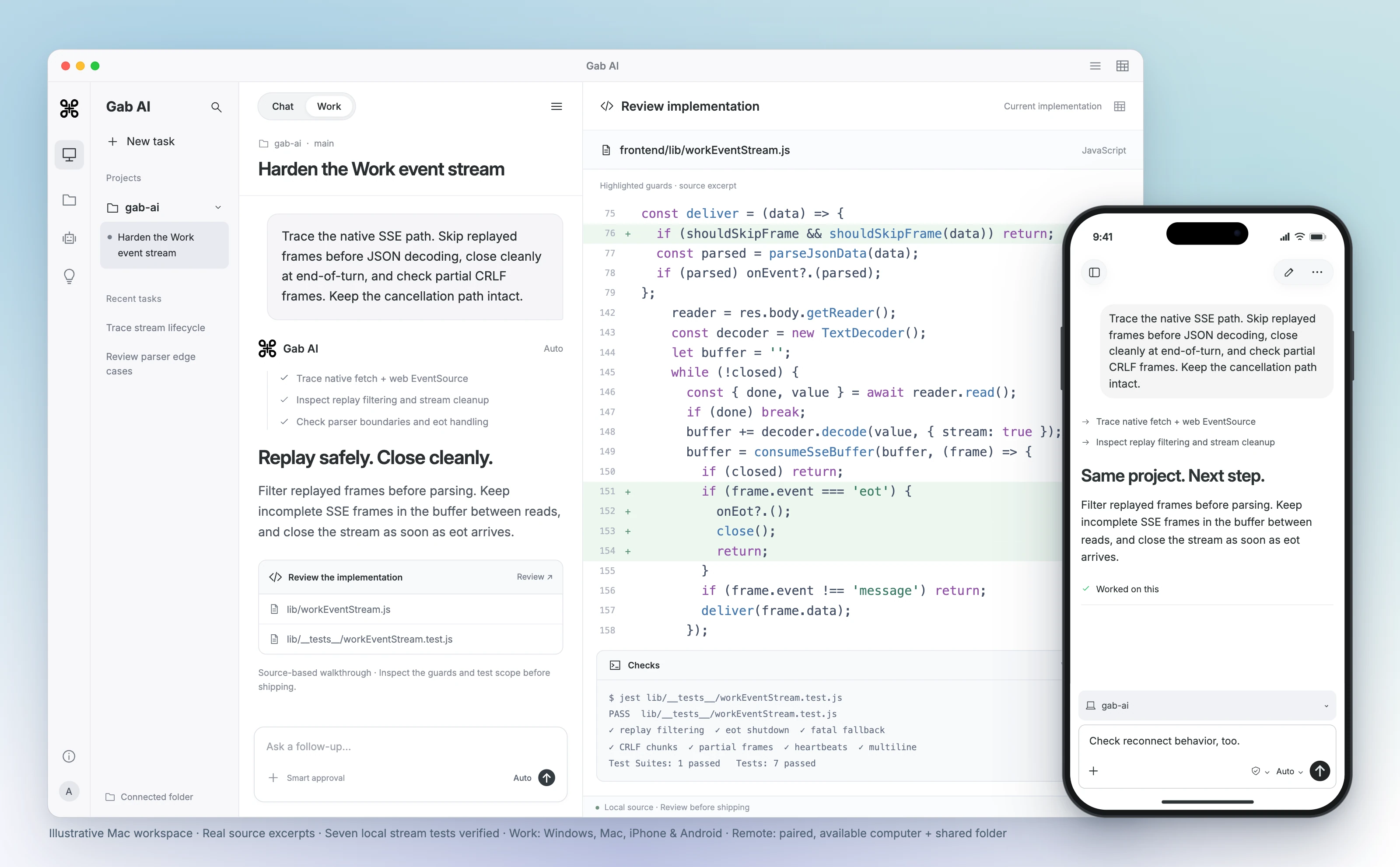
Same project. Desktop to phone.

Review code on your computer, then continue the shared project from your iPhone or Android phone. Remote supports Windows and compatible direct-download Mac apps. Keep the paired computer awake, online and Gab AI running.

Continue the same task from your computer or phone.

Gab AI for Mac Work scene with a connected project, event-stream code review, highlighted replay and shutdown guards, and seven verified local stream tests. Real source excerpts in an interface, not a recorded agent run. A foreground iPhone shows the same shared project and an follow-up. A paired, available Mac and shared folder are required.
Enlarge preview

Gab AI Remote · Continue a desktop project from your phone

Gab AI for Mac Work scene with a connected project, event-stream code review, highlighted replay and shutdown guards, and seven verified local stream tests. Real source excerpts in an interface, not a recorded agent run. A foreground iPhone shows the same shared project and an follow-up. A paired, available Mac and shared folder are required.

Arya by Gab AI

Uncensored chat. An openly conservative voice.

Discuss politics, culture and faith with Gab’s own model. Arya gives you a stated perspective alongside the other models you can choose in Gab AI.

AryaGab’s own model

Ask the questions that matter to you.

Develop an argument, examine an objection or write in your own voice. Ask about a supplied Scripture passage, prepare a Bible study or shape a devotional with Arya’s Christian worldview.

Keep exploring in the same conversation, or choose another available model when you want a different approach. Review important factual claims and sources, whichever model you choose.

Bring useful context to Gab AI

Bring your conversations. Keep going with more models.

Coming from ChatHub AI? Keep the conversations, source material and decisions you want to build on. Direct ChatHub archives are not a supported Gab import format. Bring useful context into a new chat, or import supported ChatGPT, Claude, Grok and Gab exports.

  1. Keep your original history and files

    Retain your ChatHub AI conversations and source files. Prepare a concise brief with key decisions, instructions and relevant text you have permission to use.

  2. Import supported exports separately

    For ChatGPT, Claude, Grok or Gab history, open Settings → Import, select the matching provider and choose a supported ZIP or JSON file. An archive from another product is not a supported substitute.

  3. Check the context, then continue

    Review imported, skipped and error counts for supported imports and open a representative chat. For a manual brief, check the key context before choosing an available model and continuing.

Text-history imports do not transfer memories, settings, credentials or original file contents. Recreate useful instructions, attach the source files you need and keep client or API configuration separately.

Check an answer and its follow-up separately

Turn bakery notes into a notice, then refine the call to action in the same Gab AI conversation.

first answer

On Saturday we open at 9:00 AM and close at 1:00 PM. Sourdough pickup begins at 10:00 AM. Customers order by phone. Missing details: Date, address, and phone number.

Read follow-up
Exact follow-up
Text
Rewrite the notice under 40 words. Keep the opening, closing and pickup times. Give one clear call to action without inventing a phone number, date, address or prices. Keep missing details explicit. Count only the notice text, not the Missing details line.

revised answer

On Saturday we open at 9:00 AM and close at 1:00 PM. Sourdough pickup begins at 10:00 AM. Call us to place your order. Missing details: Date, address, and phone number.

Keep the comparison controlled

The notice grew from 22 to 24 words, excluding Missing details. To compare models, run the same complete first request independently with matched available settings; earlier replies can otherwise change context.

Gab AI vs ChatHub AI: model comparison and access

Compare the workflow, model choice and account setup that matter to you.

Gab AI vs ChatHub AI: model comparison and access
DecisionGab AIChatHub AI
Model comparisonPlus Compare shows several model replies side by side. Decks organize separate conversations on desktop web and Mac.One input can reach up to six chatbots simultaneously.
Project workPlus Work creates editable documents, spreadsheets, presentations and code projects.DeepShelf (formerly Notebook): source-based chat and report export with citations, as described in its Notebook guide.
Keys and accessSupported models use Gab account access and credits; separate provider keys are not needed.Its subscription includes model access without individual provider API keys.
Creative toolsDedicated image, video and music workflows, subject to model and plan access.Image/video generators, image and file chat, web access and code preview are listed.
Desktop and mobileWindows, Mac, iPhone, iPad, Android and web. Remote connects phone controllers to shared projects on Windows or compatible direct-download Mac hosts.Web and browser extension; iOS and Android apps are listed in the current subscription.
Plans and allowancesWebsite Plus: $20.00 monthly or $200.00 annually; 2,000 monthly credits. Model/tool costs and limits apply.Pro advertises US$14.99/month billed annually, 10,000 basic queries, 1,500 advanced queries, 3,000 credits and 300 document uploads monthly. Check checkout and current limits.
Permissions and dataRelevant prompts, files and enabled context can reach selected providers through Gab. Review the privacy guide and the permissions for each tool.Check the context shared with ChatHub, its selected model and its current privacy terms.
Bring existing chatsImport supported ChatGPT, Claude, Grok and Gab text exports. Direct archives from this comparison product are not supported; bring useful context into a new chat manually.Keep your ChatHub history and source files. A different service’s importer does not transfer all settings or attachments.

ChatHub AI alternative questions

Is there a free ChatHub AI alternative?

Yes. Gab AI is free to start without a credit card. A new account receives 250 signup credits after email verification for eligible requests. Plus adds Work, live Voice, monthly credits and included default Arya chat in the app. Check Pricing for model and feature access; authenticated Gab API requests require Plus and use credits.

Is this an alternative to random video chat?

No. This page compares ChatHub AI at chathub.gg, the multi-model AI product. It is not a comparison of random video-chat services.

Can I compare models in Gab like ChatHub?

Yes. Gab Compare displays several models’ replies side by side and requires Plus. ChatHub supports up to six simultaneous chatbot responses. Choose by the layout, models, tools and follow-up workflow rather than assuming identical features.

Does ChatHub require my own provider API keys?

Its current subscription includes model access without individual provider keys. Gab also provides supported models through its own account access and credits. A Gab API key is needed for authenticated requests from your own software.

How does Gab Work compare with ChatHub DeepShelf?

Gab Work creates editable documents, spreadsheets, presentations and code projects. ChatHub now calls its Notebook tool DeepShelf; its linked guide describes source uploads, questions and reports with citations. Check the result, editing controls and sources you need in each workflow.

Is a ChatHub credit the same as a Gab credit?

No. ChatHub combines query, credit and upload allowances, while Gab has its own credit and access rules. Compare the useful result and completed usage for the same task; a larger numerical balance does not establish a lower cost.

Can I use Gab across Windows, Mac, iPhone and Android?

Yes. Use one Gab account across Windows, Mac, iPhone, iPad, Android and web. Remote lets iPhone and Android controllers continue shared projects on Windows or compatible direct-download Mac hosts. Keep the paired computer awake, online and Gab AI running. The Mac App Store edition uses cloud Work; local and app-control requirements vary by edition.

What does Arya bring to the workspace?

Arya is Gab’s own model for uncensored chat with an openly conservative perspective and Christian worldview. It sits alongside clearly labeled provider models. Use the perspective and workflow you need, and check important factual claims and sources whichever model you choose.

Can I import ChatHub AI chats directly into Gab?

Direct ChatHub archives are not a supported Gab import format. Keep your originals and bring relevant text or a brief into a new conversation. Gab accepts supported ChatGPT, Claude, Grok and Gab text-history exports as ZIP or JSON. Review imported, skipped and error counts and check a representative chat. Memories, settings, credentials and original file contents require separate setup.

Guides and resources

Find more detail and choose your next step.

Try another perspective on your next task.

Create your account, bring a useful question or source, and shape the result in conversation.