Skip to content
Gab AI

Compare AI workspaces

A t3.chat alternative for repeated tasks

Looking for a t3.chat alternative for the tasks you repeat? Bring Arya and leading models together with Compare, Decks, creative tools and editable Work projects. Use Gab AI across Windows, Mac, iPhone and Android, with clear account usage to review.

Free to try with signup credits. See Pricing for plans and model access.

Models and everyday work

A quick question. A project you can keep developing.

Start with the work you repeat: a draft, a research question or a coding problem. Choose the model and workspace that help you inspect the answer and take the next step.

Gab AI Compare and Decks

Compare ideas. Give each part its own conversation.

Send one prompt to several models with Compare and read their replies side by side. Keep separate research, writing and visual threads together in a Deck as the project develops.

  • Compare
  • Decks
  • Model choice

t3.chat model choices

A model library for conversation and creation.

t3.chat’s public model catalog includes reasoning and image-generation models. Check the current picker for access and the input or output type you need.

  • Conversation
  • Reasoning models
  • Image generation

Gab Compare requires Plus and uses credits. Decks keep separate conversations together on desktop web and Mac. Available models and tools depend on access.

Chat, files and creative work

Move from a useful answer to an editable result.

A brief can become a proposal, budget, presentation or code project. Choose the output and revision workflow deliberately, then review the finished work.

Gab AI Work

Choose Auto or a supported main model.

Give Work the brief, source files and format you need. Create an editable document, spreadsheet, presentation or code project, review the result and ask for a focused revision in the same task.

t3.chat conversations and media

Check the model for the task.

Its public catalog includes text and image-generation choices, while its FAQ covers attachments and search. Compare the particular file or media task you need in the current product.

  • Text models
  • Image models
  • Attachments & search

Gab Work requires Plus and uses credits. Check the output format, editing tools and model access that your task needs in each service.

Usage and repeated tasks

Understand the meter before comparing the price.

Use the same source, model requirements and intended result when comparing costs. A displayed balance or estimated point count is not a universal price per message.

Gab AI credits

Check the estimate and completed usage.

Signup credits, monthly plan allowances and purchased packs have different rules. Context, model choice, output and tools affect usage. Review a completed request in Usage History before scaling a repeated task.

t3.chat usage meter

Two balances with different refill schedules.

Base refills every four hours; Overage refills at monthly renewal. Requests reserve an estimate and settle final usage after completion.

  • Base
  • Overage
  • Completed usage

Desktop, mobile and Remote

Windows, Mac, iPhone and Android. One Gab AI account.

Keep your conversations, models and credits together across your devices. For a project on your computer, continue from your phone in the folders you choose to share through Gab Remote.

Gab AI on desktop and mobile

Your workspace, wherever you pick it up.

Use Chat and cloud Work across supported devices. Connect a project folder on Windows or a compatible direct-download Mac app, then pair your iPhone or Android phone to follow the task and continue the shared project with Remote.

t3.chat on the web

Continue through its current chat workspace.

Open your t3.chat conversations in its web app. Check the current service for the device and installation options you prefer, and verify the tools available in your account.

  • Web chat
  • Account access
  • Current tool setup

Same project. Desktop to phone.

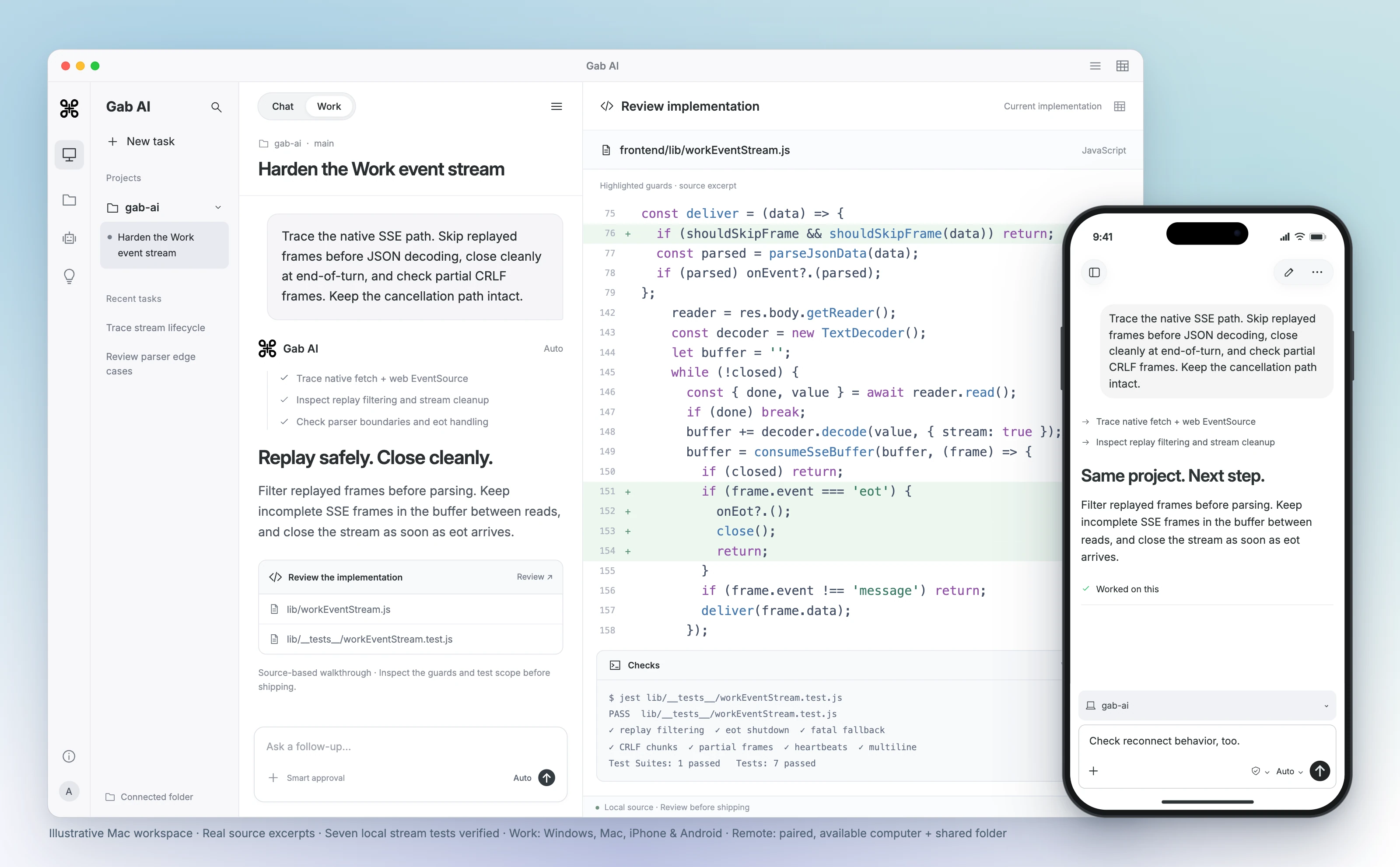
Review code on your computer, then continue the shared project from your iPhone or Android phone. Remote supports Windows and compatible direct-download Mac apps. Keep the paired computer awake, online and Gab AI running.

Continue the same task from your computer or phone.

Gab AI for Mac Work scene with a connected project, event-stream code review, highlighted replay and shutdown guards, and seven verified local stream tests. Real source excerpts in an interface, not a recorded agent run. A foreground iPhone shows the same shared project and an follow-up. A paired, available Mac and shared folder are required.
Enlarge preview

Gab AI Remote · Continue a desktop project from your phone

Gab AI for Mac Work scene with a connected project, event-stream code review, highlighted replay and shutdown guards, and seven verified local stream tests. Real source excerpts in an interface, not a recorded agent run. A foreground iPhone shows the same shared project and an follow-up. A paired, available Mac and shared folder are required.

Arya by Gab AI

Uncensored chat. An openly conservative voice.

Discuss politics, culture and faith with Gab’s own model. Arya gives you a stated perspective alongside the other models you can choose in Gab AI.

AryaGab’s own model

Ask the questions that matter to you.

Develop an argument, examine an objection or write in your own voice. Ask about a supplied Scripture passage, prepare a Bible study or shape a devotional with Arya’s Christian worldview.

Keep exploring in the same conversation, or choose another available model when you want a different approach. Review important factual claims and sources, whichever model you choose.

Bring useful context to Gab AI

Bring your conversations. Keep going with more models.

Coming from t3.chat? Keep the conversations, source material and decisions you want to build on. Direct t3.chat archives are not a supported Gab import format. Bring useful context into a new chat, or import supported ChatGPT, Claude, Grok and Gab exports.

  1. Keep your original history and files

    Retain your t3.chat conversations and source files. Prepare a concise brief with key decisions, instructions and relevant text you have permission to use.

  2. Import supported exports separately

    For ChatGPT, Claude, Grok or Gab history, open Settings → Import, select the matching provider and choose a supported ZIP or JSON file. An archive from another product is not a supported substitute.

  3. Check the context, then continue

    Review imported, skipped and error counts for supported imports and open a representative chat. For a manual brief, check the key context before choosing an available model and continuing.

Text-history imports do not transfer memories, settings, credentials or original file contents. Recreate useful instructions, attach the source files you need and keep client or API configuration separately.

Judge a revision by the requirement it changed

Make a draft more useful with a focused follow-up. This Gab AI example turns a statement about phone orders into a direct call to action.

Read original notice ending
Original notice ending
Text
Customers order by phone.
Read actual revised notice ending
Actual revised notice ending
Text
Call us to place your order.
Read revision request
revision request
Text
Rewrite the notice under 40 words. Keep the opening, closing and pickup times. Give one clear call to action without inventing a phone number, date, address or prices. Keep missing details explicit. Count only the notice text, not the Missing details line.

Keep facts, unknowns and length visible

The full revised notice retains all three times and explicitly missing date/address/phone. It is 24 words versus 22 initially, excluding Missing details. Both fit their requested limits; the revision is not shorter.

Gab AI vs t3.chat: models and usage allowances

Compare the workflow, model choice and account setup that matter to you.

Gab AI vs t3.chat: models and usage allowances
DecisionGab AIt3.chat
Models and conversationsArya and supported provider models, Plus Compare and Decks for separate conversations.Its public catalog lists reasoning and image-generation models; current access varies.
Files and creative workPlus Work creates editable files; eligible image, video and music workflows are also available.Check the current model and product tools against the output you want to make.
Usage meterSignup credits, recurring plan allowance and separate purchased balances.Base refills every four hours; Overage at monthly renewal.
Completed usageInspect estimates and completed usage; context, models and tools affect cost.Reserves an estimate, then settles final request usage.
Desktop and mobileWindows, Mac, iPhone, iPad, Android and web. Remote connects phone controllers to shared projects on Windows or compatible direct-download Mac hosts.Use its current web workspace and check the device/install options for your account.
Price and accessWebsite Plus: $20.00 monthly or $200.00 annually; 2,000 monthly credits. Model/tool costs and limits apply.Its terms direct readers to Settings for current prices and usage limits. Check the account offer before subscribing.
Provider processingRelevant prompts, files and enabled context can reach selected providers through Gab. Review the privacy guide and the permissions for each tool.Its FAQ describes provider-training settings, exceptions and BYOK responsibility; review the current terms.
Bring existing chatsImport supported ChatGPT, Claude, Grok and Gab text exports. Direct archives from this comparison product are not supported; bring useful context into a new chat manually.Keep your t3.chat history and files; its archives are not a supported direct Gab import.

t3.chat alternative questions

Is there a free t3.chat alternative?

Yes. Gab AI is free to start without a credit card. A new account receives 250 signup credits after email verification for eligible requests. Plus adds Work, live Voice, monthly credits and included default Arya chat in the app. Check Pricing for model and feature access; authenticated Gab API requests require Plus and use credits.

Is every t3.chat message the same cost?

No. Its FAQ says model choice, context, attachments and search affect usage. Use completed usage, not a fixed-message assumption.

How do the t3.chat usage balances refill?

Base refills every four hours and Overage at monthly renewal. The FAQ’s example points illustrate the mechanism rather than a tariff.

How can I compare Gab and t3.chat costs?

Choose a task you repeat and use the same source and desired result. Compare the plan, model eligibility, finished work and completed usage. This page does not establish that either service is cheaper for every workload.

Can I use Gab Work for a task I started in chat?

Yes. Give Work the brief, relevant source material and required format. Work requires Plus and uses credits. Review the editable result and request a focused revision; check your source facts before using it.

How should I compare provider data settings?

Read each service’s current privacy guidance and the terms of the model you select. Consider the prompt, prior turns, files and tools you enable. For BYOK, check your provider organization’s settings too.

Can I use Gab across Windows, Mac, iPhone and Android?

Yes. Use one Gab account across Windows, Mac, iPhone, iPad, Android and web. Remote lets iPhone and Android controllers continue shared projects on Windows or compatible direct-download Mac hosts. Keep the paired computer awake, online and Gab AI running. The Mac App Store edition uses cloud Work; local and app-control requirements vary by edition.

What does Arya bring to the workspace?

Arya is Gab’s own model for uncensored chat with an openly conservative perspective and Christian worldview. It sits alongside clearly labeled provider models. Use the perspective and workflow you need, and check important factual claims and sources whichever model you choose.

Can I import t3.chat chats directly into Gab?

Direct t3.chat archives are not a supported Gab import format. Keep your originals and bring relevant text or a brief into a new conversation. Gab accepts supported ChatGPT, Claude, Grok and Gab text-history exports as ZIP or JSON. Review imported, skipped and error counts and check a representative chat. Memories, settings, credentials and original file contents require separate setup.

Guides and resources

Find more detail and choose your next step.

Make your next conversation useful.

Create your account, bring a useful question or source, and shape the result in conversation.