Skip to content
Gab AI

Compare AI workspaces

A Monica AI alternative for browser workflows

Looking for a Monica alternative for reading, writing and research? Bring leading models and Arya together with Compare, Decks and editable Work projects. Keep going across Windows, Mac, iPhone and Android, with a browser sidebar for supported page context.

Free to try with signup credits. See Pricing for plans and model access.

Models, Compare and Decks

Compare perspectives. Keep the useful work together.

Both Gab AI and Monica let you compare model responses. In Gab, use Compare for one question and several answers, then organize separate conversations in a Deck as your project grows.

Gab AI Compare and Decks

One brief. Several approaches. Your next step.

Read several models’ answers side by side with Compare. Keep a research thread, writing draft and visual direction in separate Deck columns, so each part has its own conversation while the project stays in view.

Monica model comparison

Ask other models about the same question.

Monica documents a “Get answers from other models” control after a response. Select the models you want and compare their replies. Both services offer multiple perspectives; choose by the available models, layout and follow-up workflow.

  • Model selection
  • Response comparison
  • Follow-up chat

Gab Compare requires Plus and uses credits. Decks keep separate conversations together on desktop web and Mac. Available models and tools depend on access.

Gab AI Work and Monica Agent

From source material to something you can use.

Turn notes into a report, a budget or a presentation. Gab Work creates editable files and projects; Monica also offers research, slides and interactive artifacts. Compare the output and revision workflow you need.

Gab AI Work

Ask for the file. Keep refining the result.

Choose Auto or a supported main model and give Work your sources, goal and intended format. Open the resulting document, spreadsheet, presentation or code project, review it and ask for a focused revision in the same task.

Monica Agent and Artifacts

Research, build slides and create interactive outputs.

Monica Agent documents Deep Research, Browser Operator and Create Slides. Its Artifacts feature also supports conversational creation and revision of websites, applications and charts, with a preview and publishing controls.

  • Deep Research
  • Create Slides
  • Artifacts

Gab Work requires Plus and uses credits. Check the files, editing controls and tools included in each service’s current plan.

Reading, writing and browser tasks

Work with the page. Choose what you share.

Get help with a difficult passage, summarize an article or draft a reply beside the page. Reading supplied text and operating a browser are different workflows, with their own setup and permissions.

Gab AI browser sidebar

Bring a useful passage into the conversation.

Use side chat, Ask Gab AI with selected text or readable page context in supported desktop browsers. Review the draft before sending it. Connected-tab automation is a separate direct-download Mac Work feature with its own website approvals.

Monica browser tools

A toolbar and sidebar for browsing tasks.

Monica’s Chrome and Edge extensions offer page summaries, translation and writing assistance. Its Smart Toolbar works with selected text; Browser Operator documents navigation and web interactions. Check the tool and permissions for the task you want to run.

  • Smart Toolbar
  • Page summaries
  • Browser Operator

Desktop, mobile and Remote

Windows, Mac, iPhone and Android. One Gab AI account.

Keep your conversations, models and credits together across your devices. For a project on your computer, Gab Remote lets you continue from your phone in the folders you choose to share.

Gab AI on desktop and mobile

Your workspace, wherever you pick it up.

Use Chat and cloud Work across supported devices. Connect a project folder on Windows or a compatible direct-download Mac app, then pair your iPhone or Android phone to follow the task and continue the shared project with Remote.

Monica desktop and mobile apps

Monica also works across desktop and mobile.

Monica lists Windows and Mac apps, iOS and Android apps, and Chrome and Edge extensions. Its desktop guide describes hotkeys, selected-text assistance and screenshot analysis. Check the specific app and tool you use rather than assuming every platform has the same controls.

  • Windows
  • Mac
  • iPhone
  • Android

Same project. Desktop to phone.

Review code on your computer, then continue the shared project from your iPhone or Android phone. Remote supports Windows and compatible direct-download Mac apps. Keep the paired computer awake, online and Gab AI running.

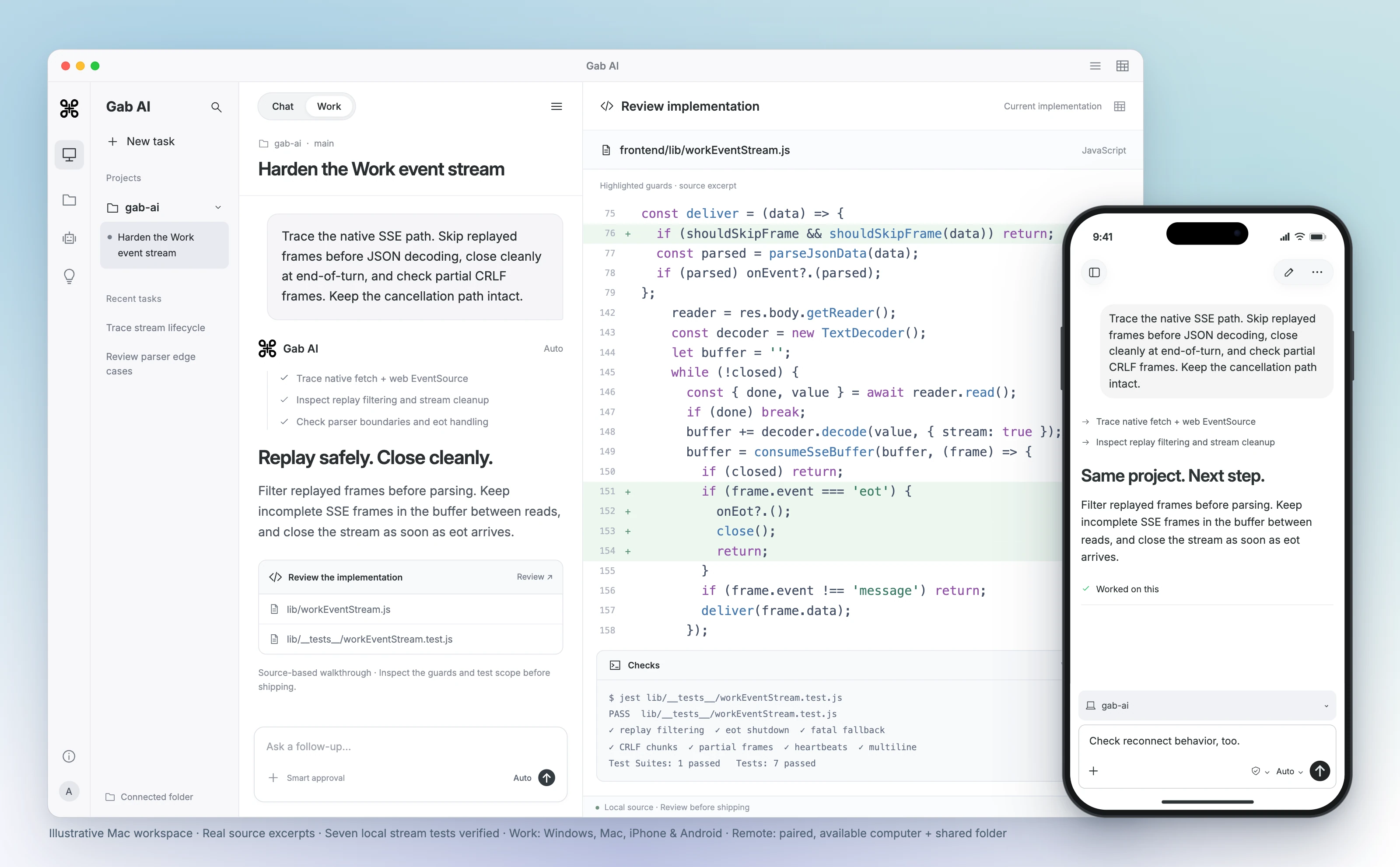
Continue the same task from your computer or phone.

Gab AI for Mac Work scene with a connected project, event-stream code review, highlighted replay and shutdown guards, and seven verified local stream tests. Real source excerpts in an interface, not a recorded agent run. A foreground iPhone shows the same shared project and an follow-up. A paired, available Mac and shared folder are required.
Enlarge preview

Gab AI Remote · Continue a desktop project from your phone

Gab AI for Mac Work scene with a connected project, event-stream code review, highlighted replay and shutdown guards, and seven verified local stream tests. Real source excerpts in an interface, not a recorded agent run. A foreground iPhone shows the same shared project and an follow-up. A paired, available Mac and shared folder are required.

Arya by Gab AI

Uncensored chat. An openly conservative voice.

Discuss politics, culture and faith with Gab’s own model. Arya gives you a stated perspective alongside the other models you can choose in Gab AI.

AryaGab’s own model

Ask the questions that matter to you.

Develop an argument, examine an objection or write in your own voice. Ask about a supplied Scripture passage, prepare a Bible study or shape a devotional with Arya’s Christian worldview.

Keep exploring in the same conversation, or choose another available model when you want a different approach. Review important factual claims and sources, whichever model you choose.

Bring useful context to Gab AI

Bring your conversations. Keep going with more models.

Coming from Monica? Keep the source material, instructions and decisions you want to build on. Direct Monica chat imports are not supported. You can bring useful text into a new Gab conversation, or import supported exports from ChatGPT, Claude, Grok and Gab.

  1. Keep your source conversations

    Retain the Monica conversations and files you want to keep. Prepare a concise brief with the key decisions, relevant text and instructions you have permission to use.

  2. Import supported history separately

    For ChatGPT, Claude, Grok or Gab exports, open Settings → Import, select the matching provider and choose a supported ZIP or JSON file. Monica backups are not a supported Gab import format.

  3. Check the context, then keep going

    Review imported, skipped and error counts for supported imports and open a representative chat. For a new Monica-based brief, check the important context before choosing an available model and continuing.

Text-history imports do not transfer memories, settings, credentials or original file contents. Recreate the instructions you want to retain and attach the source files you need.

Review a source-based answer before adapting it

Turn a supplied Bible passage into study questions, then adapt the wording for your audience.

Original answer excerpt

Message: How does Jesus redefine the identity of a "neighbor" in this parable? Note: Jesus shifts the focus from who is worthy of receiving help to who chooses to demonstrate mercy, regardless of social or ethnic distance (Luke 10:36–37).

Read focused follow-up
Exact focused follow-up
Text
Adapt those same three questions for a family with children ages 8–12, in about ten minutes. Use short, gentle language, preserve accurate verse references and the distinction between text and suggested application. Give one simple action the family could discuss for this week. Do not add invented details. Keep it under 140 words. Remove the phrase “regardless of social or ethnic distance”: that background was not established by the supplied text. Keep the interpretation clearly distinct from the text’s wording.

Revised answer excerpt

Message: Who does Jesus say is our neighbor? Note: Jesus teaches that a neighbor is the person who chooses to be kind and shows mercy to someone in need (Luke 10:36–37).

Return to the supplied passage

The first interpretation added social/ethnic background that the supplied text did not establish. The revised wording remains an interpretation to review, not an automatically verified citation or denominational endorsement.

Gab AI vs Monica: browser assistance and costs

Compare the workflow, model choice and account setup that matter to you.

Gab AI vs Monica: browser assistance and costs
DecisionGab AIMonica
Model comparisonGPT, Claude, Gemini, Arya and more. Plus Compare displays several models’ replies side by side; Decks organize separate conversations on desktop web and Mac.Model Response Comparison lets you request replies from other selected models after a response. Check the current model choices and access.
Browser assistanceSide chat, selected text and readable page context through the desktop extension. Connected-tab automation uses a separate direct Mac Work setup and approvals.Chrome and Edge extensions with summaries, translation and writing tools. Smart Toolbar supports selected text; Browser Operator handles web interactions.
Editable workPlus Work creates documents, spreadsheets, presentations and code projects with Auto or a supported main model.Monica Agent offers Deep Research and Create Slides. Artifacts supports interactive websites, apps and charts with conversational revisions.
Desktop and mobileWindows, Mac, iPhone, iPad, Android and web. Remote connects phone controllers to shared projects on Windows or compatible direct-download Mac hosts.Windows and Mac desktop apps, iOS and Android mobile apps, plus browser extensions. Check each platform’s current features and requirements.
Plans and usageWebsite Plus: $20.00 monthly or $200.00 annually; 2,000 monthly credits. Model/tool costs and limits apply.Monica advertises Pro at US$99/year, with 5,000 basic queries, 200 advanced queries and 1,500 advanced credits monthly. Check checkout for the current offer; feature and context settings affect usage.
Free accessFree to try with signup credits for eligible requests. See Pricing for the plan and model details.The Free plan lists 40 basic-model accesses daily and limited image/video, ChatPDF and AI Agent trials. Advanced features have separate allowances and conditions.
Permissions and dataPrompts, relevant files and enabled context can reach selected providers through Gab. Review page access, folder permissions and the privacy guide.Review extension permissions, the context supplied to Monica’s tools and its current privacy policy. Check the scope of each enabled feature.
Bring existing chatsSupported ChatGPT, Claude, Grok and Gab text exports can be imported. Monica archives are not supported; bring useful context into a new chat manually.Keep your original Monica conversations and source files. Do not assume settings, memories or attachments transfer to a different service.

Monica alternative questions

Is there a free Monica alternative?

Yes. Gab AI is free to start without a credit card. A new account receives 250 signup credits after email verification for eligible requests. Plus adds Work, live Voice, monthly credits and included default Arya chat in the app. Monica also offers limited free access and trials. Check the current model and feature allowances in each service.

Can I compare model responses in Gab AI like Monica?

Yes. Compare sends one prompt to several models and displays their replies side by side in one conversation. It requires Plus and uses credits. Monica also documents model response comparison. Gab Decks keep separate conversations together on desktop web and Mac; choose the layout and follow-up workflow that fit your project.

What can Monica do besides text chat?

Monica documents research, Browser Operator, slides, interactive Artifacts, file chat and creative tools. Gab offers its own Chat, Work and media workflows. Compare the particular output, tools and current plan you need; this page does not establish feature-for-feature parity or a quality winner.

How does Gab Work compare with Monica Agent?

Gab Work creates editable documents, spreadsheets, presentations and code projects, using Auto or a supported main model. Monica Agent documents Deep Research, Browser Operator and Create Slides, while Artifacts supports interactive outputs and revisions. Both go beyond a text answer. Check the output format, editing controls and available tools for your task.

Does Gab replace every Monica browser feature?

No feature-for-feature parity is established. Gab’s extension offers side chat, selected text and supported page context. Connected-tab automation is a separate direct-download Mac Work feature with setup and website approvals. Monica has its own toolbar, extensions and Browser Operator. Check the exact browser, app edition, task and permissions.

Are there apps like Monica for Windows, Mac, iPhone and Android?

Yes. Gab AI has Windows, Mac, iPhone, iPad and Android apps and a web workspace. Monica also lists Windows, Mac, iOS and Android apps. Gab Remote lets iPhone and Android controllers continue shared projects on Windows or compatible direct-download Mac hosts. The paired host must be awake, online and running Gab AI; the Mac App Store edition uses cloud Work.

Is a Monica advanced credit the same as a Gab credit?

No. Monica combines query allowances with advanced credits for certain features and context settings. Gab has its own credit rules, with usage affected by the model, context and tools. Compare the current plan and completed usage for the same task; equal numerical balances do not establish equal cost or value.

Can I move Monica settings or chats automatically?

Direct Monica imports are not supported. Bring relevant text and a concise brief into a new Gab chat. Gab accepts supported ChatGPT, Claude, Grok and Gab text-history exports as ZIP or JSON files. Keep the original export, select its provider, review imported, skipped and error counts, and check a representative conversation. Memories, settings, credentials and original file contents require separate setup.

What is Arya, and how is it different from the other models?

Arya is Gab AI’s own model for uncensored chat with an openly conservative perspective and Christian worldview. GPT, Claude, Gemini and other provider models are separate, clearly labeled choices. Choose the perspective and workflow you need, and check important factual claims and sources whichever model you use.

Guides and resources

Find more detail and choose your next step.

Put what you are reading to work.

Create your account, bring a useful question or source, and shape the result in conversation.