Looking for an OpenRouter alternative for your API workflow? Use supported Gab endpoints alongside Arya, Compare, Decks and editable Work projects. Keep one Gab account across Windows, Mac, iPhone and Android, and check your client’s exact model, tool and routing requirements.
Compare requires Plus. Model access and credit usage vary.
Model access and routing
Choose a model. Choose how the request gets there.
Both services offer model access and automatic routing, with different controls and contracts. Match the endpoint, model, streaming and tool requirements of your actual client.
Gab AI models and Auto
A supported API beside your workspace.
Choose a supported model or use Gab Auto for suitable requests. Keep the API’s credit rules separate from included default Arya app chat. Use Compare and Decks in the app to develop ideas before integrating a request.
OpenRouter documents Auto Router, provider selection and fallbacks. Eligible plans also provide policy and regional routing options. Check the router, provider and plan settings required by your workload.
For a project, choose how the agent will use files, tools and model access. Gab Work and OpenRouter’s Ori tools offer different ways to carry a task forward.
Gab AI Work
Choose Auto or a supported main model.
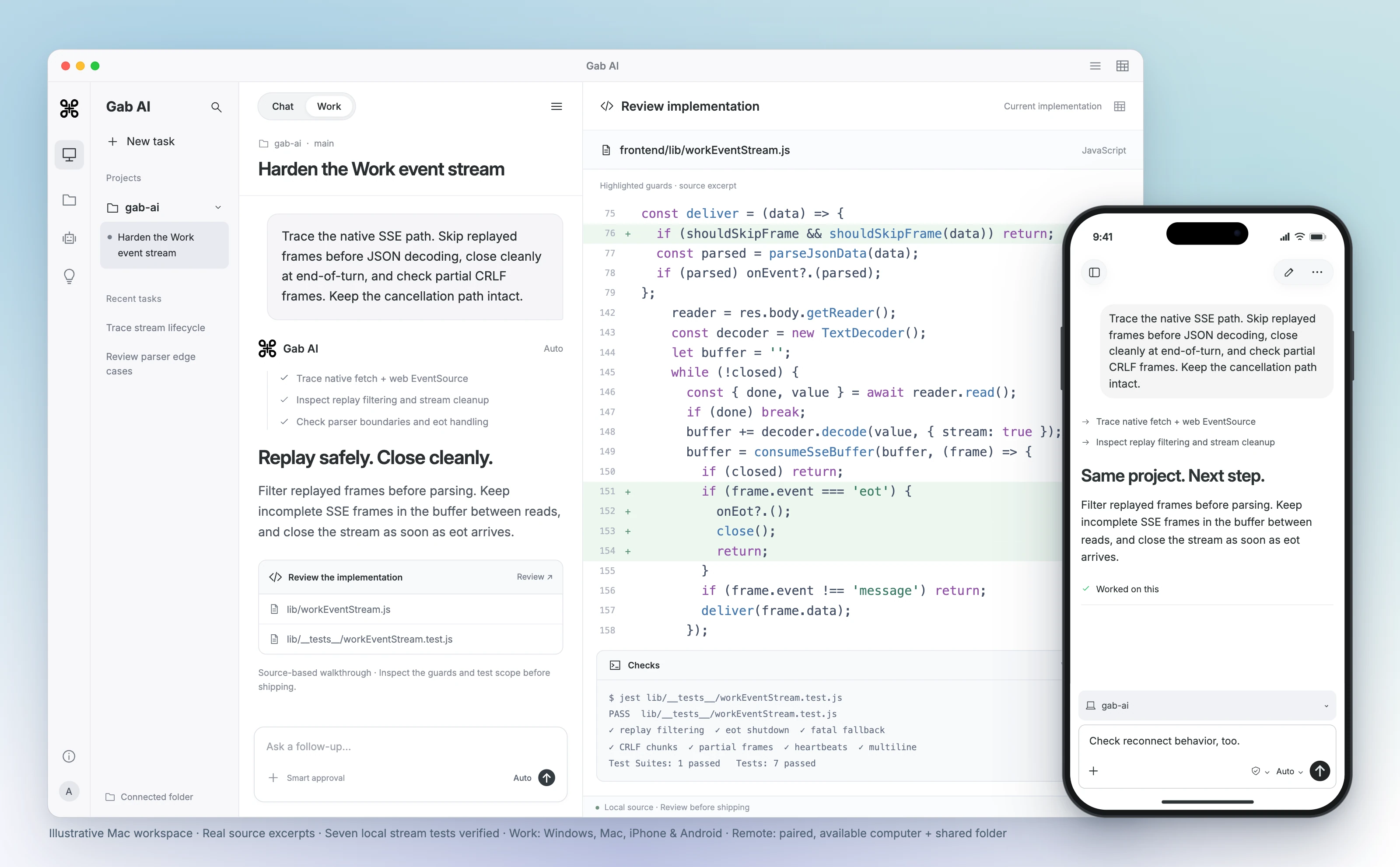
Give Work the brief, source files and format you need. Create an editable document, spreadsheet, presentation or code project, review the result and ask for a focused revision in the same task.
OpenRouter lists Ori Harness, Ori Code and Ori Eval as available. Ori Harness connects supported agent CLIs, while Ori Code is a terminal coding agent. Check the current tools and setup for your project.
Gab Work requires Plus and uses credits. Check the output format, editing tools and model access that your task needs in each service.
Clients, keys and usage
Move the request carefully. Check what actually ran.
A compatible API shape does not transfer every routing field, setting or tool. Validate a small representative request before moving a larger workload.
Gab API integration
Follow the guide for your client.
Use a Gab API key, documented base URL and supported model ID. Test the endpoint, streaming and tools you need, then inspect the response and completed usage. Gab API access requires Plus and uses credits.
OpenRouter provides Chat and an API, with model-specific usage pricing. Its quickstart covers client setup; provider routing and BYOK have their own controls. Keep the original configuration until your new client has been checked.
Windows, Mac, iPhone and Android. One Gab AI account.
Keep your conversations, models and credits together across your devices. For a project on your computer, continue from your phone in the folders you choose to share through Gab Remote.
Gab AI on desktop and mobile
Your workspace, wherever you pick it up.
Use Chat and cloud Work across supported devices. Connect a project folder on Windows or a compatible direct-download Mac app, then pair your iPhone or Android phone to follow the task and continue the shared project with Remote.
Use OpenRouter Chat or a compatible client. Its Ori guide covers terminal tools on macOS, Linux/WSL and Windows PowerShell; Ori Desktop is currently listed as waitlist. Check current availability before choosing an installation.
Review code on your computer, then continue the shared project from your iPhone or Android phone. Remote supports Windows and compatible direct-download Mac apps. Keep the paired computer awake, online and Gab AI running.
Continue the same task from your computer or phone.
Loading preview…
Preview unavailable.
Enlarge preview
Gab AI Remote · Continue a desktop project from your phone
Discuss politics, culture and faith with Gab’s own model. Arya gives you a stated perspective alongside the other models you can choose in Gab AI.
AryaGab’s own model
Ask the questions that matter to you.
Develop an argument, examine an objection or write in your own voice. Ask about a supplied Scripture passage, prepare a Bible study or shape a devotional with Arya’s Christian worldview.
Keep exploring in the same conversation, or choose another available model when you want a different approach. Review important factual claims and sources, whichever model you choose.
Bring your conversations. Keep going with more models.
Coming from OpenRouter? Keep the conversations, source material and decisions you want to build on. Direct OpenRouter archives are not a supported Gab import format. Bring useful context into a new chat, or import supported ChatGPT, Claude, Grok and Gab exports.
01
Keep your original history and files
Retain your OpenRouter conversations and source files. Prepare a concise brief with key decisions, instructions and relevant text you have permission to use.
02
Import supported exports separately
For ChatGPT, Claude, Grok or Gab history, open Settings → Import, select the matching provider and choose a supported ZIP or JSON file. An archive from another product is not a supported substitute.
03
Check the context, then continue
Review imported, skipped and error counts for supported imports and open a representative chat. For a manual brief, check the key context before choosing an available model and continuing.
Text-history imports do not transfer memories, settings, credentials or original file contents. Recreate useful instructions, attach the source files you need and keep client or API configuration separately.
Use Gab’s Chat Completions API to turn workshop notes into a proposal, then ask for a clear next action.
First API answer
The workshop proposal includes 24 proposed participants at USD 20 each, generating USD 480 in income. After subtracting the USD 370 base cost, the remaining funds are USD 110 before unspecified tax and delivery. Currently, no date, venue, or approval exists for the event.
After asking for the next action
The workshop proposes 24 participants at USD 20, yielding USD 480 income. The base cost is USD 370, leaving USD 110 before unspecified tax and delivery. No date, venue, or approval exists. Please confirm tax and delivery before approving the proposal.
What changed
The revision gives the group a clear next step: confirm tax and delivery before approval. The participant count and budget stay the same, and the date and venue remain unconfirmed.
Read the complete API request bodies
POST these JSON bodies to https://gab.ai/v1/chat/completions with your Gab API key in Authorization: Bearer and Content-Type: application/json. The follow-up includes the earlier messages. Use the API setup guide for authentication and client configuration.
First API request body
JSON
1
2
3
4
5
6
7
8
9
10
11
12
13
14
15
16{"model":"arya","messages":[{"role":"system","content":"Use only the supplied facts. Do not add personal information, invented facts or external sources."},{"role":"user","content":"Write three short sentences for a workshop proposal using only these facts: 24 proposed participants at USD 20 gives USD 480 income. Base cost is USD 370, so remaining funds are USD 110 before unspecified tax and delivery. No date, venue or approval exists. State the figures and unknowns clearly; do not invent details. Maximum 60 words."}],"temperature":0,"max_tokens":256,"stream":false}
Follow-up API request body
JSON
1
2
3
4
5
6
7
8
9
10
11
12
13
14
15
16
17
18
19
20
21
22
23
24{"model":"arya","messages":[{"role":"system","content":"Use only the supplied facts. Do not add personal information, invented facts or external sources."},{"role":"user","content":"Write three short sentences for a workshop proposal using only these facts: 24 proposed participants at USD 20 gives USD 480 income. Base cost is USD 370, so remaining funds are USD 110 before unspecified tax and delivery. No date, venue or approval exists. State the figures and unknowns clearly; do not invent details. Maximum 60 words."},{"role":"assistant","content":"The workshop proposal includes 24 proposed participants at USD 20 each, generating USD 480 in income. After subtracting the USD 370 base cost, the remaining funds are USD 110 before unspecified tax and delivery. Currently, no date, venue, or approval exists for the event."},{"role":"user","content":"Keep those figures and unknowns. Add a direct next action asking the group to confirm tax and delivery before approving the proposal. Use no more than 60 words."}],"temperature":0,"max_tokens":2048,"stream":false}
Compare the workflow, model choice and account setup that matter to you.
Gab AI vs OpenRouter: API access and routing
Decision
Gab AI
OpenRouter
Workspace
Gab AIArya, supported provider models, Plus Compare, Decks and creative tools.
OpenRouterChat, API access and the Ori family of agent tools.
Routing
Gab AISupported model selection and Gab Auto; verify the client’s exact behavior.
OpenRouterAuto Router, provider selection and fallbacks; policy and regional controls depend on plan.
Project work
Gab AIPlus Work creates editable files and code projects with Auto or a supported main model.
OpenRouterOri Harness, Ori Code and Ori Eval are listed as available; current tools have separate setup requirements.
Billing
Gab AIWebsite Plus: $20.00 monthly or $200.00 annually; 2,000 monthly credits. Model/tool costs and limits apply. Authenticated API usage uses credits.
OpenRouterStandard charges 5.5% on credit purchases; Business charges 8%. Model inference uses provider rates. BYOK has separate allowance and fee rules.
Free access
Gab AISignup credits cover eligible in-app requests. Authenticated Gab API access requires Plus.
OpenRouterSelected free models: 20 requests/minute and 50/day, rising to 1,000/day after buying at least US$10 in credits. Other account conditions apply.
Desktop and mobile
Gab AIWindows, Mac, iPhone, iPad, Android and web. Remote connects phone controllers to shared projects on Windows or compatible direct-download Mac hosts.
OpenRouterChat and compatible clients; Ori terminal tools. Ori Desktop is currently listed as waitlist.
Keys and portability
Gab AIA Gab API key and supported endpoint/model are required. Separate provider keys are not needed for supported Gab models.
OpenRouterOpenRouter has its own key, model IDs, routing options and optional BYOK. Test client behavior before switching.
Bring existing chats
Gab AIImport supported ChatGPT, Claude, Grok and Gab text exports. Direct archives from this comparison product are not supported; bring useful context into a new chat manually.
OpenRouterPreserve chat history and original client configuration. OpenRouter archives and routing settings do not import directly into Gab.
Yes. Gab AI is free to start without a credit card. A new account receives 250 signup credits after email verification for eligible requests. Plus adds Work, live Voice, monthly credits and included default Arya chat in the app. Check Pricing for model and feature access; authenticated Gab API requests require Plus and use credits.
Is Gab a drop-in replacement for every OpenRouter request?
No universal endpoint, SDK, model-ID or routing parity is established. Follow Gab’s client and endpoint guides, test your required streaming and tools, and inspect the response and completed usage before moving a workload.
Does OpenRouter also have Chat and agent tools?
Yes. OpenRouter provides Chat as well as an API. Its Ori documentation lists Harness, Code and Eval as available. Gab Work offers its own project and editable-file workflow. Check the current interface and tool setup you need.
Does Plus make Gab’s API free?
No. Included default Arya app chat and authenticated API requests have separate rules. Gab API access requires Plus and uses credits based on the request, model and tools.
Do I need separate provider keys for Gab?
No separate provider keys are needed for supported Gab models. Your API client needs a Gab API key. Keep its credentials private and use the documented authentication, base URL and model identifier.
Can I copy OpenRouter routing fields into Gab?
Do not assume that a routing field or provider policy transfers. Map the requirement to Gab’s documented controls and test the supported request. Keep the previous client configuration so you can compare behavior and recover your setup.
How should I compare API fees and usage?
Compare the model’s input/output rates, tools and completed usage alongside any credit-purchase or BYOK fees. OpenRouter’s Standard and Business percentage fees apply when purchasing credits, not as a markup on each model request. This page does not establish a universal cheaper option.
Can I use Gab across Windows, Mac, iPhone and Android?
Yes. Use one Gab account across Windows, Mac, iPhone, iPad, Android and web. Remote lets iPhone and Android controllers continue shared projects on Windows or compatible direct-download Mac hosts. Keep the paired computer awake, online and Gab AI running. The Mac App Store edition uses cloud Work; local and app-control requirements vary by edition.
What does Arya bring to the workspace?
Arya is Gab’s own model for uncensored chat with an openly conservative perspective and Christian worldview. It sits alongside clearly labeled provider models. Use the perspective and workflow you need, and check important factual claims and sources whichever model you choose.
Can I import OpenRouter chats directly into Gab?
Direct OpenRouter archives are not a supported Gab import format. Keep your originals and bring relevant text or a brief into a new conversation. Gab accepts supported ChatGPT, Claude, Grok and Gab text-history exports as ZIP or JSON. Review imported, skipped and error counts and check a representative chat. Memories, settings, credentials and original file contents require separate setup.