Skip to content
Gab AI

Compare AI workspaces

A Poe alternative for creative tasks

A Poe alternative for writing, images, video, music and editable projects. Bring leading models and Arya together with Compare, Decks and Work, then keep going across Windows, Mac, iPhone and Android.

Free to try with signup credits. See Pricing for plans and model access.

Models, Compare and Decks

More than model access. A place to bring it together.

Both Gab AI and Poe bring models from several providers into one account. Choose by how you want to compare ideas, organize conversations and carry the result into your next task.

Gab AI Compare and Decks

Compare the answers. Keep the project together.

Send one prompt to several models with Compare and read their replies side by side. Use a Deck to keep separate conversations together: a campaign plan, image direction and video brief can each have their own thread.
Poe multi-bot chat

Bring different bots into one conversation.

Poe supports combining and comparing bots in a single chat, alongside official models and creator-built bots. If you already use particular Poe bots, check their instructions, available tools and rate cards when choosing your next workspace.

  • Multi-bot chat
  • Official models
  • Creator bots

Gab AI Work and Poe Canvas

From a useful answer to work you can keep.

A proposal, budget or presentation needs more than a chat reply. Gab Work creates editable files and projects; Poe’s Canvas apps offer another way to build interactive experiences around its models.

Poe Canvas apps

Create an interactive app around the models.

Poe’s App Creator can generate and revise web apps from a description. Canvas apps run on Poe, can call its bots and display their responses through custom interfaces. You can also provide your own application code.

  • App Creator
  • Interactive canvases
  • Model-powered tools

Gab Work requires Plus and uses credits. Compare the file or application you need, its revision tools and the models available on your plan.

Desktop, mobile and Remote

Windows, Mac, iPhone and Android. One Gab AI account.

Keep your conversations and creative tools close across desktop and mobile. For a project on your computer, use Gab Remote to continue from your phone in the folders you choose to share.

Gab AI on desktop and mobile

One account. More ways to keep working.

Keep your models, conversations and credits in one account. Chat with Arya or another available model, use cloud Work, or connect a supported desktop project and continue from your phone with Remote.

Poe apps

Poe also runs on desktop and mobile.

Poe offers apps for Windows, Mac, iOS and Android, alongside its web service. Both services can travel with you. For Gab’s connected-folder workflow, follow the Windows or direct-download Mac setup, then pair your iPhone or Android phone through Remote.

  • Windows
  • Mac
  • iPhone
  • Android

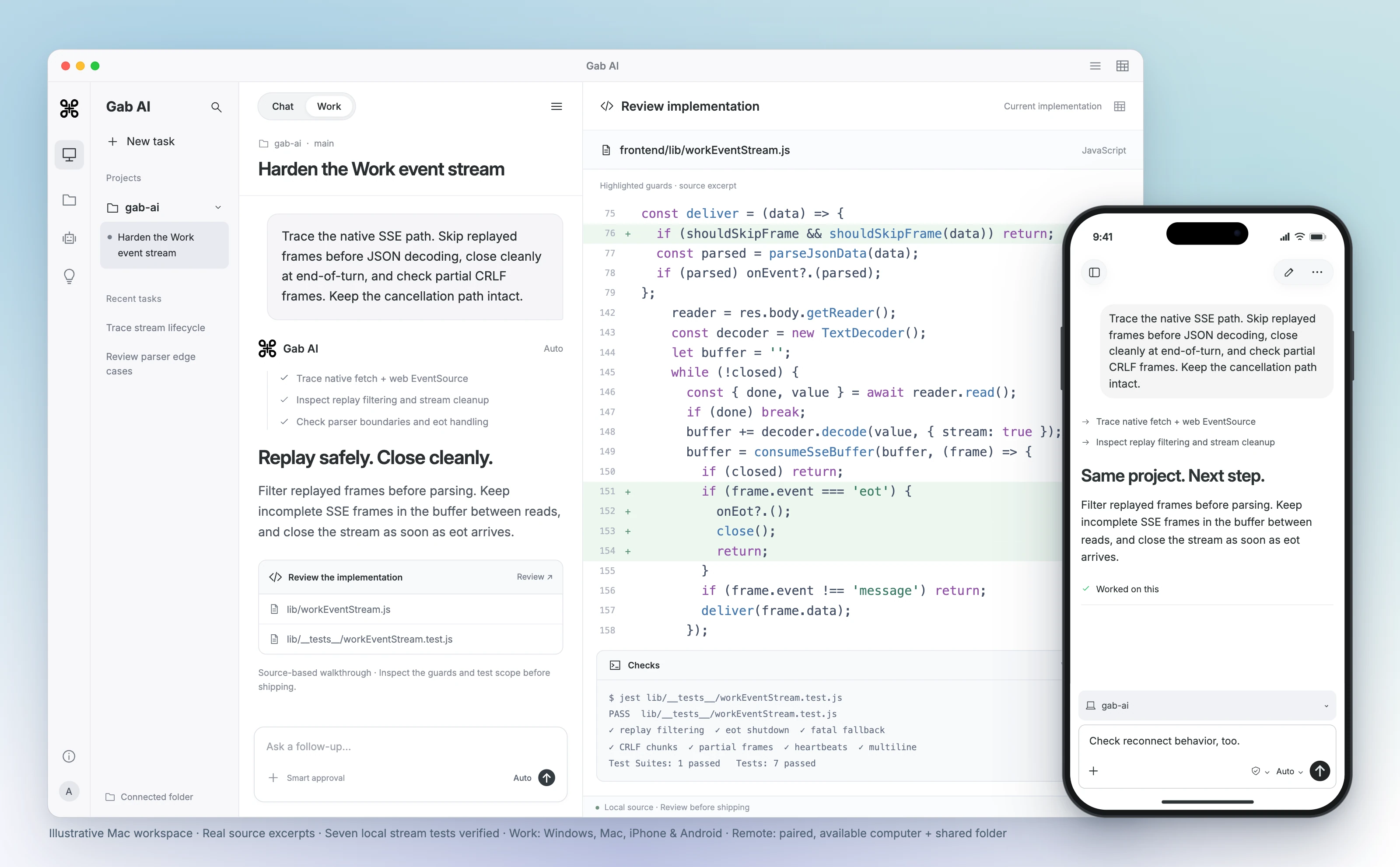
Same project. Desktop to phone.

Review code on your computer, then continue the shared project from your iPhone or Android phone. Remote supports Windows and compatible direct-download Mac apps. Keep the paired computer awake, online and Gab AI running.

Continue the same task from your computer or phone.

Gab AI for Mac Work scene with a connected project, event-stream code review, highlighted replay and shutdown guards, and seven verified local stream tests. Real source excerpts in an interface, not a recorded agent run. A foreground iPhone shows the same shared project and an follow-up. A paired, available Mac and shared folder are required.
Enlarge preview

Gab AI Remote · Continue a desktop project from your phone

Gab AI for Mac Work scene with a connected project, event-stream code review, highlighted replay and shutdown guards, and seven verified local stream tests. Real source excerpts in an interface, not a recorded agent run. A foreground iPhone shows the same shared project and an follow-up. A paired, available Mac and shared folder are required.

Arya by Gab AI

Uncensored chat. An openly conservative voice.

Discuss politics, culture and faith with Gab’s own model. Arya gives you a stated perspective alongside the other models you can choose in Gab AI.

AryaGab’s own model

Ask the questions that matter to you.

Develop an argument, examine an objection or write in your own voice. Ask about a supplied Scripture passage, prepare a Bible study or shape a devotional with Arya’s Christian worldview.

Keep exploring in the same conversation, or choose another available model when you want a different approach. Review important factual claims and sources, whichever model you choose.

Bring useful context to Gab AI

Bring your conversations. Keep going with more models.

Coming from Poe? Bring the brief, decisions and source material you need into a new Gab conversation. Direct Poe chat imports are not supported. If you also have ChatGPT, Claude, Grok or Gab exports, you can import their supported text history.

  1. Keep your original conversations

    Save the Poe conversations you want to retain. For your next Gab chat, prepare a short brief with the important decisions, instructions and source material you have permission to use.

  2. Import other supported history

    For ChatGPT, Claude, Grok or Gab exports, open Settings → Import, select the matching provider and choose a supported ZIP or JSON file. A Poe archive is not a supported substitute.

  3. Check the context, then continue

    Review imported, skipped and error counts for supported imports, and open a representative chat. For a new Poe-based brief, check that the essential context is present before choosing an available model.

Memories, settings, credentials and original file contents do not transfer with text-history imports. Recreate the instructions and context you want to keep.

Compare a music brief with what came back

Explore two Gab AI instrumentals with different percussion instructions. Listen to the change in arrangement and choose a direction for your own track.

Read original prompt
Original prompt
Text
An instrumental acoustic folk cue, warm fingerpicked guitar and soft upright piano, gentle brushed drums, relaxed steady rhythm, cozy and hopeful. Natural spacious sound; no vocals.

Original · drums requested

Acoustic folk with guitar, piano and brushed drums requested.

Gab output: 22.3 seconds. Listen to the arrangement and ending.

Revision · no percussion requested

Same brief; only the percussion phrase changed.

Gab output: 18.5 seconds. An independent new generation.

Read revised prompt
Revised prompt
Text
An instrumental acoustic folk cue, warm fingerpicked guitar and soft upright piano, no drums or percussion, relaxed steady rhythm, cozy and hopeful. Natural spacious sound; no vocals.

Listen and measure

Listen for the percussion change and how each track ends. The second track is a new generation from the revised prompt, so compare the whole arrangement with the first.

Gab AI vs Poe: model access, points and credits

Compare the workflow, model choice and account setup that matter to you.

Gab AI vs Poe: model access, points and credits
DecisionGab AIPoe
Models and outputsGPT, Claude, Gemini, Arya and more, with dedicated image, video and music tools. Model and feature access varies by plan.Poe provides bots and models, including image, video and audio generation.
Compare and organizeCompare reads several models’ replies side by side. Decks keep separate conversations together on desktop web and Mac.Multi-bot chat combines and compares bots in a single thread, including official models and creator bots.
Editable projectsPlus Work creates editable documents, spreadsheets, presentations and code projects, with Auto or a supported main model.Canvas apps are interactive web apps hosted on Poe. App Creator can generate and revise them; apps can call Poe bots.
Desktop and mobileWindows, Mac, iPhone, iPad, Android and web. Remote connects phone controllers to shared projects on Windows or compatible direct-download Mac hosts.Apps for Windows, Mac, iOS and Android, plus the web. Check each app’s current requirements and features.
Usage unitCredits; model, context and tools affect usage. Signup credits cover eligible requests; Pricing explains model and feature access.Compute points; a bot’s rate card and request affect cost. Included points generally do not roll over unless specified.
Price and allowanceWebsite Plus: $20.00 monthly or $200.00 annually; 2,000 monthly credits. Model/tool costs and limits apply.Poe’s purchase FAQ advertises plans starting at $4.99/month. Check the selected daily/monthly points and current offer.
Developer useGab key and supported endpoints; API costs differ from included Plus default app chat.Poe account keys spend the owner’s points; paid API models require the documented subscription/add-on conditions.
Bring existing chatsImport supported ChatGPT, Claude, Grok and Gab text history. Poe exports are not supported; bring useful Poe context into a new chat manually.Keep your Poe conversations and any saved source material. Do not assume bot settings, memories or attachments transfer to another service.

Poe alternative questions

Is there a free Poe alternative?

Yes. Gab AI is free to start without a credit card. A new account receives 250 signup credits after email verification for eligible requests. Plus adds Work, live Voice, monthly credits and included default Arya chat in the app. Poe also offers limited access with daily points. Compare the models and tasks covered by each plan rather than assuming either service is unlimited.

Can I use Claude and GPT on Gab AI like on Poe?

Yes. Available GPT and Claude models appear alongside Gemini, Arya and other choices in Gab AI. Check the model library and Pricing for current access. A provider model in Gab AI uses Gab’s workspace and tools; it does not import a Poe bot’s custom instructions or reproduce every Poe feature.

Does Gab AI have its own model?

Yes. Arya is Gab AI’s own model for uncensored chat with an openly conservative perspective. Third-party models such as GPT, Claude and Gemini are clearly labeled choices alongside it. Gab also brings Chat, Compare, Decks, Work and creative tools into the workspace.

Are there apps like Poe for iPhone and Android?

Yes. Gab AI has apps for Windows, Mac, iPhone, iPad and Android, plus a web workspace. Use the same account for cloud conversations and credits across supported devices. Remote lets iPhone and Android controllers continue shared projects on Windows or compatible direct-download Mac hosts. Features and requirements vary by platform and edition.

Can I compare several models in Gab AI?

Yes. Compare sends one prompt to several models and displays their replies side by side in one conversation. It requires Plus, and model access and credit usage vary. Decks keep separate conversations together on desktop web and Mac. Poe also supports multi-bot chat; choose the layout and workflow that fit your project.

How does Gab Work compare with Poe Canvas apps?

Gab Work takes a task through to editable files such as documents, spreadsheets, presentations and code projects. Poe Canvas apps are interactive web applications hosted on Poe; App Creator can build and revise them from a description, and they can call Poe bots. Choose based on the file or application you want to make, then check the available tools and plan.

Can I create media or use an API with Poe?

Yes. Poe offers image, video, audio and music bots, plus an external application API. Its API uses the key owner’s points; paid models require an active subscription or add-on points. Gab also has creative tools and supported API endpoints. Gab API requests require Plus and use credits separately from included default Arya app chat.

Is a Poe point equal to a Gab credit?

No. They are different billing units. In Poe, inspect the bot’s Rates and the completed message’s point use. In Gab, check the chosen model, context, tools and completed credit usage. Compare the useful result and cost for the same task; a larger numerical allowance does not establish a better price.

Can I import my Poe chats directly into Gab?

No. Gab currently accepts supported ChatGPT, Claude, Grok and Gab exports, not Poe archives. Keep your original Poe conversations and bring a concise brief or relevant text into a new Gab chat. For supported imports, select the matching provider, review imported, skipped and error counts, then check a representative conversation. Memories, settings, credentials and original file contents have separate scopes.

Guides and resources

Find more detail and choose your next step.

Make something you can build on.

Create your account, bring a useful question or source, and shape the result in conversation.