
Document, Spreadsheet and Presentation Editors
Edit documents, spreadsheets and presentations beside your conversation. Find the right editor, make direct changes or request a revision, then save and reopen your file.
Enlarge preview
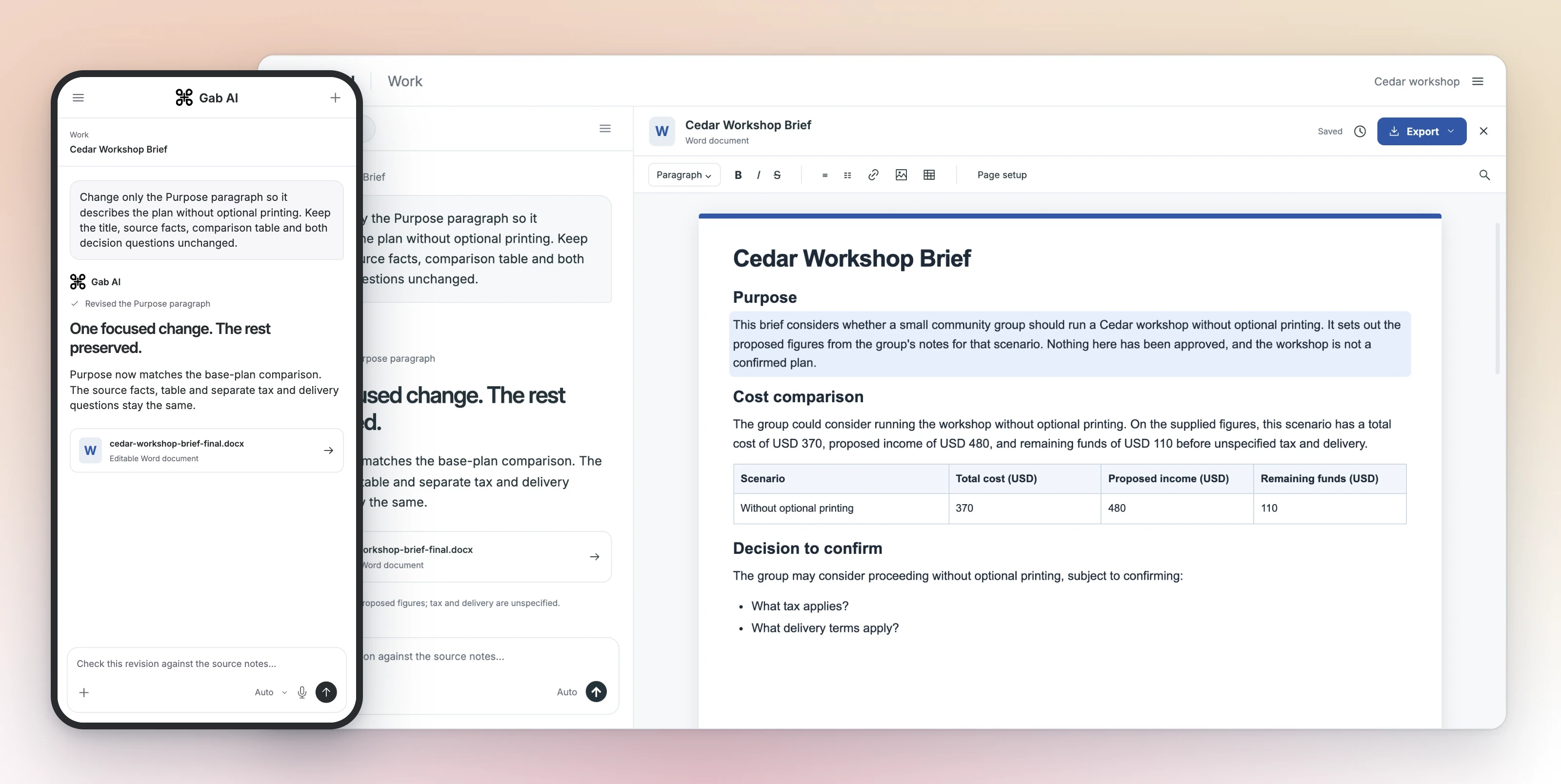
An editable document and a focused revision
Choose the file and the available editor
An editable document, workbook or presentation needs its own native structure. A formatted Chat response is different. Supported desktop-web workflows can expose full editors beside the chat; other artifact contexts may show read-only previews or source viewers.
File types and meaningful checks
| Item | Details |
|---|---|
| Documents | Native paragraphs/tables, text formatting and source facts. The real Cedar proposal has editable Word structure. |
| Spreadsheets | Cells, formulas, references and dependent totals. Inspect a known calculation after changing an input. |
| Presentations | Slides, native text/tables and speaker notes. Inspect changed and untouched slides. |
Create or open the intended artifact
Ask Work for the actual editable file and required structure, then select its output card. If opening an existing file, use a supported input and inspect what imported; accepted extension does not prove every object or formula converted faithfully.
Direct edits and AI revisions
Use the available formatting/cell/slide controls for direct edits. For a conversational revision, identify the open file, exact change and what must stay. An instruction to preserve manual edits is a requirement to verify, not a guarantee that only the target changes.
When another revision arrives
Check the available revision notice/history before replacing the open version. Save or preserve work you need, then deliberately choose which version to load. Inspect the specific change afterward; not every viewer has the same history or restore controls.
Save, reopen and inspect the change
After a direct edit, wait for the save state and reopen the same file through its supported entry. Check the exact changed text, value or slide, and keep the version you need for comparison.
Use the format for your next step
Choose an offered export format, open the resulting copy in the intended app and check its text, structure, formulas or slides. Keep the editable original.
Access and usage
Creating and revising in Work requires Plus and applicable credits. Model/media operations and follow-ups can add usage. Active-session capacity, hourly new-task launches and account credits are separate. Inspect current options and Usage; there is no fixed price for a game, image or finished film.
Editor questions
Use the controls your file and client actually offer.
Can I assume every artifact card opens a full editor?
No. File type, client and entry context determine whether you see a full editor, preview or source viewer.
Does the AI always preserve my manual edits?
State preservation requirements, retain a needed version and inspect the returned revision. Do not treat the instruction as an exact-preservation guarantee.
Is Saved enough to verify a direct edit?
Reopen the same file and inspect the specific change. If you need a separate export, inspect that copy too.
Guides and resources
Find more detail and choose your next step.
Make the delivered file your own.
Open an editable file from your Work task. Use its available editor controls, save your change and reopen the same file to inspect it.