
How Gab AI Works: Modes, Models, Context and Credits
Get to know Gab AI: Chat for questions and drafts, Work for projects and editable files, and creative tools for images, video, music and more.
Enlarge preview
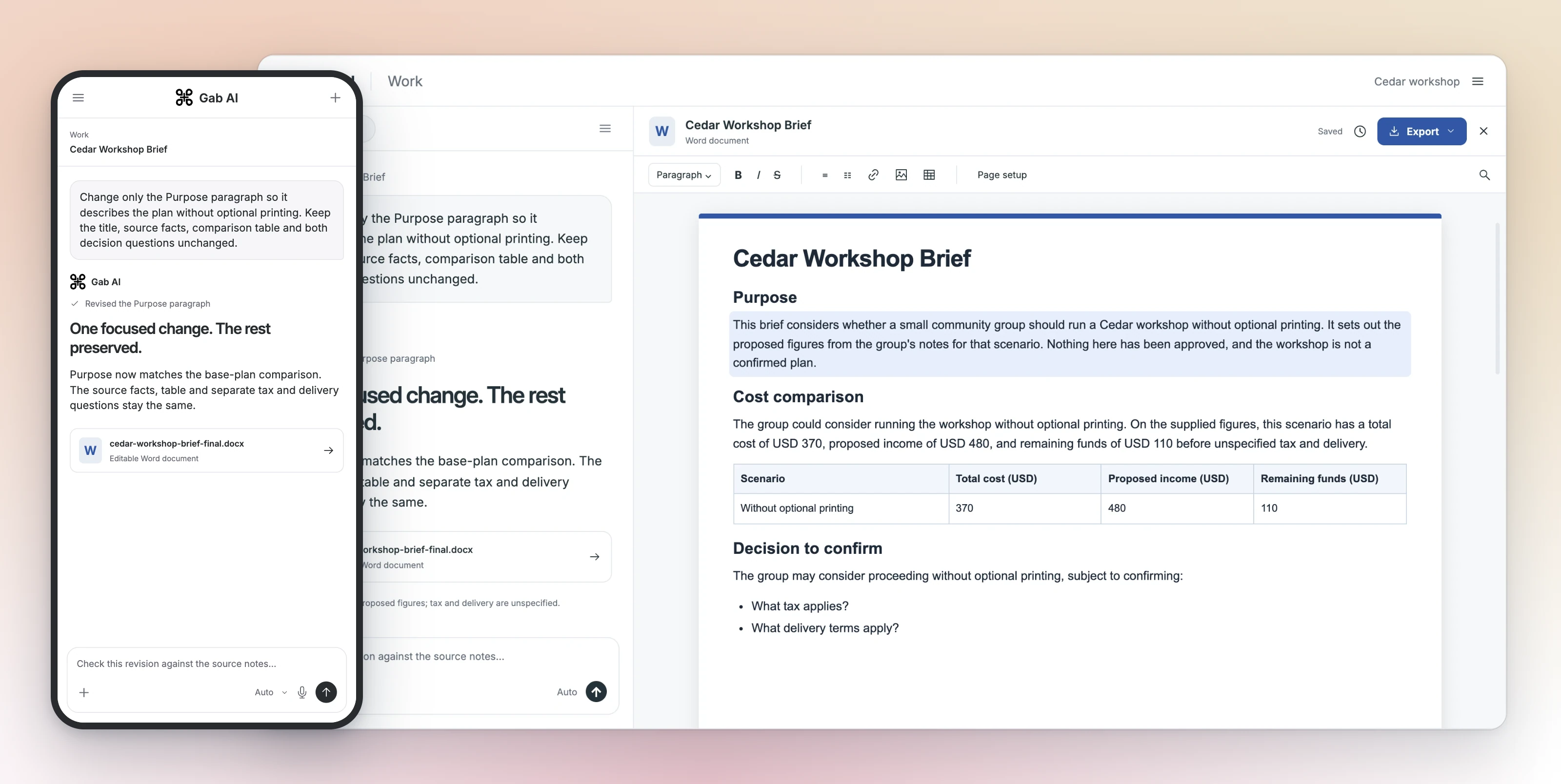
A conversation beside an editable file
One account for conversations and projects
Write, research, code and create with Gab AI. Use Chat for a conversation, Work for a project with files and tools, or a creative generator for a specific media task.
Choose the output and then the mode
Chat is useful for answers, drafts and interactive cards. Plus Work uses a task workspace and tools for projects and editable artifacts. Direct generators expose task-specific media options. Choose by the result and review it.
Choose the result you need
| Item | Details |
|---|---|
| An answer or short draft | Start in Chat. Supply facts and a format, inspect the answer, then give a focused follow-up. |
| An editable file or project | Use Plus Work with a concrete brief. Inspect the delivered file, save/reopen behavior and any export you need. |
| An image, video or music track | Use the relevant generator or qualified Work studio guide. Inputs, models, duration and credits differ. |
| A spoken conversation | Use live Voice under its Plus and credit rules. Dictation and Read aloud are separate controls. |
| An application integration | Read the API reference. API authentication, model IDs, supported endpoints and credits differ from included in-app Chat. |
Pick a model or use Auto
Choose a named model for the inputs and capabilities you need, or let Auto route a request. Open the current picker or model library for the available choices.
Separate conversation history, instructions and Memory
Earlier messages can provide current conversation context. Custom Instructions guide behavior. Saved Memory supplies eligible reusable facts when enabled; collection context and temporary-chat personalization have separate scopes. None guarantees perfect recall or exact use of a long source. Keep original facts available and check the answer.
Research with sources you can read
Use Web Search to find source material and follow the research lesson to compare it. Open citations to check the claims, dates and units in the answer.
Answers you can use. Files you can edit.
Chat can return text and interactive cards. Work can create documents, spreadsheets, presentations, code and media files with their own viewers and editors. Open the actual output, make your changes and use its save or export controls.
Plans and request usage
Signup credits fund eligible requests. Plus adds Work, live Voice, included default Arya in-app Chat and a monthly credit allowance. Other models, tools and API requests can use credits. Use Pricing and Credits for the details.
Understand the context in a request
Gab sends relevant prompts, attachments, prior turns and enabled context to the selected provider through its services. Personal details in that material may still be shared; the privacy guide explains processing and controls.
Check the actual client and permission boundary
Cloud Work differs from local connected-folder execution. Direct Mac/Windows support, Remote hosting and the Mac App Store edition have distinct capabilities. A plugin installation does not itself grant a service account, browser or folder access. Read the current client/setup guide before starting a task that depends on those controls.
Inspect the outcome, revise and inspect again
Start with a source and a stated success condition. In the earlier bakery task, the follow-up preserved three times and missing details, made the call to action clearer and increased the word count. That useful small check is separate from checking a spreadsheet formula, citation, playable game or live external action.
Platform questions
Keep product layers and evidence separate.
Does one account give me every provider feature?
No. Gab exposes supported integrations under current model, account, client and tool conditions. A provider name or catalog entry is not every feature of that provider’s own product.
Are Chat cards and editable Work files the same thing?
No. A card is interactive content in a Chat message. Native documents, spreadsheets, presentations and other Work artifacts have their own editing, save/reopen and export behavior.
Does a source link prove the answer is correct?
No. Open the source and check whether it supports the actual claim, date, units and context. Sources can be incomplete, irrelevant or inconsistent with an answer.
Give Gab AI something useful to do.
Bring a question, rough notes or a source file. Start a conversation for a quick draft, or choose Work when you need a project and its files.
Open Gab AIFollow the quickstart